

Overview
General Introduction
-
What is UCP?
The Unify Compute Platform(Unify Compute Platform, hereafter referred to UCP) defines a unified set of heterogeneous programming interfaces, and provides APIs(Application Programming Interface, hereafter referred to API) to enable calls to all resources on the computing platform. UCP abstracts and encapsulates the functional hardware on the SOC, and externally provides function-based APIs for creating corresponding UCP tasks (e.g., VP operator tasks), and supports the setting of a hardware backend to be submitted to the UCP scheduler, which can complete the unified scheduling of tasks on the Soc based on hardware resources.
Specifically, the following features are provided: Vision Process, Neural Network Inference, High Performance Library and Custom Operator Plugin Development.
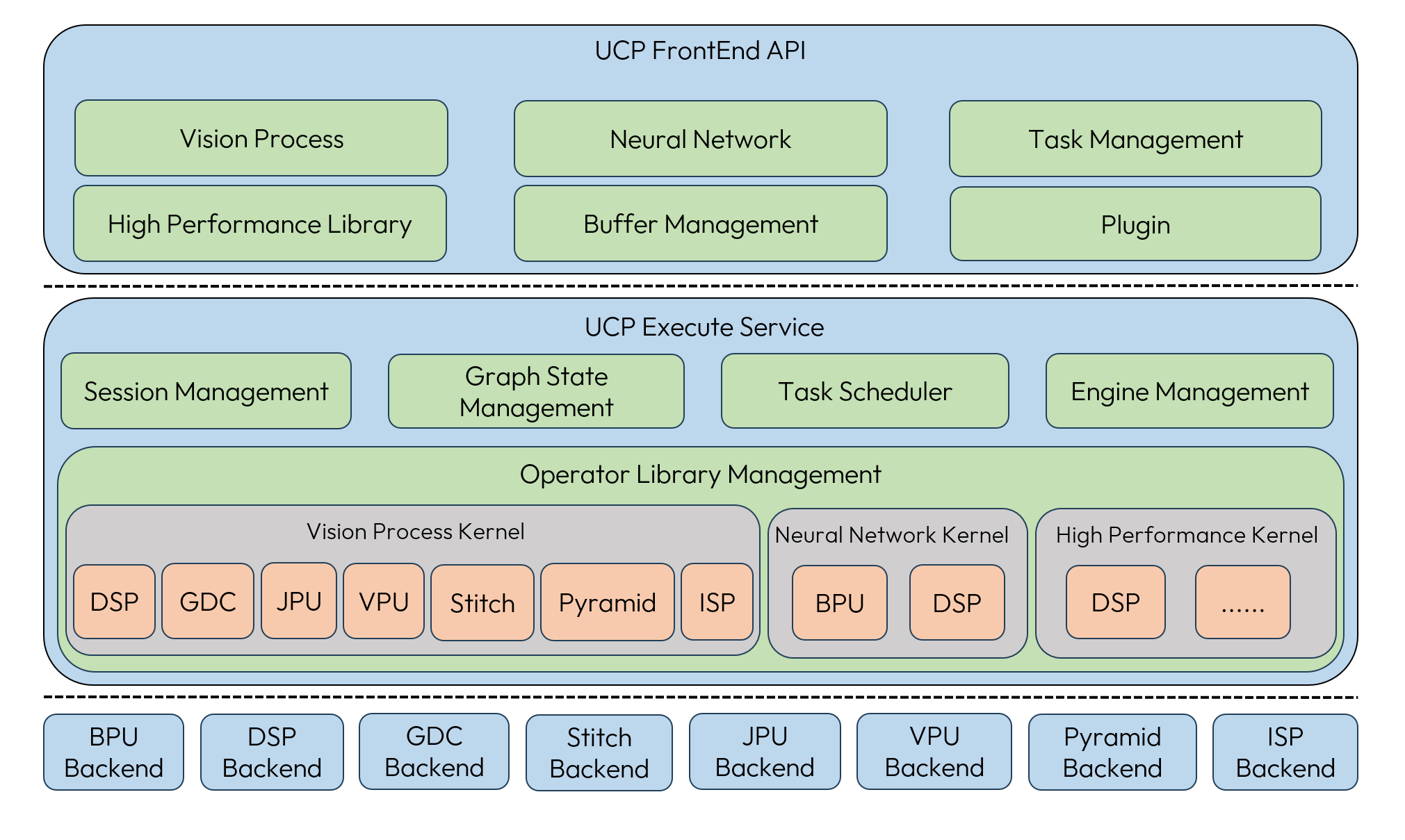
For details of the Backend, you can refer to the section Backend Instruction .
-
UCP scenarios:
Call single operator: vision operators and high performance processing operators in UCP can be used directly.
Operator plugin development and usage: custom operator development is available.
Deep Learning Model Inference: deep learning model inference tasks can be accomplished, and model parsing and hardware deployment are completed within UCP.
-
UCP advantages:
Highly abstract: for the function of single operator, no need to be troubled by hardware differences, hardware that needs to be executed can be selected by specifying the backend, reducing the difficulty of hardware deployment.
Highly integrated: as Horizon's unified heterogeneous programming interface, all the requirements development can be completed by a set of interfaces.
This section is used to guide you on how to use the UCP for hardware deployment of the model. Knowledge, experience, and skills in basic embedded development can lead to a better understanding of the contents of this section.
Environment and Tools
UCP is applicable for the Horizon J6 and higher architecture computing platforms, you need to have basic embedded development knowledge and skills to complete the cross-compilation and deployment, the usage of the environment and tool requirements refer to the following table:
The usage of UCP is described in this document with Linux as the default operating system. For other operating systems, please refer to the documentation and adjust the related configurations according to the actual situation.
Operating Modes
The UCP framework supports two main operating modes: Direct Mode and Relay Mode. The QNX operating system and x86 simulation does not support Relay mode.
By default, the system operates in Direct Mode. In Relay Mode, UCP enables unified scheduling
of multi-process tasks. To use Relay Mode, you must first start the ucp_service,
which is located at deps_aarch64/ucp/bin/service/. You also need to enable Relay
Mode by setting the environment variable HB_UCP_ENABLE_RELAY_MODE=true, allowing user processes
to communicate via the relay service. Regardless of whether Direct Mode or Relay Mode is used,
the UCP interface calls remain consistent, without impacting the programming logic.
You can flexibly choose between these two modes based on the system’s performance and flexibility requirements.
Interface Usage Flow
There are three ways to execute UCP task structure calls: synchronous execution, asynchronous execution, and registered callback function execution. Here is an example of calling the VP interface hbVPRotate(hbVPRotate) to illustrate the three task execution modes.
Synchronous Execution
When creating a task, pass the corresponding parameter of the taskHandle into the nullptr, which can be immediately synchronously executed, with the following reference code:
Asynchronous Execution
When creating a task, the taskHandle parameter needs to be initialized to nullptr in advance. After submitting a UCP task (hbUCPSubmitTask), executing the interface (hbUCPWaitTaskDone) at the specified location in the thread. Waiting for the task to complete, with the following reference code:
Registered Callback Function Execution
When creating a task, the taskHandle parameter needs to be initialized to nullptr in advance. The callback function needs to be registered before the task is submitted (hbUCPSubmitTask).
The reference code for setting the callback function is as follows:
- UCP has built-in the Neural Network Kernel, Vision Process Kernel, and High Performance Kernel, which may be supported by different Backends.
- UCP tasks are uniformly scheduled according to a priority-based scheduling strategy, and the priority of task execution can be specified when submitting tasks.
- Synchronous execution does not support configuring the task control parameters and selecting the backend. UCP will select the appropriate hardware for execution based on the executable backend of the current task and the hardware load information.
- Asynchronous execution supports configuring task control parameters and backend selection. If not specified, the backend is selected based on load balancing across available backends.
- Except for ISP and video encoding and decoding tasks, the input and output memory for all tasks must be allocated and managed by you using the memory interfaces provided by UCP.
DEB Deployment Package
UCP provides a DEB deployment package located at ucp_tutorial/tools/deb/hbucp_aarch64_x.x.x.deb.
This package is designed to simplify deployment on the board, ensuring easier and more
efficient system configuration. By automatically installing the necessary binaries and dependent libraries,
By automatically installing the necessary binaries and dependent libraries, the UCP-related applications can be quickly set up and running.
After successfully installing the DEB package, the binaries ucp_service and hrt_ucp_monitor will
automatically be installed in the /usr/bin directory, allowing you to access these tools
via the command line. The related dynamic libraries will be installed in the /lib/aarch64-linux-gnu directory,
ensuring that all runtime dependencies are correctly configured.
During the installation, the system automatically configures the required library paths, removing the need for manual intervention. This ensures that all dependent libraries are correctly loaded when running applications, thus ensuring the stability and reliability of the system.
Installation Command Example
When installing the DEB package for the first time, the system will display.
Upgrade Installation Command Example
When upgrading the DEB package, if the installation process fails, the system will automatically roll back to the previous version.
Uninstalling the DEB Package
To uninstall an already installed DEB package, refer to the following command:
Backend Instruction
The backend refers to the back-end computing hardware for UCP task execution. The current backends supported by UCP include BPU, DSP, GDC, STITCH, JPU, VPU(Video Process Unit), PYRAMID, ISP.
HardWare Feature Description
DSP
GDC
STITCH
JPU
VPU(Video Process Unit)
PYRAMID
ISP
x86 Simulation Description
In addition to the development board, UCP also provides the same development support in an x86 simulation environment as it does on the board.
Function Description
Similar to the development board, UCP provides the same visual processing, model inference, and high-performance computing capabilities in an x86 architecture through simulation. All samples and interface code can be equivalently used in the simulation environment. You can develop and debug code in the x86 environment, gaining immediate feedback during the development process. This allows you to identify and resolve issues early, improving development efficiency and code quality, and ensuring seamless migration of the code to run on SoC hardware.
The simulation methods for each backend supported by UCP are as follows:
- BPU and DSP hardware use instruction-level simulation.
- GDC, JPU, and VPU hardware use CModel executable file simulation.
- The CModel executable file for GDC hardware is
gdc_cmodel. - The CModel executable files for JPU hardware are
Nieuport_JpgEncandNieuport_JpgDec, used for JPEG encoding and decoding, respectively. - The CModel executable files for VPU(Video Process Unit) hardware are
hevc_enc,hevc_dec,avc_encandavc_dec. Among them,hevc_encandhevc_decare used for H.265 encoding and decoding respectively, whileavc_encandavc_decare used for H.264 encoding and decoding respectively.
- The CModel executable file for GDC hardware is
- STITCH and PYRAMID hardware use simulation libraries.
Environment Description
Compilation Environment
The UCP simulation uses the compiler environment provided by the Docker image.
Runtime Environment
- When using DSP hardware for simulation, you need to configure the Xtensa development environment and specify the DSP simulation image path.
For environment configuration, refer to Install DSP Toolchain And Configure Core.
You can specify the DSP simulation image path by setting the environment variable
HB_DSP_CMODEL_IMAGEto ensure the application can locate the correct simulation image file. The reference command is as follows:
- When running CModel executable files, you need to add the executable file path to the PATH environment variable so that they can be run directly from the terminal. The reference command is as follows:
- No additional configuration is required for running simulation of the other hardware.
Performance Description
However, the performance of the x86 simulation environment is usually lower than that of the actual hardware due to the following reasons: As previously mentioned, the simulation methods used by the various backends supported by UCP include instruction-level simulation, CModel executable file simulation, and simulation libraries.
-
Instruction-level simulation: This method simulates and executes each instruction individually, resulting in higher computational overhead and lower simulation speed.
-
CModel executable file simulation: CModel executable files perform input and output operations through file read/write processes. File I/O operations are time-consuming and can impact the simulation speed to some extent.
-
Simulation libraries: These run on the CPU, which simulates the behavior of hardware accelerators. However, the CPU's architecture and design are not specifically optimized for these tasks, leading to lower execution efficiency. Although the performance of the simulation environment is typically lower than that of actual hardware, the simulation environment provides comprehensive API support and precise functional verification. This significantly enhances your development efficiency and code quality, helping you identify and resolve potential issues at an early stage.