This section describes how to use the sample of VP module in UCP sample package ucp_tutorial, and how to configure the development environment,
compile and run the sample application code, which helps to get started with the VP function module in UCP quickly.
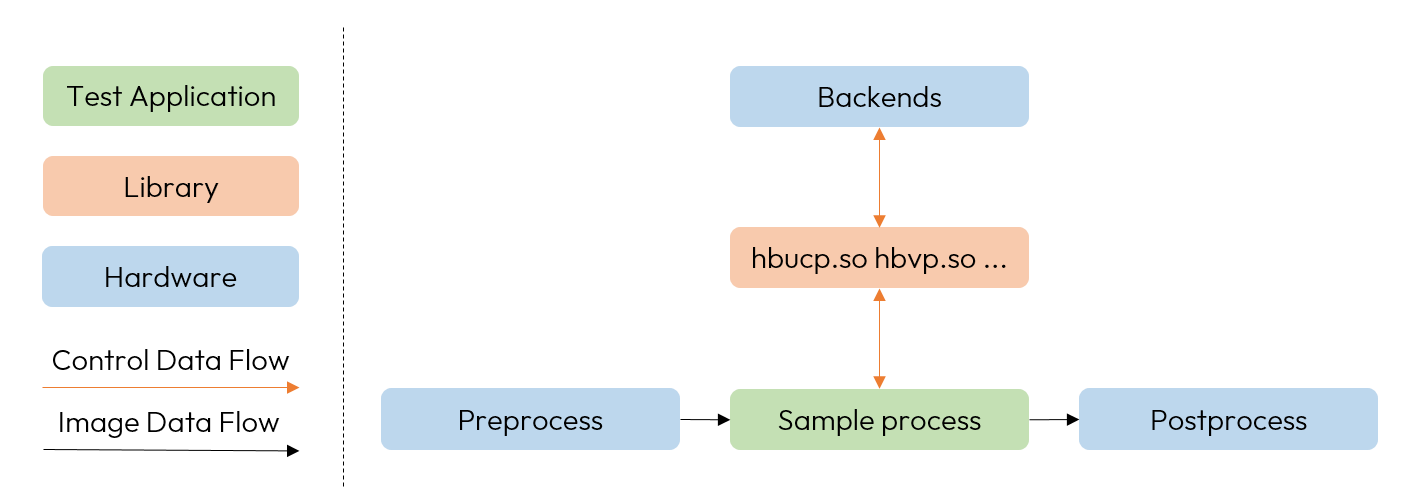
The main architecture is as follows:
The ucp_tutorial/vp folder contains the VP module samples, including basic image processing samples, image transformation samples, image feature extraction samples,
optical flow samples, and surround-view image stitching samples, video codec sample, which can be compiled by both board-side running and x86 emulation.
Among them, the board-side running compilation supports Linux and QNX operating systems.
For details, please refer to the section VP Sample.
Before compiling and running the sample application code, you need to ensure that the environment meets the requirements,
according to the guidelines in section Environment Deployment,
your development machine should already have the relevant environment installed, the requirements are as follows:
cmake >= 3.0.
For board-side compilation, you need to specify the cross-compile toolchain, for x86 emulation docker, you can use the compiler that comes with it.
In the ucp_tutorial/vp/code directory of the sample, there is a pre-configured build script build.sh,
with the options -a x86, -a aarch6 and -a aarch64-qnx to support three types of builds respectively, and executing the build.sh script directly will complete the one-click build with default parameter -a aarch64,
and the generated files will be saved to the ucp_tutorial/vp/vp_samples directory.
Moreover, the directory encompasses three compilation scripts, namely build_aarch64.sh, build_qnx.sh and build_x86.sh, tailored to distinct compilation configurations.
Employing these scripts mirrors the functionality of the build.sh script.
The command you need to execute to compile the VP module running on the board side with linux system is as follows:
cd ucp_tutorial/vp/codesh build_aarch64.sh
After executing the compilation script, the executable programs and dependency files required to run the samples will be generated and saved in the ucp_tutorial/vp/vp_samples directory.
Taking the VP as an example, its generated objects are shown below,
containing image data, sample running scripts, running dependency libraries, executable files, and script directories for running the examples,
which together form a complete running environment and running dependencies.
After all the steps of compiling are completed correctly, the executable samples will be configured and saved in the vp_samples folder.
Depending on the execution environment, the two ways of commands for executing the samples on the board and simulation are introduced as follows.
Copy the entire vp_samples folder to the development board,
and go to the vp_samples/script folder and execute the provided running script in sample folder directly to see the results of the sample run.
The reference command for executing the script as follows:
cd vp_samplescd script# Since some of the operators depend on the dsp backend, you need to refresh the dsp image, # this operation is optional and can be skipped for those who do not need dsp execution or x86 emulation.# The script supports appending parameters J6E, J6P and J6B with -p. The default is J6E. Please append the corresponding parameter according to the actual platform.sh dsp_deploy.sh# Run basic image processing samplecd 01_basic_processingsh run_image_process.sh
Go to the vp_samples/script_x86 folder and execute the provided run script in sample folder directly to see the results of the sample run.
The reference command for executing the script as follows:
cd vp_samplescd script_x86# Run basic image processing samplecd 01_basic_processingsh run_image_process.sh
Note
The Horizon J6 SOC uses the Tensilica Vision Q8 DSP from Cadence, so the dsp operators running in the x86 simulation sample relies on a set of toolchain provided by Cadence.
The environment configuration can be found in the guidelines in section Install DSP Toolchain And Configure Core.
The correct configuration of License and environment variable XTENSA_ROOT is required.
Take the sample performing on board as an example,
when the sample is running, the process log will be printed on the console and the corresponding output file will be generated.
The log will contain the flow of all the operator callings, and the output will be saved in the script/01_basic_processing folder.
The output of the sample section is as follows:
root@j6dvb:/userdata/user/ucp_sample/vp_samples/script/01_basic_processing# sh run_basic_processing.sh[I][3037][08-24][15:56:35:392][basic_image_process.cpp:527][basic_process_sample][BASIC_VP_PROCESS] Basic image process begin[I][3037][08-24][15:56:35:396][basic_image_process.cpp:537][basic_process_sample][BASIC_VP_PROCESS] Read image ../../data/images/input_noise_image.jpg success[I][3037][08-24][15:56:35:396][basic_image_process.cpp:204][basic_process_sample][BASIC_VP_PROCESS] sep filter2D operate start.[UCP]: log level = 3[UCP]: UCP version = 1.0.0[VP]: log level = 3[DNN]: log level = 3[DSP] DSP version = 0.3.9[DSP]: log level = 3DSP direct client mode[I][3037][08-24][15:56:35:408][basic_image_process.cpp:299][basic_process_sample][BASIC_VP_PROCESS] dilate operate start.[I][3037][08-24][15:56:35:409][basic_image_process.cpp:345][basic_process_sample][BASIC_VP_PROCESS] erode operate start.[I][3037][08-24][15:56:35:414][basic_image_process.cpp:487][basic_process_sample][BASIC_VP_PROCESS] equalizeHist operate start.[I][3037][08-24][15:56:35:420][basic_image_process.cpp:643][basic_process_sample][BASIC_VP_PROCESS] Basic image process finish
The generation will be saved to the vp_samples/script/01_basic_processing directory with the following contents:
This section shows how to use VP encapsulated operator to realize the function of image processing through a simple operator calling.
The main steps include image load, task creation, task commit, task completion, task destruction, save output and so on.
You can read the corresponding source code and comments to learn.
The role of the sample is to rotate the image by 90 degrees using the hbVPRotate operator, which is implemented as follows:
#include <cstring>#include "hobot/vp/hb_vp.h"#include "hobot/vp/hb_vp_rotate.h"#include "opencv2/opencv.hpp"#include "util/util.h"// Fill the operator parameterhbVPRotateDegree rotate_code = HB_VP_ROTATE_90_CLOCKWISE;// Read the input imagestd::string src_img = "../../data/images/input.jpg";cv::Mat src_mat = cv::imread(src_img.c_str(), cv::IMREAD_GRAYSCALE);LOGE_AND_RETURN_IF(src_mat.empty(), HB_UCP_INVALID_ARGUMENT, "Read image {} failed", src_img.c_str());LOGI("Read image {} success", src_img);const int32_t src_width = src_mat.cols;const int32_t src_height = src_mat.rows;const int32_t src_stride = src_width;const int32_t dst_width = src_height;const int32_t dst_height = src_width;const int32_t dst_stride = dst_width;// Initialize the input and output memory and fill the input memory with imageshbUCPSysMem src_mem, dst_mem;hbUCPMallocCached(&src_mem, src_stride * src_height, 0);hbUCPMallocCached(&dst_mem, dst_stride * dst_height, 0);memcpy(src_mem.virAddr, src_mat.data, src_stride * src_height);hbUCPMemFlush(&src_mem, HB_SYS_MEM_CACHE_CLEAN);// Fill the input image informationhbVPImage src{HB_VP_IMAGE_FORMAT_Y, HB_VP_IMAGE_TYPE_U8C1, src_width, src_height, src_stride, src_mem.virAddr, src_mem.phyAddr, 0, 0, 0};// Fill the output image informationhbVPImage dst{HB_VP_IMAGE_FORMAT_Y, HB_VP_IMAGE_TYPE_U8C1, dst_height, dst_width, dst_stride, dst_mem.virAddr, dst_mem.phyAddr, 0, 0, 0};// Create a task through the operator interface provided by VP, the task handle can be set to nullptr, // and this task will be executed in synchronized modehbUCPTaskHandle_t rotate_task{nullptr}; // UCP task handlehbVPRotate(&rotate_task/*task handle*/, &dst/*output image*/, &src/*input image*/, rotate_code/*operator parameter*/);// Set scheduling parameters to adjust task priority, select execution terminals etchbUCPSchedParam sched_param;HB_UCP_INITIALIZE_SCHED_PARAM(&sched_param);sched_param.backend = HB_UCP_DSP_CORE_0; /*Specify the execution device ID*/// Submit the taskhbUCPSubmitTask(rotate_task, &sched_param);// Wait for the task to complete, set the timeout parameter, a value of 0 means to wait all the timehbUCPWaitTaskDone(rotate_task, 500);// Release the task handlehbUCPReleaseTask(rotate_task);// Dump output imagehbUCPMemFlush(&dst_mem, HB_SYS_MEM_CACHE_INVALIDATE);cv::Mat dst_mat(dst_height, dst_width, CV_8U, dst.dataVirAddr);cv::imwrite("./rotate_image.jpg", dst_mat);// Release the memory resourcehbUCPFree(&src_mem);hbUCPFree(&dst_mem);