

Common Algorithm Model Samples
Sample Location
The common algorithmic model samples are located at 03_classification/, 04_detection/ and 07_segmentation/ folders in the horizon_model_convert_sample path.
Prepare Datasets
Dataset Download Address
The dataset can be downloaded from the following address.
Dataset Reference Structure
To facilitate your subsequent steps, after the dataset has been downloaded, you need to process the evaluation dataset according to the structure suggested by Horizon below.
| Dataset | Description |
| ImageNet Dataset | We recommend that you unzip the downloaded dataset into the following structure. Please contact Horizon if you encounter any problems during data preparation. |
| COCO Dataset | We recommend that you unzip the downloaded dataset into the following structure. Please contact Horizon if you encounter any problems during data preparation. |
| VOC Dataset | Attention |
| Cityscapes Dataset | We recommend that you unzip the downloaded dataset into the following structure. Please contact Horizon if you encounter any problems during data preparation. |
Prepare Models
When using the model conversion sample package, please prepare the corresponding floating-point model first.
If you need to do this process in the sample folder, you need to execute the 00_init.sh script in the folder first to get the corresponding original model and dataset.
Sources and modifications (if any) of the original models, please refer to below subsections.
MobileNetv1
-
model source: https://github.com/shicai/MobileNet-Caffe
-
md5sum code:
MobileNetv2
-
model source: https://github.com/shicai/MobileNet-Caffe
-
md5sum code:
ResNet50
-
model source: https://pytorch.org/vision/main/models/generated/torchvision.models.resnet50.html
-
md5sum code:
GoogleNet
-
model source: https://github.com/HorizonRobotics-Platform/ModelZoo/tree/master/GoogleNet
-
md5sum code:
EfficientNet_Lite0/1/2/3/4
To quickly start running samples and avoid the risks caused by third party tools, we strongly recommend using the off-the-shelf ONNX model in the model_zoo/mapper/ directory in Horizon model release package. If you are interested in reproducing the model conversion process of tflite2onnx, you can still try using the below 3rd-party tool, however, we do not guarantee the quality and success of the conversion.
-
model source: obtain the TAR package from https://github.com/tensorflow/tpu/tree/master/models/official/efficientnet/lite
-
md5sum of the converted ONNX models in Horizon model_zoo:
-
Download and get
.tflitefrom the TAR package, and then convert it to an ONNX model using the tflite2onnx tool (https://pypi.org/project/tflite2onnx/).
Note that model layouts may vary by tflite2onnx version. If the input layout of the converted ONNX model is NHWC, when building, the configure input_layout_train of the EfficientNet_Lite0/1/2/3/4 should be NHWC.
Vargconvnet
-
model source: https://github.com/HorizonRobotics-Platform/ModelZoo/tree/master/VargConvNet
-
md5sum code:
Efficientnasnet_m
-
model source: https://github.com/HorizonRobotics-Platform/ModelZoo/tree/master/EfficientnasNet
-
md5sum code:
Efficientnasnet_s
-
model source: https://github.com/HorizonRobotics-Platform/ModelZoo/tree/master/EfficientnasNet
-
md5sum code:
ResNet18
-
model source: https://pytorch.org/vision/main/models/generated/torchvision.models.resnet18.html
-
md5sum code:
YOLOv2_Darknet19
- To quickly start running samples and avoid the risks caused by third party tools, we strongly recommend using the off-the-shelf Caffe model in the model_zoo/mapper/ directory in Horizon model release package. If you are interested in reproducing the model conversion process of darknet2caffe, you can still try using the below 3rd-party tool, however, we do not guarantee the quality and success of the conversion.
- To achieve optimal on-board performance, we modified the
remove_node_typeparameter in the YAML file used for hbm model compilation and removed theDequantizenode from the hbm model.
- To get YOLOv2_Darknet19, first download the .cfg and .weight files of YOLOv2 608x608 from YOLO's official website (https://pjreddie.com/darknet/yolo/) and convert it to a Caffe model using the darknet2caffe conversion tool (https://github.com/xingyanan/darknet2caffe).
As this conversion tool is a simplified version, you should modify the .prototxt file generated by this tool before the conversion, change the 'Reshape' layer to 'Passthrough' layer, and then add an NCHW2NHWC Permute operation to the output node.
For details about the parameters of the modified Passthrough layer, refer to the yolov2.prototxt sample.
2.md5sum code:
YOLOv3_Darknet53
To achieve optimal on-board performance, we modified the remove_node_type parameter in the YAML file used for hbm model compilation and removed the Dequantize node from the hbm model.
- YOLOv3_Darknet53 model:
URL: https://github.com/ChenYingpeng/caffe-yolov3/ .
The caffemodel file can be downloaded from the Baidu Cloud URL provided in the README.md file in GitHub, in which you should add an NCHW2NHWC Permute operation to the output node.
-
md5sum code:
YOLOv5x
To achieve optimal on-board performance, we modified the remove_node_type parameter in the YAML file used for hbm model compilation and removed the Dequantize node from the hbm model.
- YOLOv5x model: Download the corresponding pt file from https://github.com/ultralytics/yolov5/releases/tag/v2.0
When cloning the source code, be sure to use [v2.0] tags, otherwise the conversion may fail.
-
md5sum code:
- To better adapt to post-processing code, before exporting the ONNX model, we modified the code at Github as follows (for more code details see: https://github.com/ultralytics/yolov5/blob/v2.0/models/yolo.py):
Remove the reshape from 4D to 5D at the end of each output branch (i.e., not splitting the channel from 255 to 3x85), then convert the layout from NHWC to NCHW before dumping.
The bottom left image displays the visualization of a certain output node before modifying the model, while the bottom right image displays the visualization of the corresponding output node after the modification.
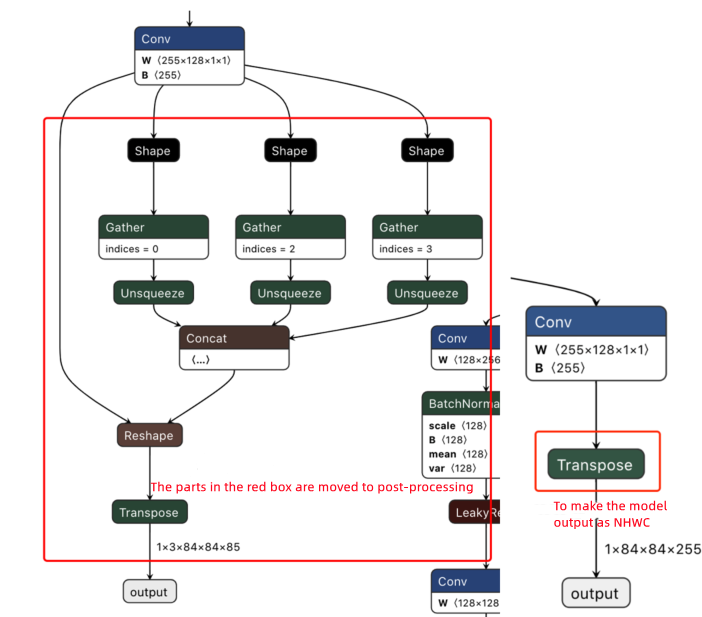
- After download, perform the pt to ONNX file conversion using the script https://github.com/ultralytics/yolov5/blob/v2.0/models/export.py .
When using the export.py script:
When cloning the source code, be sure to use [v2.0] tags, otherwise the conversion may fail.
- Because Horizon algorithm toolchain only supports ONNX opset [10] ~ [19], please modify the
opset_versionparameter in thetorch.onnx.exportas per the version you use. - Change the default input name parameter in the
torch.onnx.exportfrom'image'into'data'to keep it consistent with that of in the YOLOv5s sample in the model conversion sample package. - Change the default data input size in the
parser.add_argumentfrom 640x640 to 672x672 as in the YOLOv5x sample in the model conversion sample package.
SSD_MobileNetv1
To achieve optimal on-board performance, we modified the remove_node_type parameter in the YAML file used for hbm model compilation and removed the Dequantize node from the hbm model.
-
SSD_MobileNetv1 model: Obtain the Caffe model from URL: https://github.com/chuanqi305/MobileNet-SSD
-
md5sum code:
Efficientdetd0
To achieve optimal on-board performance, we modified the remove_node_type parameter in the YAML file used for hbm model compilation and removed the Dequantize node from the hbm model.
-
model source: https://github.com/HorizonRobotics-Platform/ModelZoo/tree/master/EfficientDet
-
md5sum code:
CenterNet_Resnet101
To achieve optimal on-board performance:
-
We put the maxpool and sigmoid nodes into the model and specify them to be compiled as BPU nodes for reducing the amount of computation during post-processing.
-
We modified the
remove_node_typeparameter in the YAML file used for hbm model compilation and removed theDequantizenode from the hbm model.
-
model source: https://github.com/HorizonRobotics-Platform/ModelZoo/tree/master/Centernet
-
md5sum code:
Fcos_efficientnetb0
- This model is a trained model using the PTQ method.
- To achieve optimal on-board performance, we modified the
remove_node_typeparameter in the YAML file used for hbm model compilation and removed theDequantizenode from the hbm model.
-
model source: https://github.com/HorizonRobotics-Platform/ModelZoo/blob/master/Fcos_Efficientnetb0
-
md5sum code:
Yolov4
To achieve optimal on-board performance, we modified the remove_node_type parameter in the YAML file used for hbm model compilation and removed the Dequantize node from the hbm model.
-
model source: https://github.com/HorizonRobotics-Platform/ModelZoo/tree/master/YoloV4
-
md5sum code:
YOLOv3_VargDarknet
To achieve optimal on-board performance, we modified the remove_node_type parameter in the YAML file used for hbm model compilation and removed the Dequantize node from the hbm model.
- YOLOv3_VargDarknet model
URL: https://github.com/HorizonRobotics-Platform/ModelZoo/tree/master/Yolov3_VargDarknet . The model file can be downloaded from the Baidu Cloud URL provided in the README.md file in GitHub.
-
md5sum code:
Fcos_resnet50
To achieve optimal on-board performance, we modified the remove_node_type parameter in the YAML file used for hbm model compilation and removed the Dequantize node from the hbm model.
-
model source: https://github.com/HorizonRobotics-Platform/ModelZoo/tree/master/Fcos_Resnet50
-
md5sum code:
Fcos_resnext101
To achieve optimal on-board performance, we modified the remove_node_type parameter in the YAML file used for hbm model compilation and removed the Dequantize node from the hbm model.
-
model source: https://github.com/HorizonRobotics-Platform/ModelZoo/tree/master/Fcos_Resnext101
-
md5sum code:
Unet_mobilenet
To achieve optimal on-board performance, we modified the remove_node_type parameter in the YAML file used for hbm model compilation and removed the Dequantize node from the hbm model.
-
model source: https://github.com/HorizonRobotics-Platform/ModelZoo/tree/master/MobilenetUnet
-
md5sum code:
DeeplabV3plus_efficientnetb0
To achieve optimal on-board performance, we modified the remove_node_type parameter in the YAML file used for hbm model compilation and removed the Reshape and Cast node from the hbm model.
-
model source: https://github.com/HorizonRobotics-Platform/ModelZoo/tree/master/DeeplabV3Plus
-
md5sum code:
Fastscnn_efficientnetb0
To achieve optimal on-board performance, we modified the remove_node_type parameter in the YAML file used for hbm model compilation and removed the Reshape and Cast node from the hbm model.
-
model source: https://github.com/HorizonRobotics-Platform/ModelZoo/tree/master/FastSCNN
-
md5sum code:
Deeplabv3plus_dilation1248
To achieve optimal on-board performance, we modified the remove_node_type parameter in the YAML file used for hbm model compilation and removed the Transpose node from the hbm model.
-
model source: https://github.com/HorizonRobotics-Platform/ModelZoo/tree/master/DeeplabV3Plus
-
md5sum code:
Deeplabv3plus_efficientnetm1
To achieve optimal on-board performance, we modified the remove_node_type parameter in the YAML file used for hbm model compilation and removed the Reshape, Cast, and Transpose node from the hbm model.
-
model source: https://github.com/HorizonRobotics-Platform/ModelZoo/tree/master/DeeplabV3Plus
-
md5sum code:
Deeplabv3plus_efficientnetm2
To achieve optimal on-board performance, we modified the remove_node_type parameter in the YAML file used for hbm model compilation and removed the Reshape, Cast, and Transpose node from the hbm model.
-
model source: https://github.com/HorizonRobotics-Platform/ModelZoo/tree/master/DeeplabV3Plus
-
md5sum code:
Demo Of Algorithm Model Samples
Taking the Resnet50 model as an example, this section illustrates the steps of floating-point to fixed-point model conversion by using the scripts in 03_classification/03_resnet50/.
Docker Container Prep
First complete the docker installation and configuration and enter the docker container accoridng to Docker Container Deployment .
Obtain The Original Model And Calibration Dataset
Execute 00_init.sh in the 03_classification/03_resnet50/ folder to obtain the model and calibration dataset needed for the current sample.
Check If the Model is Executable
Run the script as follows:
Prepare Calibration Dataset
Run the 02_preprocess.sh script in the same directory, as follows:
- We extracted 100 images from the ImageNet dataset and use them as a calibration dataset. Before calibration, we pre-processed the data and convert short size resize/crop size/NHWC to NCHW/to rgb.
- The
hb_compiletool will load data from the converted binary data, the format of the pre-processed binary data file is npy, the dtype isunit8.
Building Models
Run the 03_build.sh script in the same directory, as follows:
The above script uses the hb_compile tool to convert the model. The most important thing to focus on is the conversion configuration file, refer to Model Quantized Compilation section.
The output of the above script is as follows:
For now you ONLY need to focus on the resnet50_224x224_nv12.hbm file.
Single Image Inference
Run the 04_inference.sh script to inference a single image, as follows:
- As image pre-processing, model data post-processing are required in the image inference, we offered a Python sample script, please refer to
sh 04_inference.sh. - This script is to perform the inference against a single image and verify whether the inference result meets the expectations. If you want to perform accuracy evaluation, refer to the script
05_evaluate.sh.
Accuracy Evaluation
Run the 05_evaluate.sh script to evaluate the accuracy, as follows:
- As image pre-processing, model data post-processing are required in accuracy evaluation, awe offered a Python sample script, please refer to
sh 05_evaluate.sh. - To accelerate the evaluation, you can adjust the number of concurrent processes by using the
-poption; meanwhile, pay attention to the memory usage. When the value of the-poption is set to 0 or left unfilled, the fixed-point models in the CPU environment will be processed by 10 processes, while other scenarios using 1 process.
FAQ
Why is the reproduced accuracy slightly different from the indicators in the documentation?
There are two possible reasons:
- There may be minor differences in calculation methods when in different server environments, which can cause small data fluctuations in the accuracy of the compiled fixed-point ONNX models in different server environments when compared with the documentation.
- The different versions of third-party libraries such as OpenCV and NumPy, which may produce different results after pre-processing, and this may also lead to slight data fluctuations in reproduced accuracy when compared with the documentation.
No need to worry much about this situation, the records provided in the documentation is only for reference, and it is ok that your reproduced accuracy is slightly different from those in documents.
Why is the fixed-point model accuracy not aligned with the on-board accuracy of the hbm file in the ai_benchmark sample?
In the standard delivery, when adding the sample, we have already aligned the fixed-point model accuracy with the hbm on-board accuracy in the ai_benchmark sample.
If you find any unaligned accuracy, we recommend you first checking the model input for consistency.
When executing the fixed-point model evaluation script, you use the dataset of image type, while for the hbm model used on board, you use the binary dataset converted by the hb_eval_preprocess tool.
Based on this, if the dataset you used on-board is not generated by using the above methods, we recommend that you first use our data preprocessing tool (i.e., hb_eval_preprocess) to regenerate the dataset needed for on-board running on the same server that you run the fixed-point model accuracy and rerun the on-board accuracy to ensure the model inputs are consistent.
Make sure to use the same environment to generate the dataset by using the hb_eval_preprocess tool and to run the fixed-point model accuracy.