

Model Accuracy Tuning
Based on the accuracy evaluation in the previous section, you may find that the accuracy is less than expected. This section introduces you how to perform accuracy tuning with the accuracy tuning tools and functions to reduce quantization accuracy loss or to assist you in locating the cause of quantization accuracy loss when you experience a loss of quantization accuracy during the PTQ model conversion.
All the quantization accuracy tuning below refers to the calibrated_model.onnx quantization accuracy tuning generated during the quantization process described in the previous section.
Accuracy Tuning Advice
You can tune the model accuracy by adjusting the quantization method or the computation accuracy as follows:
Quantization Method
You can try to adjust the model quantization method by configuring different quantization methods, quantization parameter search methods, or by trying to configure the independent calibration functions:
-
Configure the calibration method
You can try to adjust the model calibration method, such as kl, max, and other calibration methods, the configuration method can be found in section The quant_config Introduction.
-
Configure the quantization parameter search methods
Two different granularity calibration parameter search methods are supported:
-
modelwise_search: search for quantization parameters at the model level, this method allows multiple calibration methods to be configured at once, which will find a minimally quantization-loss calibration method by comparing the quantization loss metric (configurable) of the model output before and after quantization.
-
layerwise_search: search for quantization parameters at the node level, this method calculates the quantization loss metric (configurable) based on the model output before and after quantization for each node and assigns the calibration method with the the minimally quantization loss to that node.
The configuration method can be found in section The quant_config Introduction.
-
-
Independent Quantization Function Configuration
Enable the independent quantization mode can reduce the computational resource consumption, you can try to configure the parameters per_channel, asymmetric, bias_correction, the configuration method can be found in section The quant_config Introduction.
Computation Accuracy
In addition to the configuration of the quantization method, you can try to configure the computation accuracy (dtype) of the model operator to try to accuracy tuning, currently we support configuring the computation accuracy of the operator at three levels: model, op_type, and op_name, and the supported configuration types include int8, int16, float16, and float32. The configuration method can be found in section The quant_config Introduction.
Accuracy Debug Tool
If you want to locate the exact operators that caused the loss of quantization accuracy, we also provide you with the accuracy debug tool to assist you in locating them, which can be found in section Accuracy Debug Tool.
Quantization Accuracy Tuning Flow
Based on our previous experience with typical model accuracy tuning processes, below we provide you with an accuracy tuning process that balances ease of use and practicality:
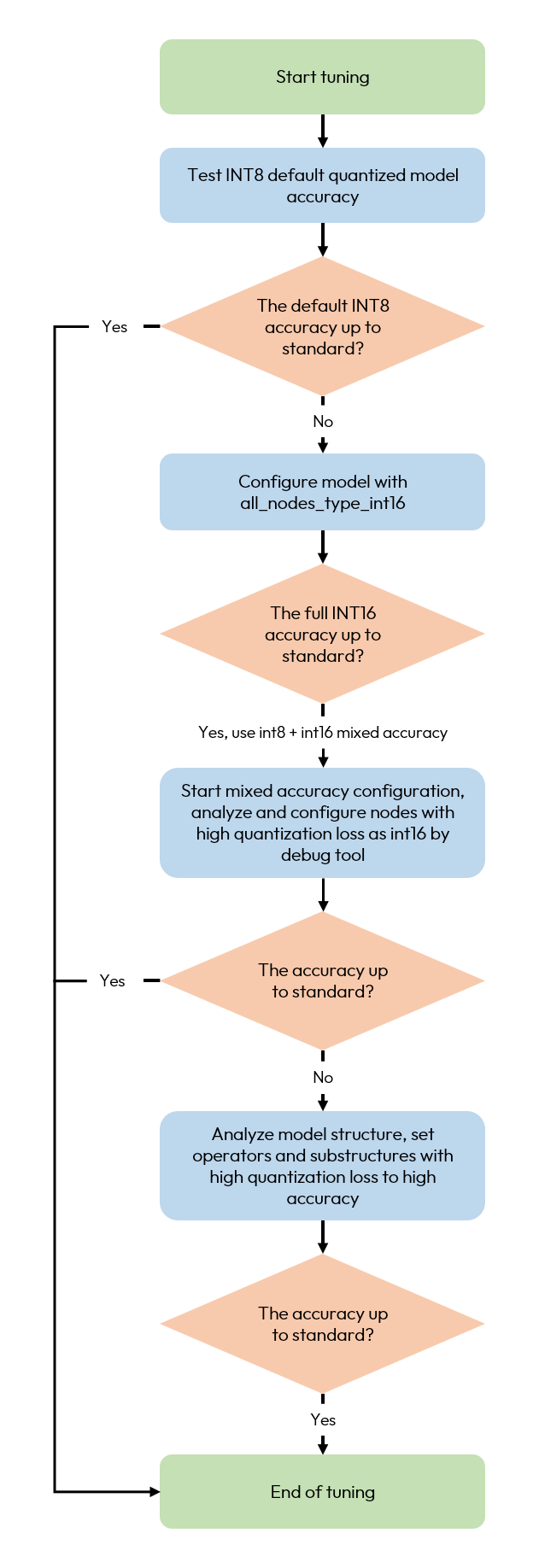
The tuning flowchart is described in detail below:
| Tuning Area | Milestone | Detailed Description | Auxiliary Function |
| Default int8 quantization model accuracy | Verify whether the int8 quantization accuracy loss meets your expectations. | Without any configuration of the quantization parameters, perform the model conversion using the default int8 quantization, test the loss of model quantization accuracy, and evaluate whether the accuracy can meet the standard. |
|
| Mixed computation accuracy tuning | Verify the upper limit of model accuracy when the model is quantized at full int16, and determine whether subsequent tuning can be completed using mixed-accuracy. | Configure all_nodes_type=int16 via quant_config, and try to configure all nodes in the model with int16 high-accuracy computation, to obtain the upper limit of the quantization accuracy expression capability of the model at int16. If all_int16 meets the accuracy standard, the subsequent mixed-accuracy configuration will use int16. | |
| By explicitly specifying the computational accuracy of the operator, complete the mixed accuracy fine-tuning. |
|