

OE Development Kit Samples Introduction
The algorithmic toolchain covers the key steps of model training (floating-point and quantization training, optional), conversion, performance/accuracy validation, deployment and inference. To facilitate your quick experience and learning, rich and comprehensive samples are provided in the OE Development Kit. To facilitate your understanding and use of these samples, this article will provide a detailed introduction to these samples.
First of all, after you obtain the OE development package, the directory structure of the unzipped samples package is shown below:
The samples directory provides model training sample, floating-point to fixed-point model sample, and UCP related sample in the Unify Compute Platform.
Below is a distribution of general processes and samples used at each stage of the toolchain:
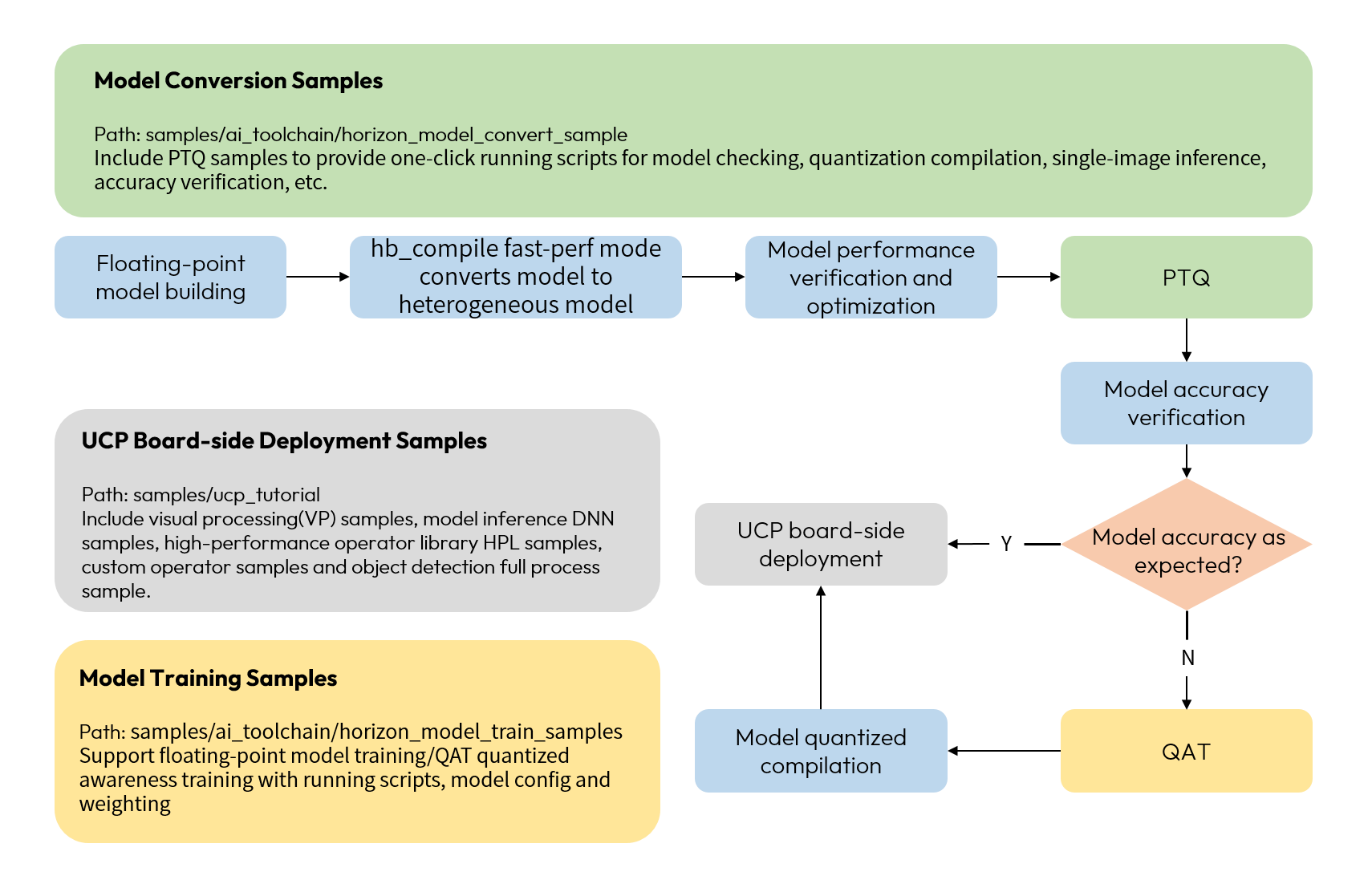
The samples correspond to different stages of use in the flow of the toolchain shown above:
-
The model conversion sample contains the processes of model checking, calibration data processing, model quantization compilation, single image inference, and accuracy evaluation in the model PTQ conversion phase.
-
The model training sample contains dataset packing scripts, model config files, training scripts, and other tool scripts for the floating-point model training (optional) and QAT quantization training (optional) phases, so that the QAT quantization training strategy can be attempted when the expected accuracy is not achieved by applying model accuracy optimization tools.
-
UCP board-side deployment samples, including visual processing, model inference, high-performance operator library, custom operator and object detection full process sample. The model inference sample provides compilation scripts, run scripts and source code for the model deployment stage.
Model Conversion Sample (horizon_model_convert_sample)
The toolchain provides model conversion samples in the samples/ai_toolchain/horizon_model_convert_sample folder, and the sample package directory structure is shown below:
The OE package not only provides PTQ model conversion samples, but additionally contains one-click run scripts for model checking, calibration data preprocessing, conversion compilation, and inference.
Take 03_resnet50 in the horizon_model_convert_sample/03_classification directory as an example of the relevant script:
For a tutorial on how to use the PTQ model conversion sample, please refer to PTQ Model Conversion Samples section.
Model Training Sample (horizon_model_train_sample)
The toolchain provides model training samples in the samples/ai_toolchain/horizon_model_train_sample directory, and the sample package structure is shown below:
Model training is usually achieved by simply using the following commands:
-
${CONFIGS} needs to be configured as the path to the config file corresponding to model training in the configs folder, which defines the model structure, dataset loading, and the whole set of training procedures, and the sample provides models including classification, detection, segmentation, and optical flow estimation tasks.
-
The tools folder provides execution scripts containing dataset processing, model training, conversion compilation, computation statistics, etc. The functions of the relevant scripts are as follows.
-
calops.py: Network modeling computational volume statistics tool.
-
compile_perf_hbir.py: Compilation and perf tool.
-
create_data.py: Dataset preprocessing tool for preprocessing Kitti3D radar dataset.
-
dataset_converters: Conversion script for different dataset formats are provided under the folder.
-
datasets: Dataset package and data visualization script are provided under the folder.
-
export_hbir.py: HBIR model export tool.
-
export_onnx.py: ONNX model export tool, exported ONNX model can only be used for visualization, does not support inference.
-
gen_camera_param_nusc.py: Script to get camera internal and external parameters from nuscenes.
-
homography_generator.py: Script to compute the ego2img matrix.
-
reference_points_generator.py: Script to calculate model input reference points from the homography matrix.
-
gen_reference_points_nusc.py: Script to get model input reference points from nuscenes.
-
infer_hbir.py: Single image prediction tool.
-
model_checker.py: Model checking tool.
-
predict.py: Prediction tool.
-
quant_analysis.py: Accuracy debug tool.
-
train.py: Model training script, support floating-point model training, quantization training function.
-
validation_hbir.py: Accuracy verification tool to provide fully aligned results on the upper board.
-
For a tutorial on using the model training samples, please refer to the introduction in the Horizon Torch Samples section.
Unify Compute Platform Sample (ucp_tutorial)
The toolchain provides sample source code and running scripts for the Unify Compute Platform UCP in the samples/ai_toolchain/ucp_tutorial directory, and the sample package structure is shown below:
-
all-round: Object detection full process sample, for detailed introduction and usage tutorial, please refer to the introduction in the section Object Detection Full Process Sample.
-
custom_operator: Custom operator sample, including the DSP sample and development sample for calling board-side GPU based on OpenCL interface, for detailed introduction and usage tutorial, please refer to the introduction in the section UCP Custom Operator.
-
deps_aarch64: AArch64 public dependency directory, containing UCP dependency library and header file, etc.
-
deps_x86: X86 simulation public dependency directory.
-
dnn: DNN samples, containing as below:
-
ai_benchmark provides performance and accuracy evaluation samples of common models for embedded application development. For detailed introduction and usage tutorial, please refer to the introduction in the section AI Benchmark User Guide.
-
basic_samples provides model inference related to the use of shallow and deep samples, designed to help you familiarize and learn the model inference related to the interface and a variety of advanced features, detailed introduction and use of the tutorial, please refer to the introduction in the section Basic Sample User Guide.
-
-
hpl: HPL samples including sample source code and minimal executable environment, detailed introduction and use of the tutorial, please refer to the introduction in the section High Performance Library - Sample
-
vp: VP samples including sample source code and minimal executable environment, detailed introduction and use of the tutorial, please refer to the introduction in the section Visual Process - Sample.
-
tools: The Unify Compute Platform UCP provides tools.