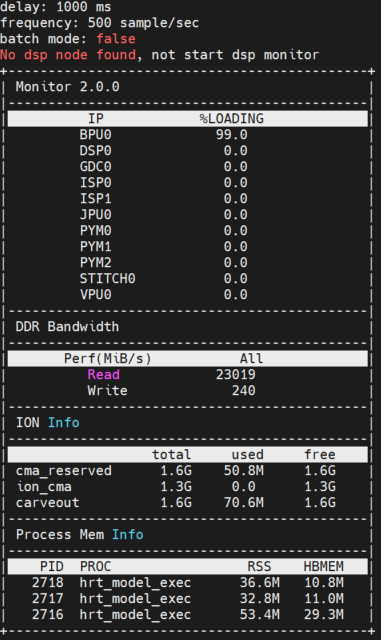
The hrt_ucp_monitor Tool Introduction
The hrt_ucp_monitor is a tool for monitoring hardware IP usage and memory information. Supported IPs include BPU, DSP, GDC, STITCH, PYM, ISP, CODEC[ VPU (Video Process Unit and JPU) ]. When submitting tasks, UCP can specify the Backend for task deployment, which corresponds to the hardware supported by UCP.
Supported memory information includes DDR read and write bandwidth, ION memory, and process memory.
The hrt_ucp_monitor tool resides in these paths of the horizon_j6_open_explorer publication:
- Linux:
samples/ucp_tutorial/tools - QNX:
samples/ucp_tutorial/deps_qnx/ucp/bin
The structure is as follows:
You can deploy the hrt_ucp_monitor to the development board using a deb deployment package method, or you can copy the hrt_ucp_monitor to the development board for use separately.
If the hrt_ucp_monitor is not located in the path specified by the PATH environment variable, you need to manually specify the tool's path, for example by executing ./hrt_ucp_monitor in the tool's directory. If you are prompted that there is no execution permission, you can first execute chmod +x ./hrt_ucp_monitor.
Support Scope
Supported IPs include BPU, DSP, GDC, STITCH, PYM, ISP, VPU (Video Process Unit and JPU).
Supported memory information includes DDR read and write bandwidth, ION memory, and process memory.
How to use
Running hrt_ucp_monitor -h or hrt_ucp_monitor --help to obtain tool usage details, as shown in the following:
During the operation of hrt_ucp_monitor, you can early exit by pressing the Q key or exectuing CTRL+C.
Parameters Description
| Parameter | Data Type | Parameter Description | Correlated Parameters |
-h, --help | None. | Display this information. | None. |
-v, --version | None. | Output version information & exit. | None. |
-v, --verbose | string | Display more detailed log information such as tool parameters during the operation of hrt_ucp_monitor. | None. |
-b, --batch | null | Specified to run in non-interactive batch mode, which is the default mode for interactive mode. | None. |
-d, --delay | int | Specify the update interval in milliseconds, with a default value of 1000 milliseconds and an effective range of [100, 10000]. | None. |
-f, --freq | int | Specify the sampling frequency,defaluting to 500 samples per second, applicable only to BPU and DSP, used to control the status sampling frequency of hardware IP. Currently supported range is [10, 1000], indicating a minimum sampling of 10 times and a maximum of 1000 samples per second. Due to different statistical methods for utilization, other hardware IPs such as GDC, STITCH do not require setting a sampling frequency. When setting a refresh time, utilization data for the specified period will be obtained. | None. |
-n, --number | int | Specify the usage refresh rate, valid range is [1, INT32_MAX]. Specify the maximum refresh numbers for the hareware IP usage, and when the refresh numbers reaches the maximum numbers, the hrt_ucp_monitor will automatically exit. You can also press CTRL+C to exit early. | If this parameter is set, the -t, --time parameter cannot be set. If they are set simultaneously, an error message will be prompted. |
-t, --time | int | Specify the tool running time in seconds, valid range is [1, INT32_MAX]. For specifying the tool running time in seconds, hrt_ucp_monitor will calculate the maximum refresh numbers based on the refresh time. When the refresh numbers reaches the maximum refresh numbers, hrt_ucp_monitor will automatically exit. You can also press CTRL+C to exit early. | If this parameter is set, the -n, --number parameter cannot be set. If they are set simultaneously, an error message will be prompted. |
-e, --enable | string | Specify the hardware IP to be monitored, valid values are bpu, dsp, gdc, stitch, pym, isp, jpu, vpu, case insensitive. Multiple parameters are separated by comma. | None. |
Uage Example
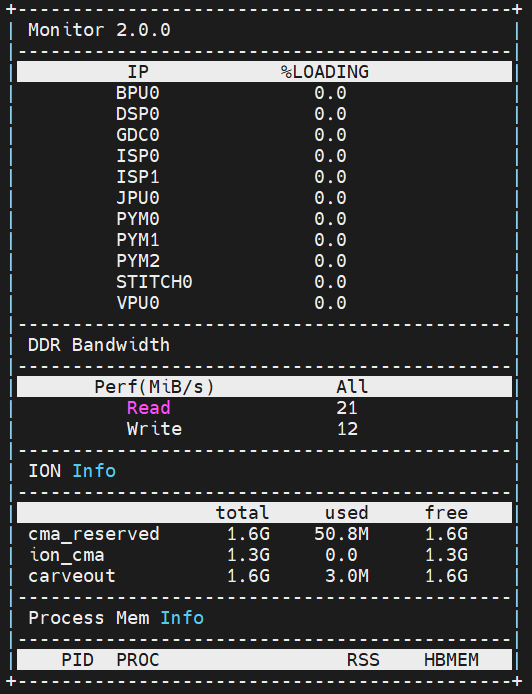
If no parameters are specified, run with the default parameters
When running hrt_ucp_monitor without specifying parameters, it will use default parameters to run. By default, all hardware IPs are monitored,
the interactive mode is used, BPU and DSP samples are taken every 500 times per second, and the hardware IP utilization is refreshed every 1000ms.
Use the batch parameter for batch processing
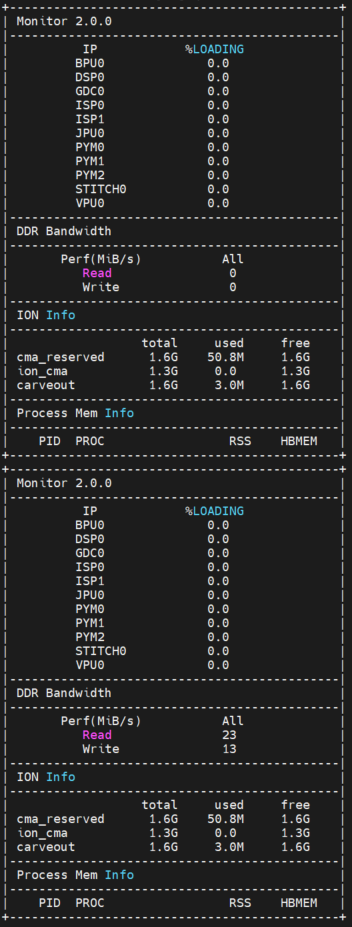
In the batch mode, it is not supported to receive user keystrokes. Instead, each time hrt_ucp_monitor refreshed the data, it will output a new line and is suitable for redirecting data to a file.
Output results in terminal
Redirect output results to file.
Use the delay parameter to set the refresh time
The refesh time is set to 3 seconds, indicating that the data will be refreshed every 3 seconds.
Use the freq parameter to set the number of periodic samplings
Set the sampleling period for the busy state of BPU and DSP to 100 samples per second.
Use the number parameter to set the maximum number of refreshes
Use the time parameter to set the refresh time
Overview
The default refresh time of the tool is 1 second, and after running for 10 seconds, it will exit.
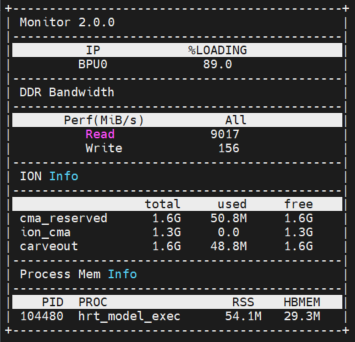
Use the enable parameter to output the occupancy rate data of the BPU
The tool will only output BPU usage data.
Use the verbose parameter to obtain the log information
Display more detailed log information such as tool parameters during the operation of hrt_ucp_monitor.