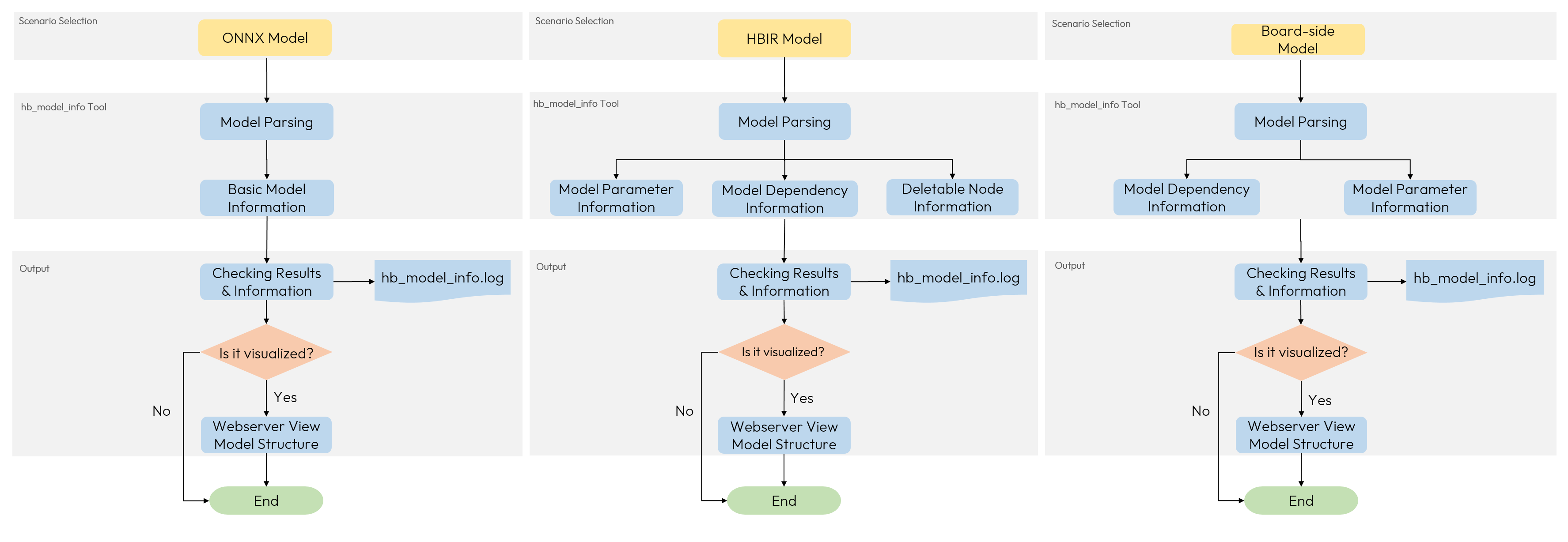
log will be stored in /open_explorer/samples/ai_toolchain/horizon_model_convert_sample/03_classification/03_resnet50/hb_model_info.log
Start hb_model_info....
hb_model_info version 3.3.0
hbm_path: /open_explorer/samples/ai_toolchain/horizon_model_convert_sample/03_classification/03_resnet50/model_output/resnet50_224x224_nv12.hbm
desc file path: resnet50_224x224_nv12_desc.json
************* resnet50_224x224_nv12 *************
############# model deps info #############
builder version     : 3.3.0
hbdk version        : 4.1.2
horizon nn version  : 2.0.5
############# model_parameters info #############
onnx_model         : /open_explorer/samples/ai_toolchain/horizon_model_convert_sample/01_common/model_zoo/mapper/classification/resnet50/resnet50.onnx
BPU march           : nash-e
layer_out_dump      : False
working dir         : /open_explorer/samples/ai_toolchain/horizon_model_convert_sample/03_classification/03_resnet50/model_output
output_model_file_prefix: resnet50_224x224_nv12
node_info           : {}
############# input_parameters info #############
------------------------------------------
---------input info : input  ---------
input_name          : input
input_type_rt       : nv12
input_space&range   : regular
input_type_train    : rgb
input_layout_train  : NCHW
input_shape         : 1x3x224x224
mean_value          : [123.675, 116.28, 103.53]
scale_value         : [0.01712475, 0.017507, 0.01742919]
separate_batch      : False
---------input info : input end -------
------------------------------------------
############# calibration_parameters info #############
calibration_type    : default
max_percentile      : None
per_channel         : False
cal_data_dir        : /open_explorer/samples/ai_toolchain/horizon_model_convert_sample/03_classification/03_resnet50/calibration_data_rgb
############# compiler_parameters info #############
debug               : True
optimize_level      : O2
compile_mode        : latency
core_num            : 1
balance_factor      : 100
input_source        : {'input': 'pyramid'}
hbm_path: /open_explorer/samples/ai_toolchain/horizon_model_convert_sample/03_classification/03_resnet50/model_output/resnet50_224x224_nv12.hbm
############# Model input/output info #############
NAME   TYPE   SHAPE            DATA_TYPE
------ ------ ---------------- ---------
input_y  input  [1, 224, 224, 1] UINT8
input_uv input  [1, 112, 112, 2] UINT8
output   output [1, 1000]        FLOAT32