由于浮点转定点过程中存在误差,当您在使用量化训练工具时,难免会碰到量化模型精度掉点问题。通常来说,造成掉点的原因有:
-
原有浮点模型不利于量化,如存在共享 op 或共享结构。
-
QAT 网络结构或配置异常,如模型中存在没有 fuse 的 pattern,没有设置高精度输出等。
-
某些算子对量化比较敏感,该算子的量化误差在前向传播过程中逐层累积,最终导致模型输出误差较大。
针对上述情况,量化训练工具提供了精度调优工具来帮助您快速定位并解决精度问题,主要包括如下模块:
-
模型结构检查:检查模型中是否存在共享 op、没有 fuse 的 pattern 或者不符合预期的量化配置。
-
QuantAnalysis 类:自动比对分析两个模型,定位到量化模型中异常算子或者量化敏感 op。
-
ModelProfiler 类 和 HbirModelProfiler 类:获得模型中每一个 op 的数值特征信息,如输入输出的最大最小值等。这两个类的功能完全一致,区别在于 HbirModelProfiler 仅接受 qat hbir 模型作为输入。通常您无需手动调用该模块,可以直接通过 QuantAnalysis.run 来获得两个模型的数值信息。
快速上手
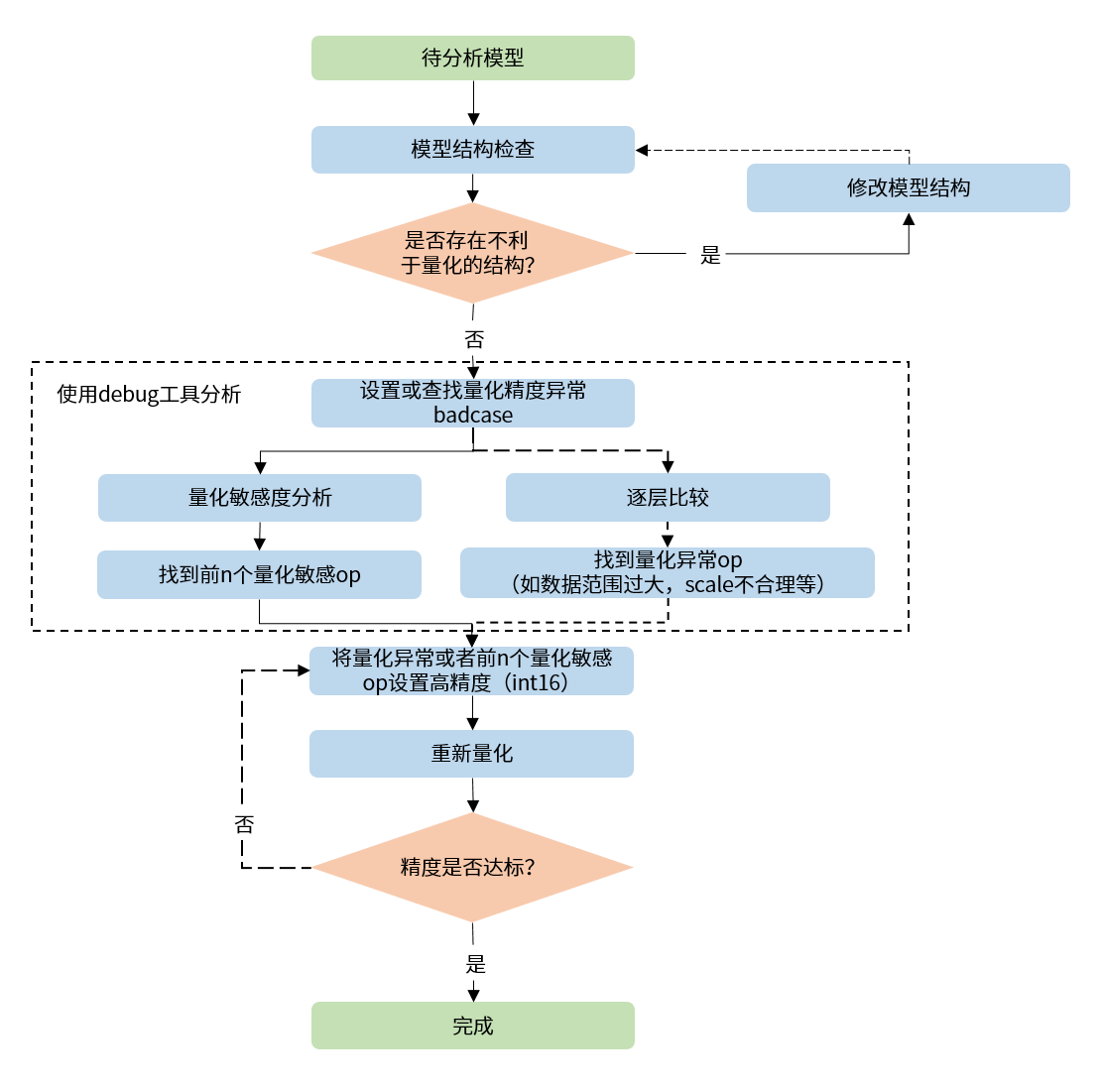
当碰到量化模型精度掉点问题时,我们推荐按照如下的流程使用精度调优工具。
-
检查模型中是否存在不利于量化的结构或者异常配置。
-
使用 QuantAnalysis 模块进行分析,具体步骤如下:
1). 找到一个 bad case 作为模型的输入。bad case 是指基准模型和待分析模型输出相差最大的那个输入。
2). 进行量化敏感度分析,目前的经验是 L1 敏感度排序前 n 个通常为量化敏感 op(不同的模型 n 的数值不一样,暂无自动确定的方法,需要手动尝试,如前 10 个,20 个...)。将量化敏感 op 设置高精度量化(如 int16 量化),重新进行量化流程。
3). 或者逐层比较两个模型的输入输出等信息,检查是否存在数据范围过大或者 scale 不合理等量化异常的 op,如某些具有物理含义的 op 应设置固定 scale。
整体的流程图如下:
一个完整的例子如下:
from copy import deepcopy

import torch
from torch import nn
from torch.quantization import DeQuantStub, QuantStub

from horizon_plugin_pytorch.march import March, set_march
from horizon_plugin_pytorch.quantization.qconfig import (
    default_qat_8bit_fake_quant_qconfig,
)
from horizon_plugin_pytorch.quantization import prepare
from horizon_plugin_pytorch.quantization import hbdk4 as hb4
from horizon_plugin_pytorch.utils.check_model import check_qat_model
from horizon_plugin_profiler import QuantAnalysis, ModelProfiler


class Net(nn.Module):
    def __init__(self):
        super(Net, self).__init__()
        self.conv = nn.Conv2d(3, 3, 1)
        self.relu = nn.ReLU()
        self.quant = QuantStub()
        self.dequant = DeQuantStub()

    def forward(self, x):
        x = self.quant(x)
        x = self.conv(x)
        x = self.relu(x)
        x = torch.nn.functional.interpolate(
            x, scale_factor=1.3, mode="bilinear", align_corners=False
        )
        x = self.dequant(x)
        return x

data = torch.rand((1, 3, 32, 32))
float_net = Net()
float_net(data)

set_march(March.NASH)
float_net.qconfig = default_qat_8bit_fake_quant_qconfig

qat_net = deepcopy(float_net)
qat_net = prepare(qat_net, data)


############################### 模型结构检查 ##############################
# 确认提示的异常层是否符合预期
check_qat_model(qat_net, data, save_results=True)
##########################################################################

qat_net(data)

# 导出 hbir 模型
qat_hbir = hb4.export(qat_net, (data,))

############################### quant analysis ############################

# 1. 初始化
qa = QuantAnalysis(
    baseline_model=float_net,
    analysis_model=qat_net,
    analysis_model_type="fake_quant",
    out_dir="./floatvsqat",
)

# 也支持对比 qat 和 qat hbir
# qa = QuantAnalysis(
#     baseline_model=qat_net,
#     analysis_model=qat_hbir,
#     analysis_model_type="fake_quant",
#     out_dir="./qatvshbir",
# )

# 2. 设置 badcase 输入
qa.set_bad_case(data)

# 实际场景下推荐使用 auto_find_bad_case 在整个 dataloader 上搜索 bad case
# 也支持设置 num_steps 参数来控制搜索的范围
# qa.auto_find_bad_case(your_dataloader, num_steps=100)

# 3. 运行两个模型
qa.run()

# 4. 两个模型逐层比较。确认 abnormal_layer_advisor.txt 提示的异常层是否符合预期
qa.compare_per_layer()

# 5. 计算敏感度节点。可以将 topk 排序的敏感度节点设置高精度来尝试提升量化模型精度
# !!!不支持 qat_hbir 模型的敏感度计算
qa.sensitivity()

##########################################################################
API Reference
模型结构检查
# from horizon_plugin_pytorch.utils.check_model import check_qat_model

def check_qat_model(
    model: torch.nn.Module,
    example_inputs: Any,
    save_results: bool = False,
    out_dir: Optional[str] = None,
):
检查 calibration/qat 模型中是否存在不利于量化的结构以及量化 qconfig 配置是否符合预期。
参数
输出
-
屏幕输出:检查出的异常层。
-
model_check_result.txt:在 save_results = True 时生成。主要由 5 部分组成:
1). 未 fuse 的 pattern。
2). 每个 module 的调用次数。正常每个 op 仅调用 1 次,0 表示未被调用,超过 1 次则表示被共享了多次。未调用或者共享多次的会有异常提示。
3). 每个 op 输出的 qconfig 配置。
4). 每个 op weight(如果有的话)的 qconfig 配置。
5). 异常 qconfig 提示(如果有的话)。
Fusable modules are listed below:
name    type
------  -----------------------------------------------------
conv    <class 'horizon_plugin_pytorch.nn.qat.conv2d.Conv2d'>
relu    <class 'horizon_plugin_pytorch.nn.qat.relu.ReLU'>

All modules in the model run exactly once.

Each layer out qconfig:
+---------------+-----------------------------------------------------------+---------------+---------------+----------------+-----------------------------+
| Module Name   | Module Type                                               | Input dtype   | out dtype     | ch_axis        | observer                    |
|---------------+-----------------------------------------------------------+---------------+---------------+----------------+-----------------------------|
| quant         | <class 'horizon_plugin_pytorch.nn.qat.stubs.QuantStub'>   | torch.float32 | qint8         | -1             | MovingAverageMinMaxObserver |
| conv          | <class 'horizon_plugin_pytorch.nn.qat.conv2d.Conv2d'>     | qint8         | qint8         | -1             | MovingAverageMinMaxObserver |
| relu          | <class 'horizon_plugin_pytorch.nn.qat.relu.ReLU'>         | qint8         | qint8         | qconfig = None |                             |
| dequant       | <class 'horizon_plugin_pytorch.nn.qat.stubs.DeQuantStub'> | qint8         | torch.float32 | qconfig = None |                             |
+---------------+-----------------------------------------------------------+---------------+---------------+----------------+-----------------------------+

Weight qconfig:
+---------------+-------------------------------------------------------+----------------+-----------+---------------------------------------+
| Module Name   | Module Type                                           | weight dtype   |   ch_axis | observer                              |
|---------------+-------------------------------------------------------+----------------+-----------+---------------------------------------|
| conv          | <class 'horizon_plugin_pytorch.nn.qat.conv2d.Conv2d'> | qint8          |         0 | MovingAveragePerChannelMinMaxObserver |
+---------------+-------------------------------------------------------+----------------+-----------+---------------------------------------+
注解
prepare 接口已集成该检查。请您关注此接口输出的检查结果,并根据检查结果对模型做针对性的调整。
QuantAnalysis 类
QuantAnalysis 类可以自动寻找两个模型输出最大的 bad case,并以此作为输入,逐层比较两个模型的输出。此外,QuantAnalysis 类还提供计算敏感度功能,您可以尝试将敏感度排名 topk 的节点设置高精度,如 int16 量化,来提升量化模型精度。
class QuantAnalysis(object):
    def __init__(
        self,
        baseline_model: Union[torch.nn.Module, HbirModule],
        analysis_model: Union[torch.nn.Module, HbirModule],
        analysis_model_type: str,
        device_ids: Union[List[int], int] = None,
        post_process: Optional[Callable] = None,
        out_dir: Optional[str] = None,
    )
参数
-
baseline_model: 基准模型(高精度)。
-
analysis_model:待分析的模型(精度掉点)。
-
analysis_model_type: 待分析的模型类型。支持输入:
- fake_quant:待分析的模型可以是精度掉点的 calibration 模型,此时基准模型可以是原始浮点模型或者一个精度达标的 int8/int16 混合配置的 calibration 模型。
-
device_ids:对比分析时模型运行的 GPU 设备 index。
-
post_process:模型后处理。
-
out_dir:指定比较结果的输出目录。
注意
由于 QAT 训练会改变模型 weight 分布,通常情况下,我们不建议您将浮点或 calibration 模型和 qat 模型做对比。
该类中各个 method 如下:
auto_find_bad_case
def auto_find_bad_case(
    self,
    data_generator: Iterable,
    num_steps: Optional[int] = None,
    metric: str = "L1",
    device: Optional[Union[torch.device, str, int]] = None,
    custom_metric_func: Optional[Callable] = None,
    custom_metric_order_seq: Optional[str] = None,
    cached_attrs: Optional[Tuple[str, ...]] = None,
):
自动寻找导致两个模型输出最差的 badcase。
参数
-
data_generator:dataloader 或者一个自定义的迭代器,每次迭代产生一个数据。
-
num_steps:迭代 steps 次数。
-
metric:指定何种 metric 作为 badcase 的 metric。默认使用 L1 最差的结果。支持 Cosine/MSE/L1/KL/SQNR/custom。若为 custom,表示使用自定义的 metric 计算方法,此时 custom_metric_func 和 custom_metric_order_seq 两个参数必须不为 None。
-
device:指定模型运行 device。
-
custom_metric_func:自定义模型输出比较函数。
-
custom_metric_order_seq:自定义模型输出比较函数的排序规则,仅支持 "ascending"/"descending",表示升序/降序。
-
cached_attrs:作为模型输入的某些属性。通常在时序模型中使用,如运行第二帧时,将第一帧的某些结果作为输入。
注解
auto_find_bad_case 函数遍历传入的 data_generator,运行基准模型和待分析模型,计算每个输出在 Cosine/MSE/L1/KL/SQNR 5 种 metric 上的比较结果,并找到在各个 metric 上比较结果最差的 badcase 输入。
输出
set_bad_case
def set_bad_case(
    self,
    data: Any,
    baseline_model_cached_attr: Optional[Dict] = None,
    analysis_model_cached_attr: Optional[Dict] = None,
):
手动设置 badcase。
注意
通常情况下,我们建议您通过 auto_find_bad_case 函数寻找 badcase。若手动设置的 badcase 非真正的 badcase,分析工具很难找出量化敏感层。
参数
load_bad_case
def load_bad_case(self, filename: Optional[str] = None)
从指定的文件中加载 badcase。
参数
- filename:指定的文件路径。默认从初始化时指定的
out_dir 目录中加载 auto_find_bad_case 函数保存的 badcase 相关文件。
save_bad_case
将 badcase 保存到 {self.out_dir}/badcase.pt 文件。
注意
和 set_bad_case 搭配使用。通常情况下,您无需手动调用此函数。
set_model_profiler_dir
def set_model_profiler_dir(
    self,
    baseline_model_profiler_path: str,
    analysis_model_profiler_path: str,
):
手动指定 model_profiler 的输出保存路径。
某些情况下,在 QuantAnalysis 初始化之前,ModelProfiler 就已定义并运行,此时可以直接指定已有的 ModelProfiler 路径,跳过 QuantAnalysis 的 run 步骤,直接比较两个模型的输出。
参数
run
def run(
    self,
    device: Optional[Union[torch.device, str, int]] = None,
    index: Optional[int] = None,
)
运行两个模型并分别保存模型中每一层的结果。
参数
注意
仅支持 auto_find_bad_case 函数找到并在 badcase.txt 中显示的 index 作为参数输入。
compare_per_layer
def compare_per_layer(
    self,
    prefixes: Tuple[str, ...] = None,
    types: Tuple[Type, ...] = None,
):
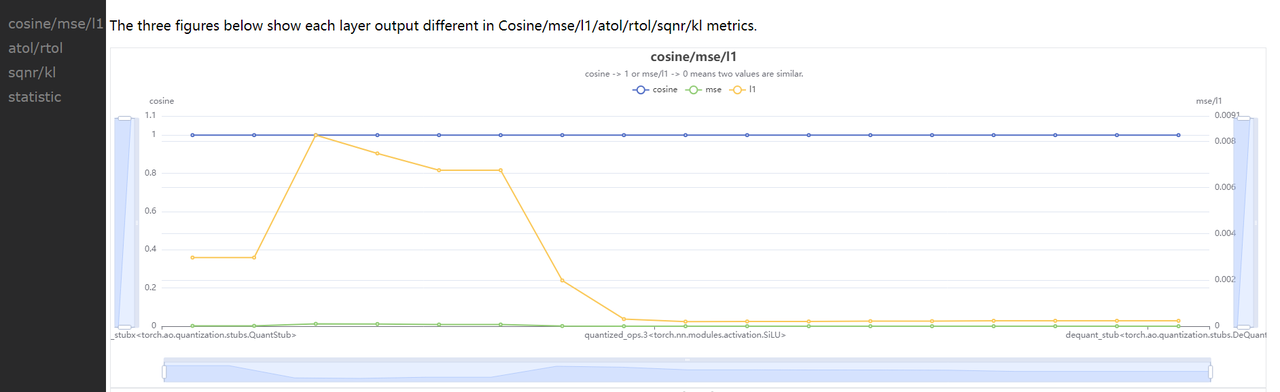
比较两个模型中每一层的结果。
参数
-
prefixes:指定 op 名字的前缀。
-
types:op 类型。
注解
通常您无需指定 prefixes 和 types 参数。若您基于一些先验经验,想跳过某些确定的、量化影响较小 op 的比较,或想节省时间,您可以通过两个参数,指定比较某些 op 或者某类 op。
输出
-
compare_per_layer_out.txt: 以表格的形式展示模型中每层 layer 的具体信息,包括各种指标、数据范围、量化 dtype 等。从左到右每一列分别表示:
-
Index:op index。
-
mod_name:该 op 名字,若 op 为 module 类型,则显示该 module 在模型中的 prefix name,若为 function 类型,则不显示。
-
base_op_type:基准模型中该 op 的 type,可能是 module 类型或者 function 名称。
-
analy_op_type:待分析模型中该 op 的 type,可能是 module 类型或者 function 名称。
-
Shape:该 op 输出的 shape。
-
quant_dtype:该 op 输出的量化类型。
-
Qscale:该 op 输出的量化 scale。
-
Cosine:该 op 在两个模型中输出的余弦相似度。
-
L1:该 op 在两个模型中输出的 L1 距离。
-
Atol:该 op 在两个模型中输出的绝对误差。
-
max_qscale_diff:该 op 在两个模型中输出最大相差了几个 scale。
-
base_model_min:基准模型中该 op 输出的最小值。
-
analy_model_min:待分析模型中该 op 输出的最小值。
-
base_model_max:基准模型中该 op 输出的最大值。
-
analy_model_max:待分析模型中该 op 输出的最大值。
-
base_model_mean:基准模型中该 op 输出的平均值。
-
analy_model_mean:待分析模型中该 op 输出的平均值。
+----+------------+--------------------------------------------------------------------+--------------------------------------------------------------------+----------------------------+---------------+-----------+-----------+-----------+-----------+-------------------+------------------+-------------------+------------------+-------------------+-------------------+--------------------+
|    | mod_name   | base_op_type                                                       | analy_op_type                                                      | shape                      | quant_dtype   |    qscale |    Cosine |        L1 |      Atol |   max_qscale_diff |   base_model_min |   analy_model_min |   base_model_max |   analy_model_max |   base_model_mean |   analy_model_mean |
|----+------------+--------------------------------------------------------------------+--------------------------------------------------------------------+----------------------------+---------------+-----------+-----------+-----------+-----------+-------------------+------------------+-------------------+------------------+-------------------+-------------------+--------------------|
|  0 | quant      | torch.ao.quantization.stubs.QuantStub                              | horizon_plugin_pytorch.nn.qat.stubs.QuantStub                      | torch.Size([1, 3, 32, 32]) | qint8         | 0.0078404 | 0.9999922 | 0.0019772 | 0.0039202 |         0.5000016 |        0.0002798 |         0.0000000 |        0.9996471 |         0.9957269 |         0.4986397 |          0.4986700 |
|  1 | conv       | torch.nn.modules.conv.Conv2d                                       | horizon_plugin_pytorch.nn.qat.conv2d.Conv2d                        | torch.Size([1, 3, 32, 32]) | qint8         | 0.0056401 | 0.9999791 | 0.0020876 | 0.0092935 |         1.6477517 |       -0.7193903 |        -0.7162931 |        0.5436335 |         0.5414499 |        -0.0423445 |         -0.0413149 |
|  2 | relu       | torch.nn.modules.activation.ReLU                                   | torch.nn.modules.activation.ReLU                                   | torch.Size([1, 3, 32, 32]) | qint8         | 0.0056401 | 0.9999741 | 0.0009586 | 0.0088447 |         1.5681799 |        0.0000000 |         0.0000000 |        0.5436335 |         0.5414499 |         0.1555644 |          0.1557564 |
|  3 |            | horizon_plugin_pytorch.nn.interpolate.autocasted_interpolate_outer | horizon_plugin_pytorch.nn.interpolate.autocasted_interpolate_outer | torch.Size([1, 3, 41, 41]) | qint8         | 0.0056401 | 0.9924216 | 0.0160291 | 0.2094204 |        37.1305954 |        0.0000000 |         0.0000000 |        0.5149657 |         0.5301697 |         0.1550578 |          0.1559310 |
|  4 | dequant    | torch.ao.quantization.stubs.DeQuantStub                            | horizon_plugin_pytorch.nn.qat.stubs.DeQuantStub                    | torch.Size([1, 3, 41, 41]) | torch.float32 |           | 0.9924216 | 0.0160291 | 0.2094204 |                   |        0.0000000 |         0.0000000 |        0.5149657 |         0.5301697 |         0.1550578 |          0.1559310 |
+----+------------+--------------------------------------------------------------------+--------------------------------------------------------------------+----------------------------+---------------+-----------+-----------+-----------+-----------+-------------------+------------------+-------------------+------------------+-------------------+-------------------+--------------------+
-
compare_per_layer_out.csv: 以 csv 的格式展示每层的具体信息。内容和 compare_per_layer_out.txt 完全一致,csv 文件的存储格式方便您通过 excel 等软件打开分析。
sensitivity
def sensitivity(
    self,
    device: Optional[torch.device] = None,
    metric: str = "L1",
    reserve: bool = False
):
模型中各个节点的敏感度排序。适用于 float 转 calibration 的精度掉点问题。
注意
sensitivity 函数不支持计算 hbir 模型的敏感度。
参数
输出
返回值
敏感度 List,List 中每个元素都是记录一个 op 敏感度信息的子 list。子 List 中从左到右每一项分别为 [op_name, sensitive_type, op_type, metric, quant_dtype, flops]。
整个 List 示例如下:
[
    [op1, "activation", op1_type, L1, qint8, flops1],
    [op2, "activation", op2_type, L1, qint8, flops2],
    [op3, "activation", op3_type, L1, qint8, flops3],
    [op1, "weight", op1_type, L1, qint8, flops4],
    ...
]
您可以将量化敏感度排名前 n 的 op 配置高精度(如 int16)来尝试提升量化模型精度。
op_name    sensitive_type    op_type                                                           L1  quant_dtype    flops
---------  ----------------  -------------------------------------------------------  -----------  -------------  -------------
conv       weight            <class 'horizon_plugin_pytorch.nn.qat.conv2d.Conv2d'>    0.000553844  qint8          9216(100.00%)
conv       activation        <class 'horizon_plugin_pytorch.nn.qat.conv2d.Conv2d'>    0.000472854  qint8          9216(100.00%)
quant      activation        <class 'horizon_plugin_pytorch.nn.qat.stubs.QuantStub'>  0.000249175  qint8          0(0%)
clean
清除中间结果。仅保留比较结果等文件。
ModelProfiler 类
统计模型 forward 过程中,每一层算子的输入输出等信息。
# from horizon_plugin_profiler import ModelProfiler

class ModelProfiler(object):
    def __init__(
        self,
        model: torch.nn.Module,
        out_dir: str,
    )
参数
-
model: 需要统计的模型。
-
out_dir: 相关文件保存的路径。
with ModelProfiler(net, "./profiler_dir") as p:
    net(data)

p.get_info_manager.table()
p.get_info_manager.tensorboard()
该类中其中各个 method 如下:
get_info_manager
def get_info_manager(self)
获得管理每个 op 信息的结构体。
返回值
管理存储的每个 op 信息的结构体 OpRunningInfoManager。其中两个重要的接口如下:
table
class OpRunningInfoManager:
    def table(
        self,
        out_dir: str = None,
        prefixes: Tuple[str, ...] = None,
        types: Tuple[Type, ...] = None,
        with_stack: bool = False,
    )
在一个表格中展示单个模型统计量。存储到 statistic.txt 文件中。
参数
-
out_dir:statistic.txt 文件的存储路径,默认 None,存储到 self.out_dir。
-
prefixes:需要统计的模型中 op 的 prefixes。默认统计所有 op。
-
types:需要统计的模型中 op 的 type。默认统计所有 op。
-
with_stack: 是否显示每个 op 在代码中对应的位置。
输出
statistic.txt 文件,从左到右每一列分别为:
-
Index:op index。
-
Op Name:op type,module 类名或者 function 名。
-
Mod Name:若是 module 类,则显示该 module 在模型中的 prefix name;若是 function 类型,则显示该 function 所在的 module prefix name。
-
Attr:input/output/weight/bias。
-
Dtype:tensor 的数据类型。
-
Scale:tensor 的 scale。
-
Min:当前 tensor 的最小值。
-
Max:当前 tensor 的最大值。
-
Mean:当前 tensor 的平均值。
-
Var:当前 tensor 中数值的方差。
-
Shape:tensor shape。
+---------+--------------------------------------------------------------------+------------+--------+---------------+-----------+------------+-----------+------------+-----------+----------------------------+
| Index   | Op Name                                                            | Mod Name   | Attr   | Dtype         | Scale     | Min        | Max       | Mean       | Var       | Shape                      |
|---------+--------------------------------------------------------------------+------------+--------+---------------+-----------+------------+-----------+------------+-----------+----------------------------|
| 0       | horizon_plugin_pytorch.nn.qat.stubs.QuantStub                      | quant      | input  | torch.float32 |           | 0.0003164  | 0.9990171 | 0.5015678  | 0.0846284 | torch.Size([1, 3, 32, 32]) |
| 0       | horizon_plugin_pytorch.nn.qat.stubs.QuantStub                      | quant      | output | qint8         | 0.0078354 | 0.0000000  | 0.9950994 | 0.5014852  | 0.0846521 | torch.Size([1, 3, 32, 32]) |
| 1       | horizon_plugin_pytorch.nn.qat.conv2d.Conv2d                        | conv       | input  | qint8         | 0.0078354 | 0.0000000  | 0.9950994 | 0.5014852  | 0.0846521 | torch.Size([1, 3, 32, 32]) |
| 1       | horizon_plugin_pytorch.nn.qat.conv2d.Conv2d                        | conv       | weight | torch.float32 |           | -0.5315086 | 0.5750652 | 0.0269936  | 0.1615299 | torch.Size([3, 3, 1, 1])   |
| 1       | horizon_plugin_pytorch.nn.qat.conv2d.Conv2d                        | conv       | bias   | torch.float32 |           | -0.4963555 | 0.4448483 | -0.0851902 | 0.2320642 | torch.Size([3])            |
| 1       | horizon_plugin_pytorch.nn.qat.conv2d.Conv2d                        | conv       | output | qint8         | 0.0060428 | -0.7674332 | 0.4652941 | -0.0412943 | 0.0422743 | torch.Size([1, 3, 32, 32]) |
| 2       | horizon_plugin_pytorch.nn.qat.relu.ReLU                            | relu       | input  | qint8         | 0.0060428 | -0.7674332 | 0.4652941 | -0.0412943 | 0.0422743 | torch.Size([1, 3, 32, 32]) |
| 2       | horizon_plugin_pytorch.nn.qat.relu.ReLU                            | relu       | output | qint8         | 0.0060428 | 0.0000000  | 0.4652941 | 0.0639115  | 0.0089839 | torch.Size([1, 3, 32, 32]) |
| 3       | horizon_plugin_pytorch.nn.interpolate.autocasted_interpolate_outer |            | input  | qint8         | 0.0060428 | 0.0000000  | 0.4652941 | 0.0639115  | 0.0089839 | torch.Size([1, 3, 32, 32]) |
| 3       | horizon_plugin_pytorch.nn.interpolate.autocasted_interpolate_outer |            | output | qint8         | 0.0060428 | 0.0000000  | 0.3504813 | 0.0639483  | 0.0043366 | torch.Size([1, 3, 41, 41]) |
| 4       | horizon_plugin_pytorch.nn.qat.stubs.DeQuantStub                    | dequant    | input  | qint8         | 0.0060428 | 0.0000000  | 0.3504813 | 0.0639483  | 0.0043366 | torch.Size([1, 3, 41, 41]) |
| 4       | horizon_plugin_pytorch.nn.qat.stubs.DeQuantStub                    | dequant    | output | torch.float32 |           | 0.0000000  | 0.3504813 | 0.0639483  | 0.0043366 | torch.Size([1, 3, 41, 41]) |
+---------+--------------------------------------------------------------------+------------+--------+---------------+-----------+------------+-----------+------------+-----------+----------------------------+
tensorboard
class OpRunningInfoManager:
    def tensorboard(
        self,
        out_dir: str = None,
        prefixes: Tuple[str, ...] = None,
        types: Tuple[Type, ...] = None,
        force_per_channel: bool = False,
    ):
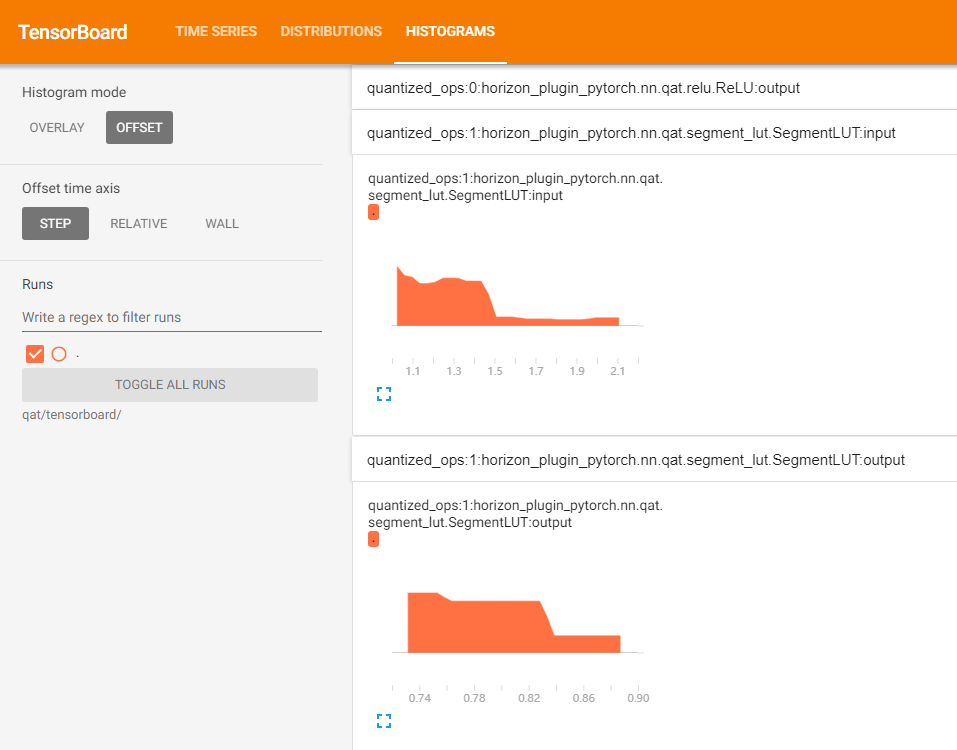
在 tensorboard 中显示每一层输入输出直方图。
参数
-
out_dir:tensorboard 相关文件保目录。默认保存到 self.out_dir/tensorboard 目录下。
-
prefixes:需要统计的模型中 op 的 prefixes。默认统计所有。
-
types:需要统计的模型中 op 的 type。默认统计所有。
-
force_per_channel:是否以 per_channel 量化的方式展示直方图。
输出
tensorboard 文件,打开后截图如下:
HbirModelProfiler 类
该类的功能和使用方式与 ModelProfiler 类完全一致。请参考 ModelProfiler 类 进行使用。
注意
由于 hbir 模型的特殊格式,qat hbir 模型在 forward 时需添加索引 0。
with HbirModelProfiler(qat_hbir, "./hbir_dir") as p:
    qat_hbir[0](data)

p.get_info_manager().table()
p.get_info_manager().tensorboard()

