

Build Floating-point Model
Quantization Principle
The core idea of model quantization is to use low-precision numerical values (e.g., INT8) to represent and compute the model parameters and activation values that were originally trained with high-precision numerical values (e.g., FP32).
The basic steps for quantizing a tensor are as follows:
- Calculate the numerical range of the tensor to determine the corresponding scaling factor (scale).
- Scale the tensor using the scaling factor to map the scaled numerical range to the interval representable by the low-precision dtype, and then cast the tensor to the low-precision dtype. Taking int8 quantization as an example, the calculation process is as follows: .
Static Quantization vs. Dynamic Quantization
Static quantization requires calculating the distribution of activation values across the model on a dataset, and computing a fixed scaling factor for each activation (this process is called "calibration"); dynamic quantization does not require a calibration process. Instead, it calculates the numerical range of the current tensor in real time during model inference, computes the scaling factor on the fly, and completes the conversion to low precision.
The current toolchain only supports static quantization, and for this reason, the tool needs to insert statistical nodes into the model. See Prepare for details.
Quantized Awareness Training
To compensate for the accuracy loss caused by model quantization, we can simulate low-precision computation during the model forward pass, and fine-tune the model under this condition to improve its accuracy metrics in low-precision computation. This process is called quantized awareness training.
The process of simulating low-precision computation is achieved by inserting fake quantization nodes into the model, as detailed in Prepare Description and Definition of FakeQuantize.
Range of Supported Operators
Due to the BPU's constraints on operators, we only support the operators listed in the Toolchain Operator Support Contraint List section as well as the special operators specially defined internally based on BPU limitations.
Building Floating-point Model
After obtaining the floating-point model, we need to make necessary modifications to the floating-point model to enable it to support quantization-related operations. The necessary operations for model modification include:
- Insert
QuantStubnodes before the model inputs andDequantStubnodes after the model outputs. - For loops with a variable number of iterations in the model forward logic (e.g., frame-by-frame computation in temporal models), mark them using the
horizon_plugin_pytorch.fx.jit_scheme.dynamic_blockinterface (the functionality of this interface is described in Prepare Description).
The following principles must be followed when inserting QuantStub and DequantStub:
- Only focus on the data that needs to be quantized (i.e., floating-point data); there is no need to insert stubs for other native fixed-point or boolean data.
- The computation between
QuantStubandDequantStubis the scope of quantization performed by the tool. Generally, auxiliary heads and loss functions of the model do not need to be deployed, so they do not require quantization. Ensure that these logics are not included in the quantization scope. - Special attention should be paid to computations between fixed-point and floating-point data in the model. In such cases, PyTorch will automatically cast the computation process and output to floating-point. However, for the quantization tool, this is also the "boundary between quantization and non-quantization". You need to manually cast the fixed-point input to floating-point, insert a
QuantStub, and then perform the computation with another floating-point number. Similarly, the quantized floating-point value must pass through aDequantStubbefore being cast to fixed-point.
Attention is needed when remodeling the model:
- The inserted
QuantStubandDequantStubnodes must be registered as submodules of the model, otherwise their quantized state will not be handled correctly. - Multiple inputs can share
QuantStubonly if their numerical distributions are the same, otherwise define a separateQuantStubfor each input. - If you need to specify the source of the data entered during board up as
"pyramid", please manually set thescaleparameter of the correspondingQuantStubto1/128. - It is also possible to use
torch.quantization.QuantStub, but onlyhorizon_plugin_pytorch.quantization.QuantStubsupports manually fixing the scale with the parameter.
Here is a simple multi-input and multi-output example. Note that each QuantStub is responsible for quantizing one input Tensor.
The modified model can seamlessly load the parameters of the pre-modified model, so if there is an existing trained floating-point model, it can be loaded directly, otherwise you need to do floating-point training normally.
After completing modifications, do not start calibration and quantization-aware training immediately. Firstly, make sure to go through the entire deployment pipeline and verify whether the model contains CPU operators.
The input image data is typically in centered_yuv444 format when the model is on board, so the image needs to be converted to centered_yuv444 format when the model is trained (note the use of rgb2centered_yuv in the code below).
If it is not possible to convert to centered_yuv444 format for model training, please insert the appropriate color space conversion node on the input when the model is deployed. (Note that this method may result in lower model accuracy)
The example in this section has fewer floating-point and QAT training epochs, just to illustrate the process of using the training tool, and the accuracy does not represent the best level of the model.
Build Quantization Friendly Model
The process of changing a floating-point model into a fixed-point model has a certain accuracy error. The more quantization-friendly the floating-point model is, the easier its quantized awareness training become, and the higher the accuracy after quantization. In general, there are several situations that can cause a model to become quantization-unfriendly:
-
Use operators with accuracy risk. For example: softmax, layernorm, etc, these operators are usually realized by table lookup or by multiple op splicing at the bottom, and are prone to dropout problems.
-
Call the same operator multiple times in a forward. If the same operator is called multiple times, the corresponding output distribution is different, but only a set of quantization parameters will be counted, when the output distribution of multiple calls is too different, the quantization error will become larger.
-
There are too many differences in the inputs of add, cat and other multi-input operators, which may cause large errors.
-
The data distribution is not reasonable. plugin adopts uniform symmetric quantization, so the uniform distribution of 0 mean is the best, and long tail and outliers should be avoided as much as possible. At the same time, the value range needs to match the quantization bit, if you use int8 to quantize the data distributed uniformly as [-1000, 1000], then the accuracy is obviously not enough. For example, the following three distributions, from left to right, the friendliness of quantization decreases, the distribution of most of the values in the model should be the middle of this distribution. In practice, you can use the debug tool to see if the distributions of the model weight and feature map are quantization-friendly. Because of the redundancy of the model, some ops that seem to have very quantization-unfriendly distributions will not significantly reduce the final accuracy of the model, and need to be considered in conjunction with the actual difficulty of qat training and the final quantization accuracy achieved.
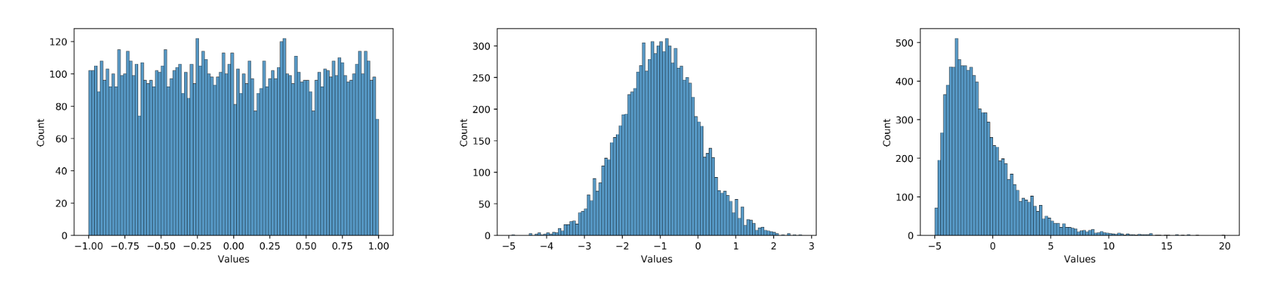
So how can we make the model more quantization-friendly? Specifically:
-
Minimize the use of nonlinear operators with unrestricted value ranges, such as reciprocal, exp, and pow. The output range of such operators may be too large, resulting in low quantization accuracy.
-
Ensure that the output distribution of multiple calls to the shared operator does not vary too much, or split the shared operator to use separately.
-
Avoid large differences in the range of values of different inputs of the multi-input operator.
-
Use int16 to quantize ops with very large value ranges and errors. You can find such ops with the debug tool.
-
Prevent the model from overfitting by increasing the weight decay and adding data augmentation. Overfitting models are prone to large values and are very sensitive to inputs, so a small error can cause the output to be completely wrong.
-
Use BN.
-
Normalize the model inputs with respect to zero symmetry.
Note that qat itself has some adjustment ability, quantization unfriendly doesn't mean it can't be quantized, in many cases, even if the above unsuitable quantization phenomenon occurs, it can still be quantized well. Since the above suggestions may also lead to a degradation of the floating-point model accuracy, they should be attempted when the qat accuracy is not achievable, especially suggestions 1 - 5, and in the end you should find a balance between the floating-point model accuracy and the quantized model accuracy.