

Model Calibration
In quantization, an important step is to determine the quantized parameters, a reasonable initial quantized parameter can significantly improve the accuracy of the model and speed up the convergence of the model.
After the model is transformed and the floating point training is completed, Calibration can be performed. Calibration is the process of inserting an Observer into the floating-point model, using a small amount of training data, and counting the distribution of the data at various points during the forward process of the model to determine a reasonable quantized parameter. Although it is possible to do quantized awareness training without Calibration, but in general it is beneficial and not detrimental to quantized awareness training, so it is recommended that you make this step a required option:
-
For part of the model, the accuracy can be achieved by Calibration only, without the need for the more time-consuming quantized awareness training.
-
Even if the model cannot meet the accuracy requirements after quantization calibration, this process can reduce the difficulty of subsequent quantization awareness training, shorten the training time, and improve the final training accuracy.
Process and Example
The overall flow of Calibration and QAT is shown below:
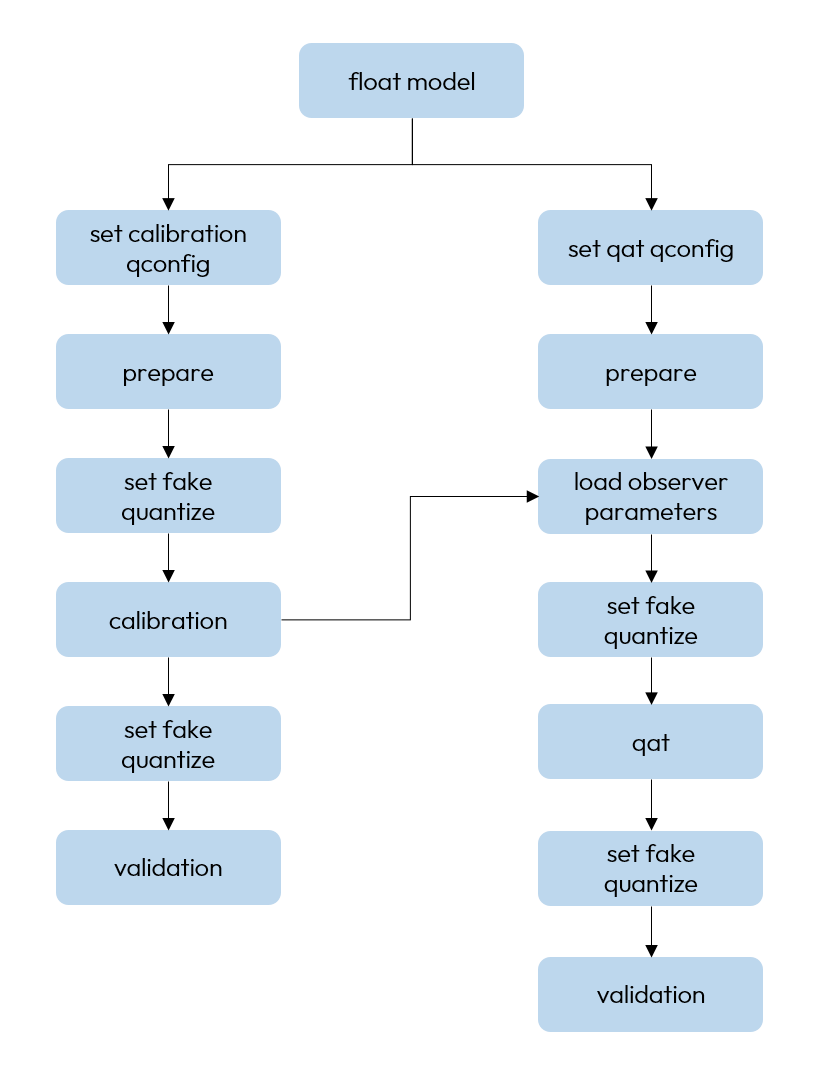
If the quantization accuracy of the model after Calibration meets the requirements, the Convert to Fixed-Point Model step can be carried out directly, otherwise the Quantized Awareness Training needs to be carried out to further improve the accuracy.
Following is a description of each step:
-
Build and train the floating-point model. Refer to the section Building Floating-point Model for detail.
-
Insert the Observer node into the floating-point model. Before converting the floating-point model using the
preparemethod, you need to setqconfigfor the model, you can refer to the section Build QConfig. -
Set
fake quantizestate toCALIBRATION.There are three states of
fake quantize, which need to be set to the corresponding state offake quantizeof the model beforeQAT,calibration, andvalidation, respectively.-
In the calibration state, only the statistics of the inputs and outputs of each operator are observed.
-
In the QAT state, the statistics of inputs and outputs of each operator are observed, and pseudo-quantizationpseudo-quantization is performed in addition.
-
In the validation state, no statistics are observed and only pseudo-quantization is performed.
-
After setting the model state to FakeQuantState.CALIBRATION, do not use model.eval() again. Otherwise, calibration will not work correctly!
-
Perform calibration. Feed the prepared calibration data to the model, and the model will be observed by the observer during the forward process to observe the relevant statistics.
-
Set the model state to eval and set the
fake quantizestate toVALIDATION. -
Verify the effect of
calibration. If you are satisfied with the result, you can directly convert the model to fixed-point or perform quantized awareness training based on it, if not, proceed with the precision tuning process (please refer to Quantization Accuracy Tuning Guide).
Common Algorithms Introduction
We recommend using HistogramObserver during calibration. This observer calculates the overall distribution of each feature across the entire calibration dataset and automatically searches for the globally optimal scale.
The currently supported search methods are:
After completing model calibration using the default search method, if the accuracy fails to meet expectations, you can use the HistogramObserver.reset_scale interface to recalculate the scale via other methods. This process does not require re-calibration (Note: The scale is stored in the state_dict, so you need to re-save the state_dict after updating the scale).
Compared with HistogramObserver, other observers generally adopt the method of frame-by-frame calculation plus moving average, which are inferior in terms of expected accuracy and result stability.
Tuning Technique
-
When calibration is performed, the more data the better. However, because of the marginal effect, when the amount of data reaches a certain level, the improvement of accuracy will be very limited. If your training set is small, you can use all of it for calibration. If your training set is large, you can select a subset of the right size in combination with the calibration time consumed, and it is recommended to calibrate at least 10 - 100 steps. The selected calibration data should cover typical input distribution as much as possible and include all relevant scenarios. Otherwise, the calibration may be biased. For example, if the application scenarios include daytime/nighttime, urban/highway, etc., the calibration dataset should include all of these cases.
-
When performing image augmentation, horizontal flip augmentation can be used, while mosaic-style augmentation should be avoided. Additionally, it is advisable to use preprocessing from the inference phase combined with training data for calibration.