

Overview
In the Toolchain Overview section, we introduced the basic concepts of PTQ and QAT to help you build an initial understanding of these two quantization methods. Next, we will further walk you through the practical usage flow so that you can understand how model quantization and compilation are used in real projects.
If this is your first time using the toolchain, we recommend that you choose the entry based on the type of model you currently have:
-
If you already have an
ONNXmodel, we recommend that you start with theONNX Model Quantizationsection. -
If you already have a
PyTorchmodel and training code, we recommend that you start with thePyTorch Model Quantizationsection.
ONNX Model Quantization
The overall ONNX model quantization pipeline is shown below:
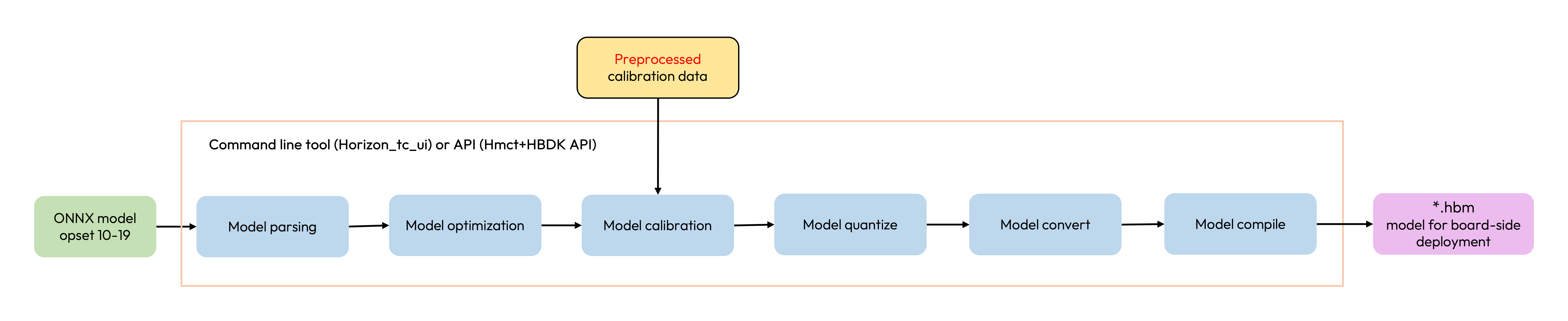
This pipeline is based on the horizon_tc_ui command-line tool or the HMCT + HBDK API, and completes graph optimization, calibration, quantization, and compilation in one streamlined flow.
It is suitable for scenarios where the model has already been exported and you want to quickly complete structure verification, quantization and compilation, performance evaluation, and accuracy evaluation. It is also a good default entry for first-time users or models with relatively simple structures.
We recommend that you first read ONNX Model Quick Start and ONNX Model Quantization Overview for a basic understanding.
PyTorch Model Quantization
The overall PyTorch model quantization pipeline is shown below:

This pipeline is built on the open-source PyTorch framework. It provides quantization capability through the plugin and uses the HBDK compiler API to complete model fixed-point conversion and compilation. This pipeline also supports further finetuning after calibration. Although the entry cost and training cost are relatively higher, it also offers a higher upper bound on accuracy, making it more suitable for iterative optimization around model structure, quantization configuration, and training strategy.
We recommend that you first read PyTorch Model Quick Start, QAT Conversion Introduction, and PyTorch Model Quantization Basic Process for a basic understanding.
Basic Differences Between the Two Pipelines
Recommended Usage
We recommend that you first read the Platform Differences section to understand the differences across platforms in quantization strategy, output precision, input/output handling, and deployment capability.
For model quantization and deployment verification on different platforms, taking the original PyTorch framework model as an example, the overall recommended flow is shown below:
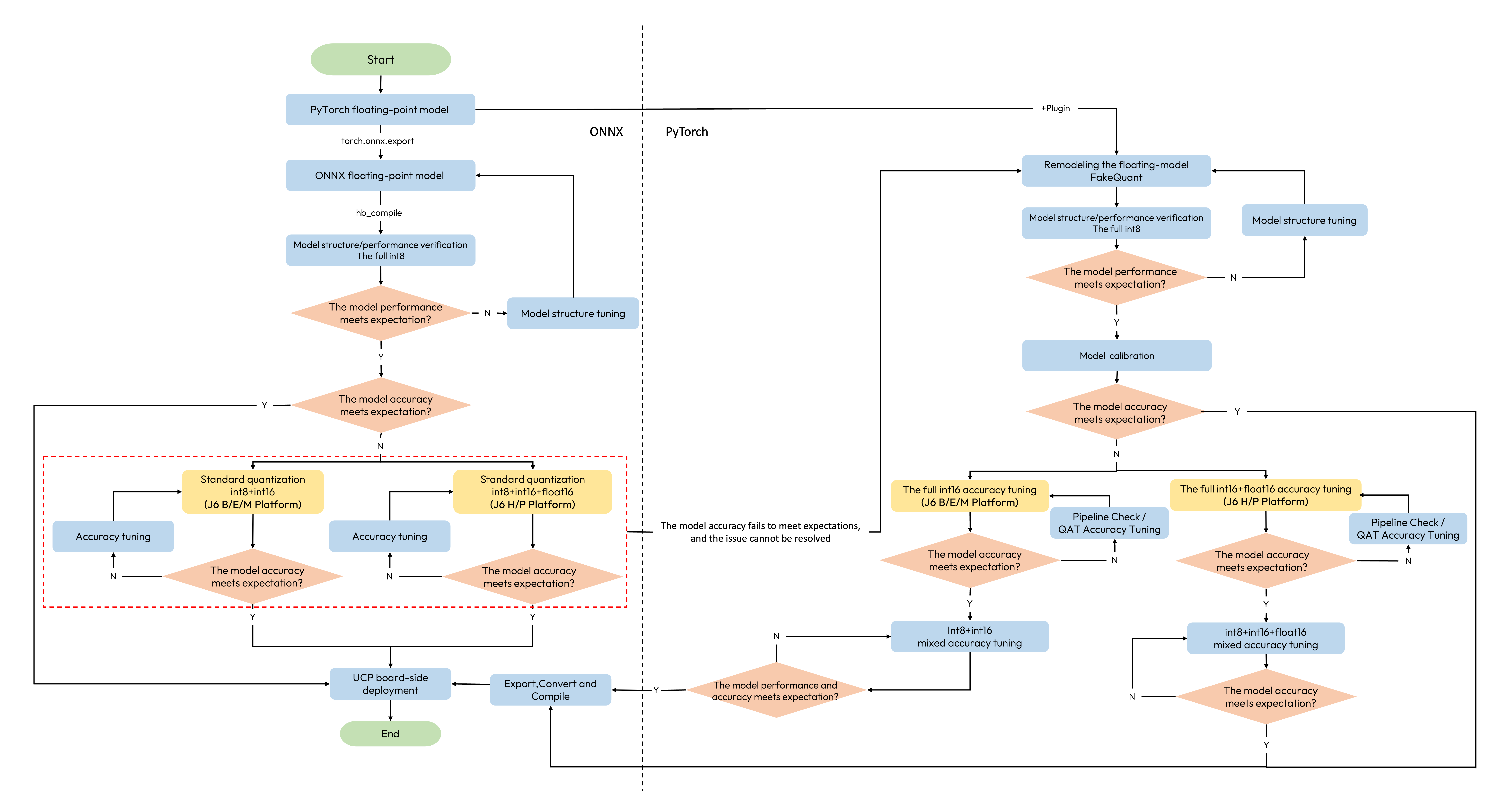
You may choose your path according to the following suggestions:
-
If your current goal is to complete model structure verification, quick performance validation, or deployment feasibility validation, we recommend that you choose the lighter path first.
-
If accuracy is still not sufficient after quick validation, you can then continue with accuracy tuning or the
QATpath for further optimization. -
No matter which path you choose, you should always return to deployment-side result verification in the end, including
quantized.bc / hbmaccuracy, performance, and consistency checks.
Choose the lighter path for quick validation
If your goal is to first confirm that the model can be quantized, compiled, and basically verified, we recommend that you choose the lighter path first:
-
For an
ONNXmodel, start with theONNX Model Quantizationpipeline. -
For a
PyTorchmodel, start by completing one minimalCalibrationloop.
Move to QAT for formal accuracy iteration
If accuracy is still not sufficient after quick validation, you can then move to a more complete optimization path:
-
For the
ONNXworkflow, continue following the Model Accuracy Tuning to perform accuracy tuning. -
For the
PyTorchworkflow, continue withQATtraining based onCalibration, and further locate issues by combining the QAT Accuracy Tuning Tool, the Precision Tuning Guide, and the Deployment Consistency Analysis .
In the following sections, we will further introduce ONNX model quantization, PyTorch model quantization, model modification scenarios that may be involved in model conversion and compilation, as well as further operations in the X86 simulation environment.