

PyTorch Model Accuracy Tuning Tool
Due to the error in the floating point to fixed point process, you will inevitably encounter the problem of quantization model accuracy dropout when using quantization training tools. Typically, there are several reasons for this:
-
The original floating-point model is not favorable for quantization, such as the existence of shared ops or shared structures.
-
The QAT network structure or configuration is abnormal, such as there is a pattern without fuse in the model, and the output is not set with high accuracy.
-
Some operators are sensitive to quantization, and the quantization error of the operator accumulates layer by layer in the forward propagation process, which ultimately leads to a large error in the model output.
For the above cases, we provides the accuracy tuning tool to help you quickly locate and solve the accuracy problems, which mainly includes the following:
-
Model Structure Checking: check if there are shared ops, patterns without fuse, or quantization configurations in the model that do not meet expectations.
-
Use the QuantAnalysis Class to compare and analyze the two models automatically: by comparing, locate the abnormal operators or quantization-sensitive ops in the quantized model.
-
Use the ModelProfiler Class and the HbirModelProfiler Class to get information about the numerical characteristics of each op in the model: the obtained information includes the maximum and minimum values of inputs and outputs, etc. The functionality of these two classes is identical, the difference is that HbirModelProfiler accepts as input only the qat hbir model. Usually you don't need to call this module manually, you can get the numerical information of both models directly from QuantAnalysis.run.
Quickstart
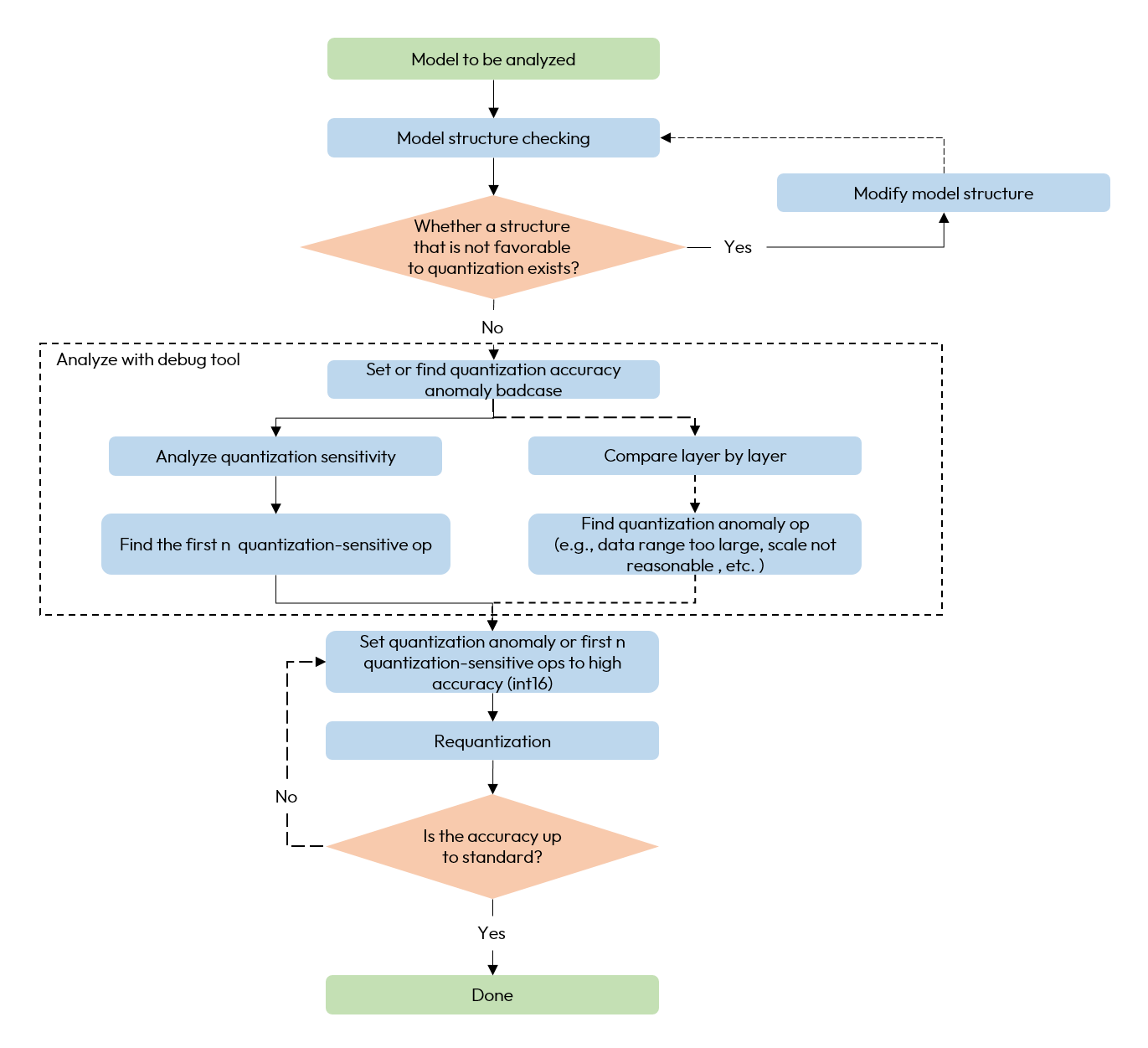
When encountering quantization model accuracy dropout problems, we recommend using the accuracy tuning tool according to the following process.
-
Check if there are any unfavorable structures or abnormal configurations in the model.
-
Use QuantAnalysis module to analyze the model as follows:
1). Find the input (i.e., the bad case) that exhibits the maximum discrepancy between the outputs of a baseline model and the model under analysis, and use this input as the input for the model.
2). Perform quantization sensitivity analysis, the current experience is that the first n L1 sensitivities are usually the quantitative sensitivity ops (the value of n varies from model to model, so there is no automatic method to determine it, so we need to try it manually, e.g., the first 10, 20...). Set the quantization sensitive op to high accuracy quantization (e.g., int16 quantization), and redo the quantization process.
3). Or compare the inputs and outputs of the two models layer by layer to check whether there is an abnormal quantization op such as the data range is too large or the scale is unreasonable, e.g., certain ops with physical meanings should be set to a fixed scale.
-
When you encounter deployment consistency issues, QuantAnalysis also supports the analysis of hbir models. You can refer to Deployment Consistency Analysis section for interface usage and analysis procedures.
The overall flow chart is as follows:
A whole example is as follows:
Recommended Workflow Based on a Loss Metric
The quickstart above uses the default Metric.ATOL, which measures the absolute error on a single tensor. For multi-output networks, there is usually no direct correspondence between "the ATOL of a certain head output is large" and "the task accuracy drops".
Therefore, we recommend that you first register a custom loss metric that is consistent with your final task objective, and debug around this loss. In this way you can locate problems directly around the task objective, instead of only looking at the local error on a certain output.
Two Common Ways to Write a Loss Metric
1. Compute the loss directly with the real GT
Let the model output carry the real GT as well, then extract the GT from output1 inside the metric, and compute the loss against the corresponding quantized prediction in output2.
2. Build a pseudo GT from the floating-point model output first, then compute the loss
Build a pseudo GT from the floating-point prediction in output1, then compute the loss against the quantized prediction in output2.
How to choose:
-
If you have a reliable GT and care more about task accuracy (accuracy tuning), use the "real GT loss".
-
If you do not have a GT, or your current goal is to locate the error introduced by quantization (consistency analysis or accuracy tuning), use the "loss with a pseudo GT built from the floating-point output".
Recommended Workflow
-
Register a custom loss metric consistent with the task objective through
Metric.register. -
Initialize
QuantAnalysisand add this loss metric tometric_list. -
Search for badcases automatically with
auto_find_bad_case(..., topk=k).kcan be set larger according to your computing resources. -
Call
run(metric=loss_metric)to collect layer-by-layer information of the badcase with the worst loss. -
Call
compare_per_layerto check the layer-by-layer error. -
Call
sensitivity(metric=loss_metric, use_sensitivity_v2=True)to further locate the sensitive ops with the largest impact on the final loss. -
If you want to further verify the gain of promoting the accuracy on a certain case, you can call
tune_bad_caseto verify the accuracy gain after the sensitivity v2 analysis is finished.
When using a metric with scope="all", the model output is computed as a whole, and the output name is fixed to all. Therefore "all" is used directly as the key in the outputs_config of tune_bad_case, and the outputs are named output_all_case_{index}_sensitive_ops.* accordingly.
If there is no suitable custom loss for your current task yet, you can also start the analysis with the default Metric.ATOL. But for multi-output networks, it is still recommended to register a loss metric consistent with the final task first.
Multi-machine Multi-GPU
QuantAnalysis tool now supports multiple machines and multiple GPUs. If you already have a training environment built with torch.nn.parallel.DistributedDataParallel, you can simply replace the train function with the quant_analysis function in the example.
Launch command:
API Reference
Model Structure Checking
Check if there are structures in the calibration/qat model that are not favorable for quantization and if the quantization qconfig configuration is as expected.
Parameters
-
model: model to be checked.
-
example_inputs: model inputs.
-
save_results: whether to save the check results to a txt file. Default is False.
-
out_dir: save path of the result file 'model_check_result.txt'. Default is empty, save to .model_check_results/.
Output
-
screen output: abnormal layers that check out.
-
model_check_result.txt: generated when save_results = True. It consists of 5 main parts:
1). Unfused pattern.
2). The calling times of each module. Normally each op is called only 1 time, 0 means it is not called, more than 1 time means it is shared many times. If it is not called or shared multiple times, an exception prompt will be displayed.
3). The qconfig configuration for each op output.
4). The qconfig configuration for each op weight (if any).
5). Exception qconfig hints (if any).
The prepare interface has integrated this check. Please pay attention to the inspection results output by this interface and make targeted adjustments to the model based on the inspection results.
QuantAnalysis Class
QuantAnalysis class can automatically find the bad case with the largest output of two models, and use it as input to compare the output of two models layer by layer. In addition, QuantAnalysis class also provides the function of calculating the sensitivity, you can try to set the node with the topk sensitivity ranking with high accuracy, such as int16 quantization, to improve the accuracy of quanitized model.
Parameters
-
baseline_model: baseline model (high accuracy).
-
analysis_model: model to be analyzed ( accuracy dropping points).
-
analysis_model_type: model to be analyzed. Support input:
-
fake_quant: support two cases:
-
the model to be analyzed can be a calibration model with dropped accuracy, in which case the baseline model can be either the original floating-point model or a accuracy-compliant calibration model in a mixed int8/int16 configuration.
-
the model to be analyzed can be a fixed-point HBIR model with dropped accuracy, and the benchmark model is the corresponding pseudo-quantized HBIR model.
-
-
pre_export: the model to be analyzed is a pseudo-quantized model with lookup table (LUT) for fixed-point conversion, and the benchmark model is the corresponding original pseudo-quantized model.
-
export: the model to be analyzed is a pseudo-quantized HBIR model, and the benchmark model is the corresponding pseudo-quantized model with LUT for fixed-point conversion.
-
convert: the model to be analyzed is a fixed-point HBIR model, and the benchmark model is the corresponding pseudo-quantized model with LUT for fixed-point conversion.
-
-
device_ids: GPU device index for running the analysis. Single GPU only. For multi-machine/multi-GPU, refer to the Multi-machine Multi-GPU section.
-
post_process: post process function which performs on model output.
-
out_dir: specify the output directory for the comparison results. Default is
./horizon_quant_analysis. -
metric_list: the list of metrics involved in the comparison. Default is
[Metric.L1, Metric.COSINE, Metric.ATOL]. Available metrics are described in Metric Description.
-
Because QAT training changes the model weight distribution, we generally do not recommend comparing floating point or calibration models with qat models.
-
HBIR models do not support computing sensitivity. If you are comparing two HBIR models, do not invoke sensitivity interface.
Metric Description
The metrics used in metric_list, run, sensitivity and other interfaces all come from horizon_plugin_profiler.utils.entities.Metric. The currently built-in metrics are as follows:
If the built-in metrics cannot meet your needs, you can also register a custom metric through Metric.register. The registered metric can be used in all functionalities such as finding badcases and computing sensitivity.
Parameters
-
name: metric name, used for display and indexing. It must not duplicate an existing metric name. After registration it can be accessed through
Metric.{name}orMetric.get_metric(name). -
ascending: the sort direction of the metric.
Truemeans the larger the value, the better the accuracy (such as COSINE and SQNR),Falsemeans the larger the value, the worse the accuracy (such as L1 and ATOL). -
scope: defines whether the metric applies to a single tensor or to the whole model output structure.
-
"pertensor": computed separately for each tensor output. The tool expands the leaf tensors in the model output and records the outputs with names such as0,1andkey. -
"all": computes a single overall score for the whole model output structure. It is suitable for scenarios where the output structure is complex and you want to measure the overall error with a single total score, the most common one being a loss. In this case the output name is fixed toall.
-
output1 and output2 come from baseline_model and analysis_model respectively, but their granularity is determined by scope:
-
When
scope="all",output1/output2are the complete output structures of both sides. -
When
scope="pertensor", the tool first expands the outputs into tensor leaves and then calls the custom function one by one, sooutput1/output2are just a single tensor.
For multi-output networks, we recommend that you register a loss metric consistent with the final task objective and debug around it, instead of only looking at the local error on a certain output. See the Recommended Workflow Based on a Loss Metric section for the detailed reasons and the recommended workflow.
The methods in this class are as follows.
auto_find_bad_case
Automatically find the badcase that causes the worst output for the two models.
Parameters
-
data_generator: dataloader or a custom iterator that produces one piece of data per iteration.
-
num_steps: number of iteration steps.
-
cached_attrs: cached attrs to use as input. Usually used in sequence model. For instance, some results of the first frame must be treated as input when running the second frame, Default None.
-
dump_in_run: whether dump badcase during the running process. When True, badcases are written to disk while being searched, which is slower but has no OOM risk. When False, they are kept in memory first and dumped together at the end, which is faster but may consume more memory. It is forced to True in multi-machine multi-GPU environments, and defaults to False in single-machine single-GPU environments.
-
topk: how many badcases to keep for each output and each metric. Default is 1. It is recommended to set
topk > 1to keep multiple badcases and cross-validate them with the subsequentsensitivity(use_sensitivity_v2=True). For many models the problem is not concentrated on a single worst sample, and only looking at top-1 easily locks your view onto a certain local anomaly, which makes the conclusion of the subsequent sensitivity analysis unstable.
Function auto_find_bad_case goes through data_generator, runs baseline model and analysis model, computes each output results on the metrics specified by metric_list during initialization and finds the topk baddest input cases on each metric.
The metric, device, custom_metric_func and custom_metric_order_seq parameters in earlier versions are all deprecated. Passing these parameters does not raise an error, but they no longer take effect:
-
metric: badcases are no longer filtered by a single metric during the search stage. Instead, one set of results is kept for each metric inmetric_list. Which metric's badcase to use is now specified through themetricparameter ofrun/sensitivity. -
device: specify the GPU throughdevice_idsduring initialization ofQuantAnalysisinstead. -
custom_metric_func/custom_metric_order_seq: custom metrics are now registered throughMetric.registerand then passed inmetric_listduring initialization. See Metric Description for details.
Output
-
badcase_report.html: Display the badcase report as an HTML page, including:
-
A table showing the topk badcase index and corresponding metric value for each output under each metric.
-
Statistical information (average value, worst value) of all cases for each output under each metric.
-
Statistical information (average value, worst value) of the topk badcase for each output under each metric.
-
Distribution histogram and percentile information (e.g., 99%, 99.9%, 99.99%) of badcase error for each output under each metric.
-
-
all_badcase_info.pt: Saved BadCaseReport object, containing complete badcase information, which can be loaded via
torch.load. -
badcase directory: This directory contains the inputs of each index shown in badcase_report.html, such as
0.pt,16.pt, etc.
Return Value
A BadCaseReport object, which is also saved in self.badcase_report.
set_bad_case
Set the badcase manually.
Usually, we suggest that you find badcase by function auto_find_bad_case. If the manual set badcase is not the actual badcase, it is difficult for quant analysis tool to find quantization sensitive layers.
Parameters
-
data: badcase input.
-
baseline_model_cached_attr: baseline model cached attr.
-
analysis_model_cached_attr: analysis model cached attr.
load_bad_case
Load a saved badcase report.
Parameters
- path: default None, which loads
all_badcase_info.ptdirectly from theout_dirdirectory specified during initialization. You can also pass in a local directory, or an http/https link (such as an artifact path on a cluster). In that case the tool first copies/downloadsall_badcase_info.pt, thebadcasedirectory andbadcase_report.htmlunder that directory toout_dir, and then loads them fromout_dir. In multi-machine multi-GPU scenarios only rank 0 is responsible for the copy/download, and the other ranks wait at the barrier and then load from local.
This interface is commonly used to reuse the result of a badcase search that has already been run. For example, in convert consistency analysis, you can first find badcases with QuantAnalysis(qat_bc, quantized_bc, "convert"), and then run the sensitivity analysis on the same badcase with QuantAnalysis(qat_export_pt, quantized_bc, "convert") together with load_bad_case().
set_model_profiler_dir
Specify the path to save the output of model_profiler manually.
In some cases, the ModelProfiler is defined and run before QuantAnalysis is initialized, in which case you can directly specify the path to the existing ModelProfiler, skipping the run step of QuantAnalysis and comparing the output of the two models directly.
Parameters
-
baseline_model_profiler_path: profiler path for the baseline model.
-
analysis_model_profiler_path: profiler path for the model to be analyzed.
run
Run the two models and save the results for each layer in the model separately.
Parameters
-
device: deprecated. Specify the GPU through
device_idsduring initialization of QuantAnalysis. -
index: use which index input as example input. Once specified, the badcase corresponding to this index is used directly and no longer selected by metric. It cannot be specified together with
metric. -
run_baseline_model: whether run the baseline model. Default True.
-
run_analysis_model: whether run the analysis model. Default True.
-
metric: which metric's selected badcase is used as input. Default None, which is equivalent to
Metric.ATOL. -
run_on_cpu: whether to force the models to run on CPU. Default False. When
analysis_model_typeisexportorconvert, the tool automatically uses CPU, because hbir models align better with torch CPU results and may differ considerably from torch CUDA, so the per-op error obtained from CPU inference is more accurate. -
out_name: only select the badcase on the specified output. Default None, which selects the worst badcase among all outputs. It only takes effect when
indexis not specified.
Only index found by auto_find_bad_case and shown in badcase_report.html is allowed to be the index parameter.
Analyzing Statistical Information
After the run() interface of QuantAnalysis is called, both of baseline_model and analysis_model will perform inference on the badcase, and the input / output of all layers will be saved in the op_infos folder of output path. By loading the opinfo file using torch.load, you can access the input and output of an operator. Then, with matplotlib, you can visualize the corresponding value distribution.
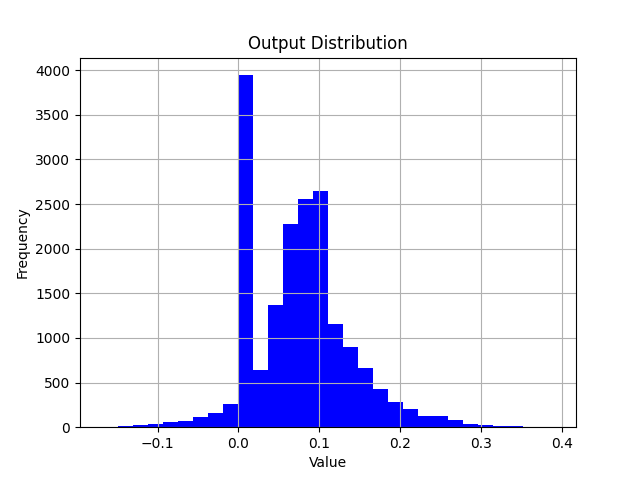
When analyzing the error of a single operator, you can build a model which only contains one operator. Feed the inputs from opinfo into the model and compare the difference between the model output and the opinfo output by visualizing with scatter plots or histograms.
compare_per_layer
Compare the results of each layer in the two models.
Parameters
-
prefixes: the prefix of ops.
-
types: the types of ops.
Usually you do not need to specify the prefixes and types parameters. If you want to skip the comparison of certain ops with less quantitative impact based on some prior experience, or want to save time, you can use these two parameters to specify the comparison of certain ops or a certain type of ops.
Output
-
compare_per_layer_report_0.html: Display the layer-by-layer comparison results as an HTML page, including trend charts of metric values for each layer and detailed data tables. -
compare_per_layer_out_0.txt: show the specific information of each layer in the model in the form of a table, including various metrics, data ranges, quantized dtype, etc.. Each column from left to right represents:-
Index: op index.
-
mod_name: name of the op, if the op is of module type, the prefix name of the module in the model will be shown, if it is of function type, it will not be shown.
-
base_op_type: type of the op in the base model, may be module type or function name.
-
analy_op_type: type of the op in the model to be analyzed, could be module type or function name.
-
Shape: shape of the op.
-
dtype: data type output of the op.
-
qscale: quantized scale output of the op.
-
L1: L1 distance of the op output in the two models.
-
COSINE: cosine similarity of the op output in the two models.
-
ATOL: absolute error of the op output in the two models.
-
max_qscale_diff: the max N scale diff of the op output in the two models.
-
base_model_min: minimum value of the op output in the baseline model.
-
analy_model_min: minimum value of the op output in the model to be analyzed.
-
base_model_max: maximum value of the op output in the baseline model.
-
analy_model_max: maximum value of the op output in the model to be analyzed.
-
base_model_mean: average of the op output in the baseline model.
-
analy_model_mean: average of the op output in the model to be analyzed.
-
same_in_qatbc_qdiff: the quantization error (in scale units) of the op at the same position in the qat bc model. Only available in export/convert mode.
-
same_in_intbc_qdiff: the quantization error (in scale units) of the op at the same position in the fixed-point bc model. Only available in export/convert mode.
-
advice: diagnostic advice for the op, including data range too large, inf or NaN contained, output without high accuracy, clamp error, etc.
-
-
compare_per_layer_out_0.csv: show the specific information of each layer in csv format. The content is exactly the same as the txt file, and the csv file format is convenient for you to open and analyze by excel and other software.
sensitivity
Sensitivity ordering of individual nodes in the model. Applies to the float conversion to calibration accuracy dropout problem.
When doing accuracy tuning, it is recommended that you always enable use_sensitivity_v2=True. Compared with the default output, it additionally splits out the clip and round errors, and directly gives the gain of switching each node from int8 to int16. It also provides csv and HTML reports, which are more convenient for analysis. The output description below is also based on v2.
Parameters
-
metric: metric for similarity ordering, default is
Metric.ATOL. Available values are described in Metric Description. -
prefixes: the prefix of ops to run sensitivity. Default None, run all ops.
-
types: the types of ops to run sensitivity. Default None, run all ops. When both
prefixesandtypesare specified, only ops that satisfy both conditions participate in the computation. -
output_names: only run sensitivity of specified outputs. Note that you need to use the output names shown in
badcase_report.html. Default None, run sensitivity of all outputs. -
use_sensitivity_v2: whether to use the v2 sensitivity, which is recommended to be set to True. Once enabled, besides the single-node quantization sensitivity, the round / clip errors are additionally split out, and the sensitivity of the node under qint8 and qint16 as well as the difference between them are given, so that you can directly judge how much gain promoting this node to int16 can bring. It only supports
analysis_model_type="fake_quant", so it cannot be used in consistency analysis scenarios. -
sensitivity_method: the sensitivity computation method. It is only available when
use_sensitivity_v2=Trueandanalysis_model_type="fake_quant".-
"ablation": the default method, which changes the state of the fake stubs one by one and runs one forward each time to observe the output error. It is slower, but generally does not run out of GPU memory. -
"grad_x_error": estimates the sensitivity withgradient x error, which only requires one forward plus one backward and is very fast, but has a higher requirement on GPU memory. This method requires thescopeofmetricto be"all", and the metric must return a scalar tensor that can be backpropagated. If a custom metric returns a non-tensor, a non-scalar tensor or a non-differentiable tensor, an error is raised at runtime.
-
The principle of grad_x_error is to cut the network at a certain stub, where quantization introduces an error , then perform a first-order Taylor expansion of the composite function of the downstream network and the loss at the current working point, and approximate the impact of this stub on the final loss with .
Note that when using grad_x_error, the metric column in the result table is named GRAD_X_ERROR (accompanied by GRAD_MAGNITUDE and ERROR_MAGNITUDE) instead of the name of the metric you passed in.
The device and reserve parameters in earlier versions are deprecated. Passing these two parameters does not raise an error, but they no longer take effect. For device, specify the GPU through device_ids during initialization of QuantAnalysis instead. If you need to check the insensitive ops (which can be tried as int8 to improve performance), read the result table from the end backwards.
Output
The result files are generated separately for each output and each badcase, named output_{out_name}_case_{index}_sensitive_ops.txt / .csv / .pt, where out_name is the output name and index is the index of this badcase in data_generator.
out_name is derived automatically from the model output structure: it is an empty string when the model returns a single tensor (the file name looks like output__case_...); it is 0, 1 when a list/tuple is returned; it is the corresponding key when a dict or namedtuple is returned, and nested structures are joined with -, such as 0-1. If a metric with scope="all" is used, the output name is fixed to all. You can check the actual output names of the current model through list(qa.badcase_report.output_to_badcase_info.keys()). These names are the ones to be used in output_names and tune_bad_case.
Besides the result of each individual badcase, two summary tables and one HTML report are also generated:
-
output_{out_name}_case_mean_sensitive_ops.*andoutput_{out_name}_case_worst_sensitive_ops.*: whentopk > 1, these are the summary tables obtained by taking the mean value and the worst value over the multiple badcase results of that output. Compared with the result of a single badcase, the summary tables are usually more stable and are more suitable as the basis for configuring mixed precision. -
sensitivity_v2_report.html: Display the sensitivity results as an HTML page, including the ranked bar charts of each metric and detailed data tables. The page also contains the mean and worst sensitivity tables, and the columns can be sorted interactively. Through the trend after sorting, you can decide from which op in the ranking to start setting qint8 to qint16.
It is recommended to check the csv first, so that you can analyze the accuracy problem by combining the sensitivity of different cases, the mean sensitivity and the worst sensitivity together.
The ops in the file are organized in order of quantization sensitivity from highest to lowest. The main columns mean:
-
op_name: op name.
-
op_type: op type.
-
fake_stub_type: Type of calculating quantization sensitivities, including:
-
output: quantization sensitivity to quantize only the output of this op.
-
weight: quantization sensitivity of the weight of the op only.
-
input-{n}:quantization sensitivity of the nst input of the op only.
-
-
metric columns: expanded into multiple columns in the form of
{quantization method}_{metric}, wheremetricis the name of the metric you passed in, such asqint8_ATOL,qint16_ATOL,qint8-qint16_ATOL,round_ATOL,clip_ATOLandfp16_ATOL. The value range and sort direction of each metric are described in Metric Description. Among them:-
round / clip: the sensitivity when only the rounding error or only the clipping error is kept, respectively, used to judge which kind of error the node error mainly comes from.
-
qint8 / qint16 / fp16: the sensitivity of the node under the corresponding dtype.
-
qint8-qint16: the difference between the two. The larger the value, the larger the gain of promoting this node from int8 to int16. The results are sorted by this column by default.
-
-
dtype: the quant dtype of this op output. Usually qint8/qint16/torch.float16.
-
flops: the flops of this op and its proportion in the whole model.
Compatibility Note for Earlier Versions
If use_sensitivity_v2 is not enabled, the tool outputs the sensitivity results in the legacy format: the file name is output_{out_name}_case_{index}_{metric}_sensitive_ops.txt (with the metric in the name, and no csv is generated), the table contains only one metric column, the fake_stub_type column is named sensitive_type, and the dtype column is named quant_dtype. The legacy results do not contain the round / clip split or the qint8-qint16 gain column, and cannot be used by tune_bad_case.
Consistency analysis (analysis_model_type being pre_export / export / convert) can currently only use the legacy sensitivity.
Return Value
A dict whose key is the output name and whose value is a list of SensitivityTable objects, one table per badcase. SensitivityTable can be re-sorted through sort_by_column.
An example of the result table is as follows (some metric columns are omitted):
You can configure the top n ops in the qint8-qint16 column as int16 to try to improve the quantized model accuracy.
If use_sensitivity_v2 is not enabled, each value in the return value is a sensitivity List, in which each element is a sub-list recording an op's sensitivity information, in the format [op_name, sensitive_type, op_type, metric, dtype, flops].
tune_bad_case
Based on the sensitivity v2 results, simulate promoting qint8 to qint16 in sensitivity order on the current badcase, and observe the improvement of the cumulative error. It solves the problem that "after getting the sensitivity table, you still have to build an experiment yourself to see the real gain".
The specific procedure is: read the SensitivityTable saved in output_{out_name}_case_{case}_sensitive_ops.pt, sort it by qint8-qint16_{metric}, and then try to temporarily change the candidate qint8 to qint16 one by one:
-
If this promotion improves the metric of the final output, the qint16 configuration is kept and the cumulative gain is recorded;
-
If there is no gain, the original qint8 dtype and the original scale are restored;
-
The search stops after
thresholdormax_tuned_stubsis reached.
-
This interface only supports
analysis_model_type="fake_quant". -
sensitivity(use_sensitivity_v2=True)must be executed before calling it, since this interface depends onoutput_{out_name}_case_{index}_sensitive_ops.ptgenerated by v2. If the legacy sensitivity is used, aFileNotFoundErroris raised because the file cannot be found. -
In multi-machine multi-GPU scenarios only rank 0 performs the actual search.
Parameters
-
outputs_config: the search parameters configured per output, whose key is the output name. It is the empty string
""for a single-output model, usually"0"and"1"for a multi-output model, and"all"when a metric withscope="all"is used. The configuration of each output contains:-
metric: the metric that measures the badcase.
-
threshold: the search stops after the metric reaches this threshold.
-
max_tuned_stubs: at most how many nodes are adjusted.
-
-
skip_prefix: skip the ops with the specified prefixes, whose key is the op name prefix and whose value is the list of
fake_stub_typeto be skipped, such as{"backbone": ["output", "weight"]}.
Output
output_{out_name}_tuned_case_{index}_sensitive_ops.txt/.csv/.pt: atuned_cumulative_{metric}column is added on top of the sensitivity table, recording the metric change of the model output after each adjustment. The rows with a value are exactly the nodes that do bring an improvement after being promoted to int16.
clean
Clears intermediate results. Only files such as comparison results are retained.
ModelProfiler Class
Statistic about the inputs and outputs of each layer of operators in the forward process of the model.
Parameters
-
model: model that requires statistics.
-
out_dir: path where the associated file is saved.
This class only supports use by means of a with statement.
The methods in this class are as follows.
get_info_manager
Get the structure that manages the information for each op.
Return Value
The structure OpRunningInfoManager manages the information stored for each op. Two of the important interfaces are as follows.
table
Show individual model statistics in a table. Store to the statistic.txt file.
Parameters
-
out_dir: storage path of statistic.txt file, default None, store to self.out_dir.
-
prefixes: prefixes of ops in the model to be counted. Default is all ops.
-
types: types of the ops in the model to be counted, defaults to all ops.
-
with_stack: if or not show the position of each op in the code.
Output
statistic.txt file, each column from left to right reads.
-
Index: op index.
-
Op Name: op type, module class name or function name.
-
Mod Name: if it is module class, the prefix name of the module in the model; if it is function type, the prefix name of the module where the function is located.
-
Attr: input/output/weight/bias.
-
Dtype: data type of the tensor.
-
Scale: scale of the tensor.
-
Min: minimum value of the current tensor.
-
Max: maximum value of the current tensor.
-
Mean: average value of the current tensor.
-
Var: variance of the values in the current tensor.
-
Shape: tensor shape.
tensorboard
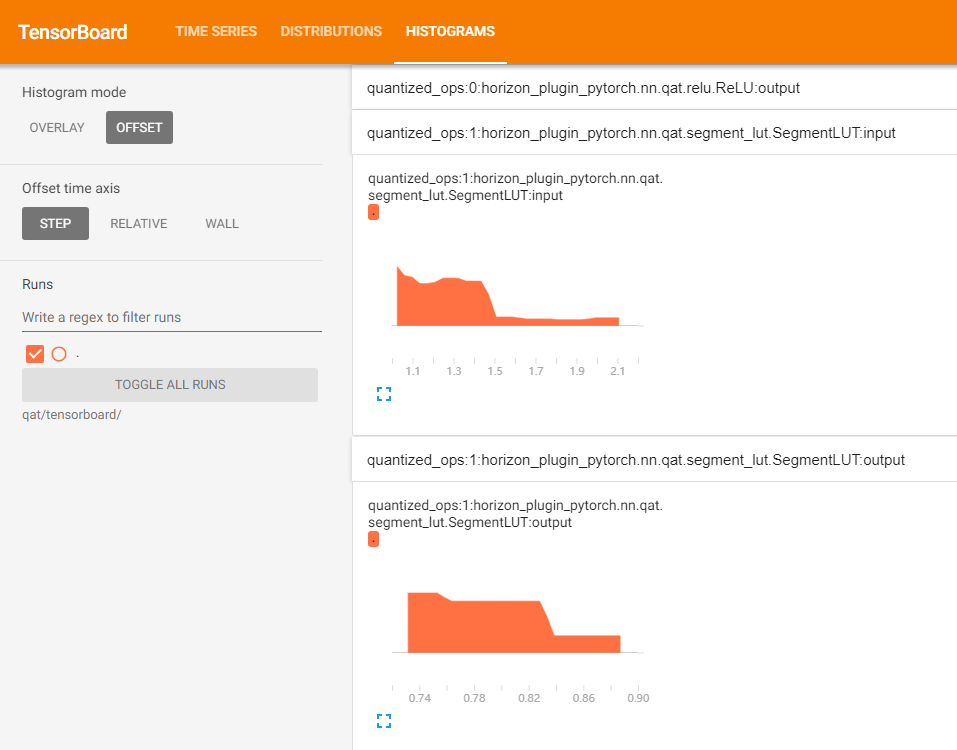
Show the input and output histograms for each layer in the tensorboard.
Parameters
-
out_dir: directory where tensorboard related files are kept. Default is self.out_dir/tensorboard.
-
prefixes: prefixes of the ops in the model to be counted, default is all.
-
types: types of the ops in the model to be counted, default is all.
-
force_per_channel: if or not to display the histogram in per_channel quantization.
Output
The tensorboard file, opened with the following screenshot.
HbirModelProfiler Class
The functionality and usage of this class is identical to the ModelProfiler class. Please refer to ModelProfiler Class for usage.
Due to the special format of the hbir model, the qat hbir model needs to add index 0 at forward process.