

PyTorch Model Quantization Basic Process
In the previous sections Model Quantization and Compilation - Overview and Introduction to PyTorch Model Quantization, we have already provided an overall introduction to the PyTorch model quantization pipeline. Next, this chapter will further walk you through the practical usage flow, covering the complete main path of PyTorch model quantization, from floating-point model transformation, QConfig configuration, Prepare, and Calibration, to QAT, export, fixed-point conversion, compilation, and final verification.
If you would like to experience a minimal closed loop first, we recommend that you read PyTorch Model Quick Start first.
If you would like to further explore a basic deployment-side example, you may also refer to the sample plugin_basic we provide in the OE package under the samples/torch_qat path.
The overall PyTorch model quantization pipeline is shown below:
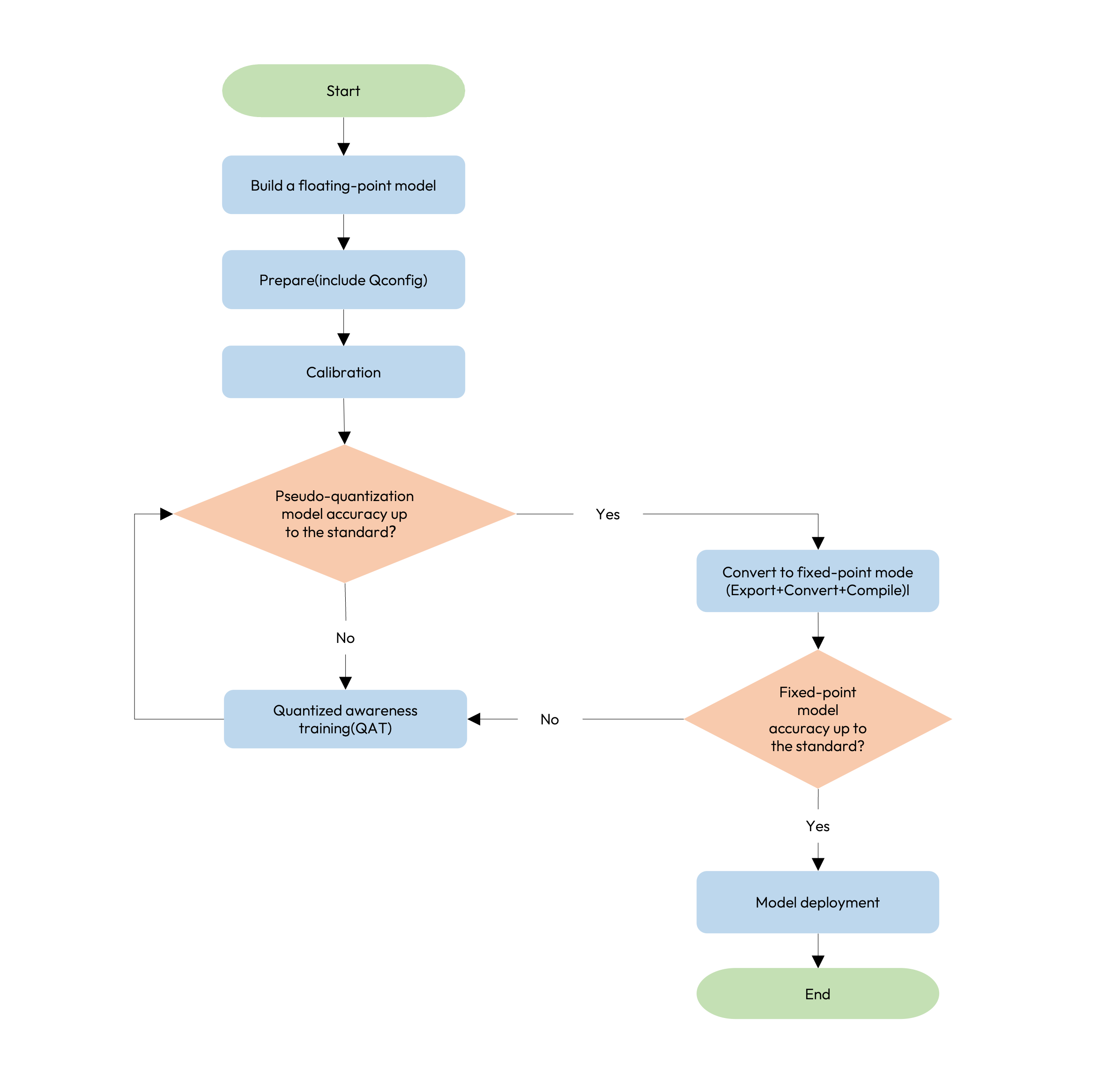
Stage Description
The detailed PyTorch model quantization pipeline includes several steps, including floating-point model transformation, Prepare(include QConfig configuration), Calibration, QAT training, Export / Convert, Compile and quantized.bc / hbm accuracy verification.
To help you quickly identify your current stage in practice, understand what should be checked at each stage, and know where to continue when problems arise, we have organized the following table for your reference.
| Stage | Input | Main Output / Artifact | Required | Key Checkpoint | Recommended Reference When Requirements Are Not Met |
|---|---|---|---|---|---|
| Floating-point Model Transformation | float model | Quantizable float model | Yes | Whether QuantStub / DeQuantStub are inserted properly, whether the preprocessing and postprocessing boundaries are clear, and whether the model is quantization-friendly | Refer to Build Quantization Friendly Model |
| Prepare | float model + platform strategy + example inputs | fake quantization model, as well as model_check_result.txt, fx_graph.txt, qconfig_dtypes.pt, qconfig_dtypes.pt.py, and qconfig_changelogs.txt | Yes | Whether the model check result, graph structure, and quantization configuration change records are as expected | Refer to Prepare Description, Build QConfig, and Debug Artifacts Guide |
| Calibration | calib model + calibration data | Model with quantization parameters | Yes | Whether the Calibration accuracy is acceptable, whether the gap from the floating-point baseline is reasonable, and whether the calibration data can represent the real input distribution | If the result is acceptable, you may proceed directly to export and compilation. If the result does not meet requirements, refer to Platform Differences and Precision Tuning Guide |
| QAT Training | calib model + training data | qat model / checkpoint | Conditionally Required | Whether the accuracy improves after QAT, and whether the training process is stable | Refer to Quantization Aware Training and Precision Tuning Guide |
| Export / Convert | calib model / qat model | qat.bc / quantized.bc | Yes | Whether the accuracy of quantized.bc meets expectations, and whether the export result is consistent with expectations | Refer to Fixed-point Model Conversion and Deployment Consistency Analysis |
| Compile | quantized.bc | hbm | Yes | Whether the performance, input / output format, and deployment constraints meet expectations | Refer to Model Compilation and Performance Evaluation and Board Evaluation |
| Final Verification | quantized.bc / hbm | Model ready for deployment | Yes | Whether the fixed-point model accuracy, board-side result, and deployment consistency meet requirements | Refer to Deployment Consistency Analysis, Debug Artifacts Guide, and Board Evaluation |
Usage Suggestions
Based on practical project experience, we recommend that you understand and use this pipeline in the following way.
-
If your current goal is to verify whether the model can be quantized, exported, compiled, and pass a basic accuracy check, we recommend that you first focus on the minimal closed loop of
Floating-point Model Transformation -> QConfig -> Prepare -> Calibration. -
If the
Calibrationresult already meets your requirements, you do not have to continue withQAT. Instead, you can directly read Fixed-point Model Conversion and Model Compilation and Performance Evaluation to continue with the follow-up process. -
If the
Calibrationresult does not meet your requirements, we recommend that you first combine Platform Differences, Precision Tuning Guide, and Debug Artifacts Guide to determine whether the main issue comes from quantization configuration, data distribution, model structure, or local operators, and then decide whether to proceed toQAT. -
If the accuracy is still abnormal after
QAT, we recommend that you first refer to the Precision Tuning Guide section for further optimization. -
If the results of
qat.bc / quantized.bc / hbmare inconsistent with expectations, we recommend that you first read Deployment Consistency Analysis for further troubleshooting. -
No matter which step you are at, when making the final decision on whether the model is ready for deployment, you should always use the accuracy, performance, and deployment results of
quantized.bc / hbmas the final criterion, rather than looking only atcalib modelorqat model.
In the following sections, we will provide detailed explanations of floating-point model transformation, QConfig configuration, Prepare, Calibration, QAT training, fixed-point model conversion, and model compilation and performance evaluation.