

ONNX Model Quantization FAQ
The following FAQs are organized along four directions: Prepare Model & Operator Support, Model Conversion, Model Performance, and Model Accuracy. When you already have a specific symptom (such as NaN, on-board accuracy drop, or quant_config not taking effect), use the table below to jump directly to the corresponding Q&A:
| Symptom | Possible cause | Where to check first | Detailed Q&A |
|---|---|---|---|
NaN appears in the Calibrated Cosine / Quantized Cosine column | The second input of a where operator in the model is -Inf, or calibration data propagates through concat / equal into an all-zero tensor, leading to an illegal calibration threshold | First check the node where NaN appears in hb_compile.log, then visualize the floating-point model to confirm the corresponding structure. Reproduce with multiple sets of calibration data | Cases where Calibrated Cosine shows NaN |
| An operator supported by BPU appears on CPU | The operator is at the head/tail of the model and is not hit by active or passive quantization, or the tail Conv high-accuracy output causes downstream operators to fall back to CPU | First check the ON column (CPU / BPU) of the operator in hb_compile.log. Combine with active / passive quantization rules to judge whether quant_config can force it onto BPU | Active and passive quantization, Why some BPU-supported operators at the tail run on CPU |
input_batch configuration does not take effect | The first dimension of input_shape is not 1, or the original ONNX model itself does not support multi-batch inference | First confirm whether the first dimension of input_shape is 1, and whether the original onnx itself supports multi-batch inference | How to compile a multi-batch model |
quant_config is set but does not take effect | Fallback triggered by the operator constraint, Resize / GridSample not explicitly falling back to int8, tail BPU-accelerable operators forced back to CPU, or active / passive quantization limitations | First check the actual Output Data Type of the operator in hb_compile.log. Combine with the platform experience template subsection in the quant_config Description section to confirm the correct syntax | quant_config configuration not taking effect |
| On-board performance below expectation | CPU operators are present, model segmentation causes heterogeneous scheduling overhead, or quantization / dequantization operators are not fused into pre/post-processing | First look at the .html / .json static evaluation files and the on-board hrt_model_exec measurements, then check the CPU operator distribution in hb_compile.log | On-board performance below expectation, Impact of model segmentation on performance |
On-board accuracy drops (noticeable gap between quantized.bc and hbm) | Differences in on-board input preparation, pre/post-processing, or stride alignment, cross-platform output type differences, or a node-removal scenario where quantized_removed_model.bc is not used for alignment | First reproduce the on-board output on the x86 side with hbm_infer, then follow the stage-by-stage investigation in ONNX Model Deployment Consistency Analysis section | quantized.bc is fine but hbm accuracy drops |
| The input order of a multi-input model changes | The input order of a multi-input model may be adjusted during conversion. This is normal | When performing accuracy consistency alignment, use hb_model_info to view the actual input order of hbm, then feed data in that order | Input order change of a multi-input model |
Prepare Model & Operator Support
How to prepare a floating-point model for Horizon support conversion?
The Horizon PTQ floating-point conversion toolchain supports both Caffe1.0 and ONNX (10 ≤ opset_version ≤ 19 and ir_version ≤ 9) model formats, and the ONNX export method is as follows:
How to verify the correctness of the original floating-point ONNX model?
The toolchain uses an interface based on the public ONNXRuntime wrapper to implement model parsing and forwarding when converting models. So we should check the legitimacy of the original floating-point ONNX model itself (i.e., whether it is capable of inference properly) and whether accuracy bias was introduced during the export of ONNX from the training framework before using the toolchain. Specific tests can be found in the The HBRuntime Inference Library section.
How to modify the input layout of the model?
On J6 platform, our tool no longer supports to modify the input layout format of the model during the conversion process, ONNX model layout will keep unchanged during the conversion process. If you need to modify the layout, you can directly modify the model before exporting onnx to finish the layout change.
If modifications are required at the model level, it is recommended that they be implemented in the following way:
-
Add transpose to the DL framework so that its input layout is NHWC and re-export the ONNX model.
-
Use the onnx library to modify the model directly, as referenced below:
Explanation on Support for int32 data types in Operator Constraints
Some operators listed in the current operator constraints indicate support for int32. However, it should be noted that int32 support is not enabled via the qtype configuration in quant_config. Below, we provide a detailed explanation of the different scenarios under which int32 are supported.
Case 1: Outputs of Certain Operators Can Be Quantized to High-Accuracy int32
Take Conv as an example. On J6E/M platform, when a Conv operator is the last quantized operator in the model (e.g., the final operator of the model), its output will be quantized to int32 by default to preserve model accuracy.
Case 2: BPU Can Directly Execute Operators Whose Inputs Are Already int32 in the Original Model
Take Mul as an example. If an Mul operator in the original ONNX model already has int32 inputs, the tool will bypass quantization for this operator, allowing it to run directly on the BPU.
Case 3: ArgMax/ArgMin Operators
According to the ONNX specification, ArgMax/ArgMin operators only support int64 outputs. However, in the operator constraints, ArgMax/ArgMin are listed as supporting int8, int16, and int32 outputs. If you wish the output of ArgMax/ArgMin to be int8, int16, or int32 during on-device deployment, you must manually insert a Cast operator after the ArgMax/ArgMin in your ONNX model.
The specific target data type for the Cast operator should be chosen based on the accuracy actually required by your model. Choosing a data type with too few bits may result in accuracy loss. We strongly recommend validating the floating-point model accuracy after inserting the Cast operator.
Examples
Taking ArgMax as an example, explain the difference between inserting a Cast operator after ArgMax and not inserting one.
Deployment of ArgMax Without Cast
-
ONNX Export Code
-
Deployment Behavior (e.g., on J6P)
As shown in the log below, this ArgMax operator will be executed on the CPU during on-device deployment.

Deployment of ArgMax With Cast
-
ONNX Export Code
-
Deployment Behavior (e.g., on J6P)
-
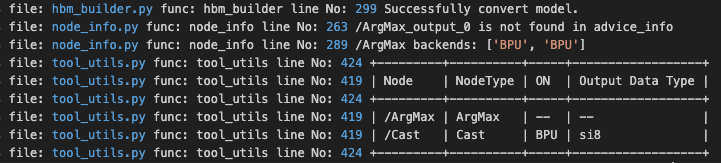
Cast to int8: As shown in the log below, the ArgMax operator runs entirely on the BPU.
-
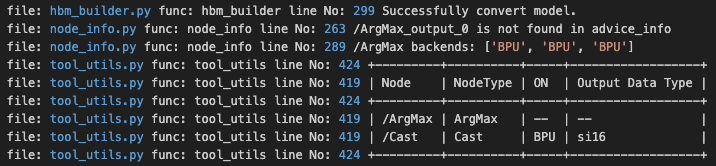
Cast to int16: As shown in the log below, the ArgMax operator runs entirely on the BPU.
-
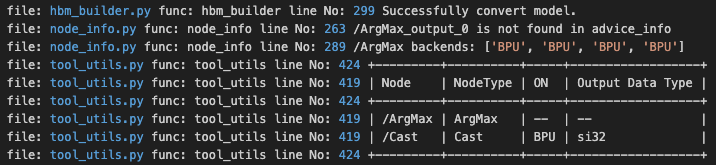
Cast to int32: As shown in the log below, the ArgMax operator runs entirely on the BPU.
-
Model Conversion
How to understand the compiler optimization level parameters in yaml file?
In the yaml configuration file of the model conversion, the compilation parameter group provides the optimize_level parameter to select the optimization level of the model compilation, the available range is O0~O2. Among which:
-
O0 without any optimization, the fastest compilation speed, suitable for use in model conversion function verification, debugging different calibration methods.
-
O1 - O2 as the optimization level gets higher, the search space during compilation and optimization gets larger.
-
The compiler's optimization strategy is not at the operator granularity level, but is a global optimization for the whole model.
How to compile to get a multi-batch model?
According to the original model type, we will discuss this issue by dividing it into dynamic input models and non-dynamic input models.
-
The
input_batchparameter can only be used only for the model which first dimension of theinput_shapeis 1 (if the model has multiple inputs, the first dimension of theinput_shapeneeds to be 1 for all inputs), and only effective when the original onnx model itself supports multi-batch inference. This parameter only supports specifying a single value, which will act on all inputs of the model when the model has multiple inputs. -
The size of each calibration data shape should be the same as the size of
input_shape.
Dynamic input model: If the original model is a dynamic input model, for example, ? x3x224x224 (dynamic input models must use the input_shape parameter to specify the model input information).
-
When input_shape is configured as 1x3x224x224, if you want to compile the model to get a multi-batch model, you can use
input_batchparameter, then each calibration data shape size is 1x3x224x224. -
When the first dimension of input_shape is an integer greater than 1, the original model itself will be recognized as a multi-batch model, and the
input_batchparameter can not be used, and you need to pay attention to the size of each calibration data shape. For example, if the input_shape is 4x3x224x224, the size of each calibration data shape need to be 4x3x224x224.
Non-dynamic input model.
-
When the input shape[0] of the input is 1, you can use the
input_batchparameter. Each calibration data shape size is the same as the original model shape. -
When the input shape[0] is not 1, the
input_batchparameter is not supported.
Where to check first
-
Artifact: confirm whether the first dimension of
input_shapein the original onnx model is 1. -
Log: the
input_parameters infogroup inhb_compile.logprints the actualinput_shapeandinput_batchtaking effect. -
Topic: this page — How to compile a multi-batch model.
Is it normal for the order of model inputs to change during the conversion of a multi-input model?
This is normal. It is possible for the model input order to change during the conversion of a multi-input model. The possible cases are shown in the following example.
-
original floating-point model input order: input1, input2, input3.
-
original.onnx model input order: input1, input2, input3.
-
quanti.bc model input order: input2, input1, input3.
-
hbm model input order: input3, input2, input1.
-
When you do accuracy consistency alignment, please make sure the input order is correct, otherwise it may affect the accuracy result.
-
If you want to check the hbm model input order, you can use the
hb_model_infocommand to check it. The input order listed in the input_parameters info group is the hbm model input order.
Where to check first
-
Artifact: the
hbmmodel itself. -
Log: the
input_parameters infogroup in the output ofhb_model_info. -
Topic: this page — Input order change of a multi-input model.
How to understand active and passive quantization during ONNX model conversion?
After successfully converting to the hbm model, you may still find that a few operators are running on the CPU, but when carefully checking the toolchain operator constraints list, the operator does satisfy the constraints, so theoretically it should have run on the BPU. Why does it still run on the CPU?
For this question, refer to the Horizon official community article. This article introduces the internal quantization principles and the logic behind the model conversion toolchain, and provides several solutions for the issue.
Where to check first
-
Artifact:
*_node_info.csv, view the CPU / BPU distribution and similarity of the target operator. -
Log: the
ONcolumn (CPU or BPU) of the operator inhb_compile.log. -
Topic: this page — Active and passive quantization, Why some BPU-supported operators at the tail run on CPU.
How to understand shape_inference_fail.onnx?
This model will only be output when the ONNX model conversion fails, it has no special meaning, you can provide this model and the log file of the model conversion to Horizon for debug analysis.
How to understand that the operator changes in the optimized model?
In order to improve the performance of the model on the board, the model conversion has an Optimizer module which performs some graphs optimization on the model to improve the performance of the model on the board. The Optimizer module mainly includes functions such as Constant Folding, Operator Replacement, Operator Property/Input Update, Operator Fusion, and Operator Move.
The Optimizer module causes a change in the operator of the your model, and this module performs some equivalent graph optimization of the model.
In the conversion process, what are the several scenarios in which the Calibrated Cosine column appears as nan in the print log of the hb_compile tool and what causes such problems?
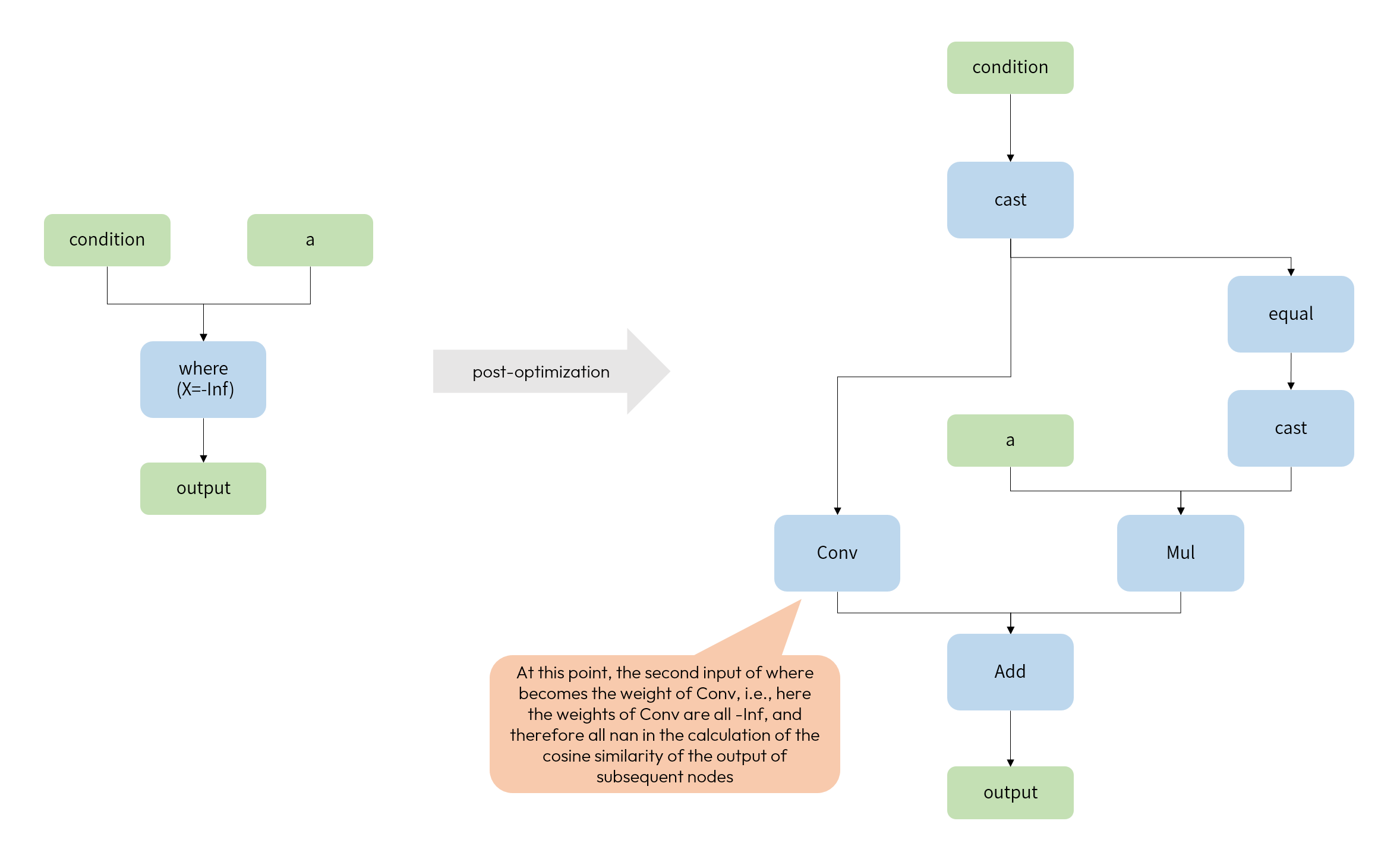
Case 1: The second input to the where operator in the model is -Inf
During the optimization phase of the conversion process, in order to be able to ensure that the where operator can be quantized, this operator will be split into a combination of several quantizable operators during the optimization phase. When the second input of where is -Inf, there will be a case of nan in the conversion process. The reason is as follows:
Case 2: All 0 tensor in the model
1). concat result in all 0 tensor.
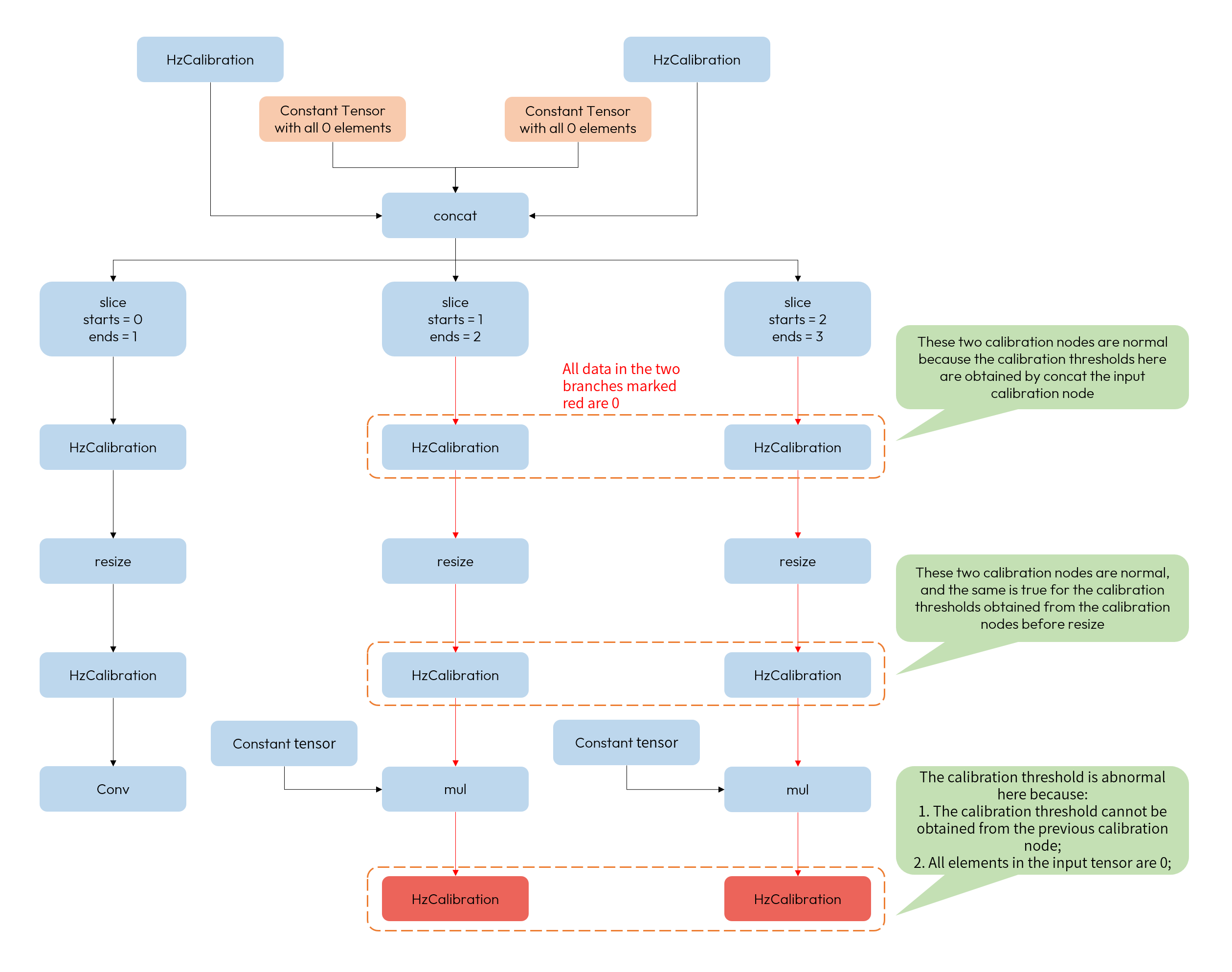
Taking the above structure as an example, the two inputs to concat are all 0 constants, so it is possible that the subsequent output after slice may have a branch in which the data flowing are all 0, and lead to illegal thresholds (i.e., thresholds of 0) in HzCalibration.
2). equal result in all 0 tensor.
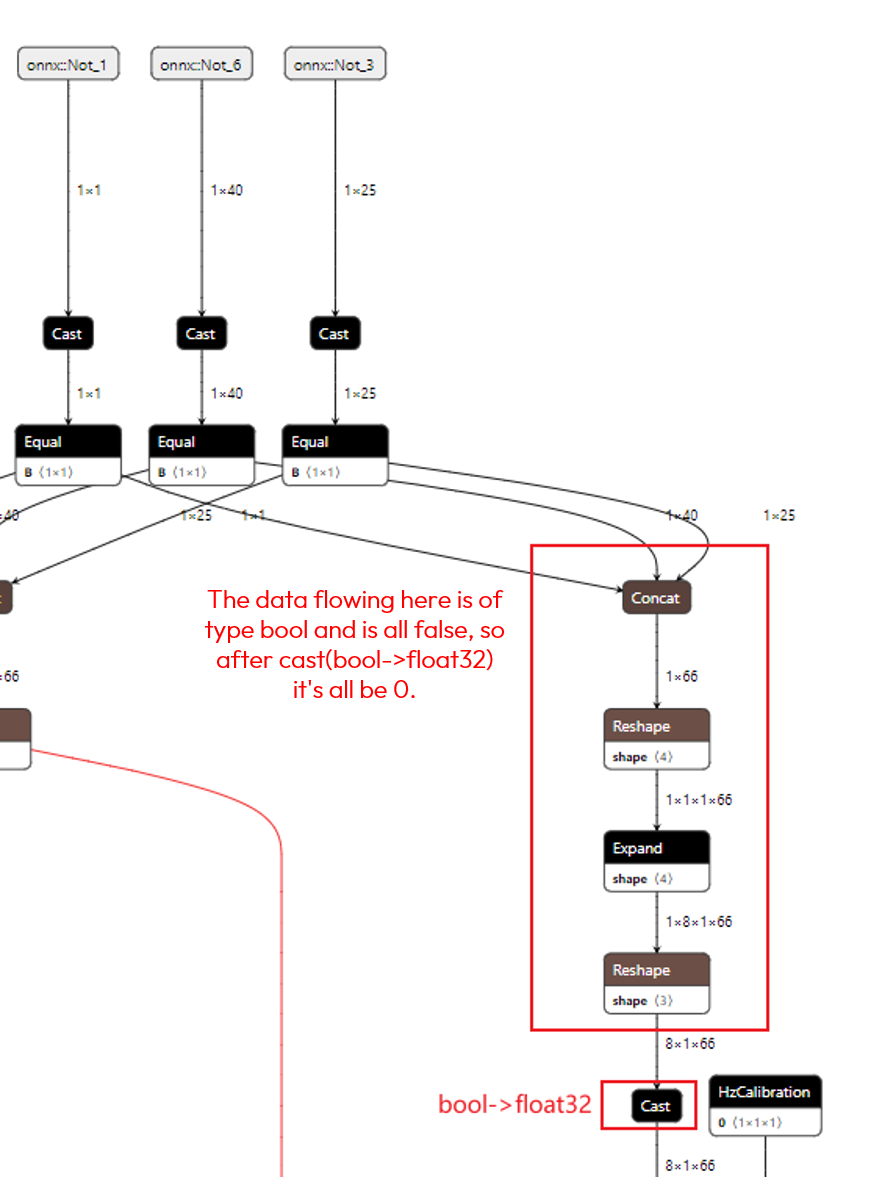
Taking the above structure as an example, the input onnx::Not_3 to the model is a bool type tensor, which after cast+equal results in all false data in the tensor, and after cast(bool -> float32) results in an all 0 tensor.
This case requires you to try to test with multiple sets of data, thus ruling out the possibility that the model has all 0 caused by the calibration data.
Where to check first
-
Artifact: the floating-point model visualization of the operator where NaN occurs (open
*_original_float_model.onnxwith Netron). -
Log: the specific node name where NaN appears in
hb_compile.logand its surrounding operators. -
Topic: this page — Cases where Calibrated Cosine shows NaN.
quant_config qtype is set but does not take effect?
When a qtype in quant_config does not take effect, it is usually related to the tool's operator constraints or the mandatory constraints imposed by the operator context. Common cases:
-
Operator constraint does not support the configured dtype, or lower accuracy is preferred at the starting point: for example, Resize / GridSample under the J6H/P all-float16 scenario should start from int8 (int8 performs better on these operators). It is recommended to explicitly configure the
qtypeof these two operators as int8. -
Tail BPU-accelerable operator is forced back to CPU: the tail Conv of the model outputs int32 / float32 by default. BPU-accelerable operators after it (such as ReLU, Add) fall back to CPU by default. To force them onto BPU, see Why some BPU-supported operators at the tail run on CPU.
-
Active / passive quantization limitations: some non-computation-intensive operators (such as Reshape, Transpose, Concat) require the quantization threshold of upstream / downstream operators to be passively quantized. Configuring
qtypeon these operators alone inquant_configdoes not take effect.
Investigation suggestions:
-
First check the
Output Data Typecolumn of the target operator inhb_compile.logto confirm the actual data type judged by the tool. -
Cross-check the Operator Constraint List section for the input / output data type combinations supported by this operator on the current platform.
-
Refer to the platform experience template subsection in the quant_config Description section for the platform-recommended syntax.
Where to check first
-
Artifact: similarity and deployment information of the target operator in
*_node_info.csv. -
Log: the
ON/Output Data Typecolumn of the target operator inhb_compile.log. -
Topic: this page — quant_config configuration not taking effect, the platform experience template subsection in the quant_config Description section.
Model Performance
How to understand the two forms of BPU acceleration and CPU computation?
-
BPU acceleration: It means that the operator can be quantized and accelerated by BPU hardware when the model is inferred at the board side, where most of the operators ( such as conv, and so on) are directly supported by the hardware. Some will be replaced with other operators to achieve acceleration (e.g., gemm will be replaced with conv); and others depend on specific contexts (e.g., Reshape, Transpose need to be BPU operators before and after) to be quantized passively.
-
CPU computation: For operators in the model that cannot be directly or indirectly accelerated by the BPU hardware, our toolchain will put them on the CPU for computation, and the runtime prediction library will also automatically complete the heterogeneous scheduling of the execution hardware during model inference.
Is there hardware support for model input color space conversion?
BPU supports conversion between common model input formats (e.g. nv12 -> rgb/bgr) and data normalization, which can be configured via yaml file.
See the description of input_type_train, input_type_rt, mean_value, scale_value and std_value parameters.
How to understand compiler optimization levels?
The yaml file optimize_level parameter configures the compiler optimization level from O0 to O2, and the higher the optimization level, the larger the search space is available and usually more time consuming.
The optimization level does not perform some defined optimization strategy at the operator granularity level, and most of the operator optimizations are independent of the optimization level (they are not time-consuming).
The optimization level is mainly for global optimization, which is the analysis and optimization of the whole model.
How to handle quantization/dequantization operators in the first and last parts of the model?
In the process of ONNX model conversion, by default, toolchain inserts quantization operator at the beginning of featuremap input model to implement the mapping of input data from float32 to lower-bit computation, and inserts dequantization operator at the end of all models to implement the mapping of output data from low-bit computation(or int32/float32 by default if BPU ends with conv) to float32. The quantization/dequantization operators are not efficient on the CPU, especially when the data shape is large.
Therefore, we prefer to integrate quantization/dequantization operations into pre- and post-processing, which is the most efficient way.
How to use unitconv operator to optimize model performance?
For an operator in the model to run on BPU, besides satisfying the BPU support conditions, it also needs to be able to find its quantization threshold on calibration.
The quantization thresholds of some non-computation intensive operators (such as concat, reshape, etc.) depend on the featuremap Tensor of the upstream and downstream operators.
Therefore, if these operators are at the beginning and end of the model they will run on the CPU by default.
At this point, for more efficient performance, unitconv can be inserted before/after this operator to introduce a new quantization threshold statistic, which in turn can be quantized on the BPU.
However, it should be noted that this approach may introduce some quantization loss.
Take the model output by conv+reshape+concat structure as an example, by default, the toolchain will output conv with high accuracy of int32/float32, and then send it to reshape and concat on CPU after dequantization to float32.
If unitconv is inserted after concat, the whole structure will run on BPU with low accuracy of int8.
At this point, although the final unitconv can still be output with high accuracy of int32/float32, the accuracy compression of the previous conv output has already introduced a certain amount of quantization loss.
Therefore, please consider whether to insert unitconv to optimize the performance.
How does model segmentation affect the performance?
When the model has CPU operators that cannot be accelerated in the middle of BPU operators, some performance loss will be introduced when switching computation between BPU and CPU operators, thus introducing a certain performance loss in two ways.
-
CPU operator performance is much lower than that of the BPU operator.
-
The heterogeneous scheduling between CPU and BPU also introduces quantization and dequantization operators (running on CPU), and because the internal computation needs to traverse the data, its time consumption will be proportional to the shape size.
The above CPU operator and quantization and dequantization operators can be measured by passing profile_path parameter through the board-side tool hrt_model_exec. Horizon Robotics recommends that you try to build the model with BPU operator to get better performance.
How to investigate when on-board performance is below expectation?
When on-board performance of hbm is below expectation, we usually investigate along the following directions:
-
Whether there are CPU operators: CPU operator performance is much lower than BPU, and heterogeneous scheduling between CPU / BPU introduces quantization / dequantization operators. First check the CPU operator distribution via
hb_compile.logand the.htmlstatic evaluation file. See Impact of model segmentation on performance. -
Whether model segmentation is excessive: frequent CPU / BPU switching significantly degrades performance. See Impact of model segmentation on performance. If it is because tail BPU-accelerable operators fall back to CPU, refer to Why some BPU-supported operators at the tail run on CPU to determine whether
quant_configcan force them onto BPU. -
Whether quantization / dequantization operators are not fused into pre/post-processing: refer to How to handle quantization/dequantization operators in the first and last parts of the model and Fusion Implementation of Dequantization Nodes to fuse them into pre/post-processing.
-
Whether static estimation matches on-board measurement: the
.html/.jsonstatic evaluation files reflect the performance upper bound of the BPU portion, while on-boardhrt_model_execmeasurements are affected by input preparation and post-processing. When the two show a large gap, first check on-board input preparation and pre/post-processing time consumption.
For further tuning, refer to the Performance Tuning Guide section.
Where to check first
-
Artifact: the
.html/.jsonstatic evaluation files,*_node_info.csv. -
Log: CPU operator distribution in
hb_compile.log, on-boardhrt_model_execmeasurement output. -
Topic: this page — On-board performance below expectation, Impact of model segmentation on performance, Performance Tuning Guide section.
Model Accuracy
How to handle the calibration data of the model correctly?
For the preparation of ONNX model calibration data, refer to the Data Preparation - Model Calibration Set Preparation section. Also, for featuremap input models, please do your own preprocessing of the data and save it as an npy file of the desired input type via the numpy.save interface.
How to dump model middle tier output?
During the model conversion phase, if debug_mode parameter in the yaml file is configured with dump_all_layers_output, adds a dequantization output node for each convolution and matmul operator, which significantly degrades the performance of the model once it is on the board.
Among them, the output_nodes parameter can specify any node in the model as an output node, which is more convenient for us to debug and tune.
In addition, the hb_verifier tool can be used to compare the consistency of the fixed-point model quantized_model.bc with the hbm model on the upper board.
During the board deployment phase, the hrt_model_exec tool also supports saving node outputs (including nodes specified with the output_nodes parameter) in bin or txt format, as described in The hrt_model_exec Tool Introduction .
Why some OPs supported by BPU at the tail part of the model running on CPU?
First, we need to understand the following two concepts:
-
Currently supports only the Conv operator at the tail of the model to be output with int32/float32 high accuracy.
-
Normally, the model conversion will fuse Conv with its subsequent BN and ReLU/ReLU6 in the optimization stage for calculation. However, due to the limitation of the BPU hardware itself, Conv, which is output with int32/float32 high accuracy at the end of the model, does not support operator fusion.
Therefore, if the model is ended with Conv+ReLU/ReLU6, then to ensure the overall accuracy of the quantized model, the Conv will by default use int32/float32 output, while the ReLU/ReLU6 will run on the CPU. Similarly, the other tail-part OPs who run on the CPU are also because that the Conv OP needs higher-accuracy output. However, Horizon supports running these operators on the BPU by configuring quant_config in the yaml file to get better performance, but introduces some loss of accuracy.
Where to check first
-
Artifact: deployment distribution and similarity of the tail operators in
*_node_info.csv. -
Log: the
ON/Output Data Typecolumn of the tail operators inhb_compile.log. -
Topic: this page — Why some BPU-supported operators at the tail run on CPU, the platform experience template subsection in the quant_config Description section.
quantized.bc accuracy is fine but hbm accuracy drops?
quantized.bc and hbm are theoretically consistent in accuracy (for the bit-alignment special case of models containing floating-point operators, refer to the Deployment Consistency Analysis section). If quantized.bc dataset accuracy is normal but hbm shows an obvious accuracy drop, investigate along the following directions:
-
Whether on-board input preparation matches
quantized.bcinput preparation: the color conversion frominput_type_rttoinput_type_trainand the mean / scale handling are baked intoquantized.bc. On-board input preparation must match accordingly. -
Whether on-board pre/post-processing matches the development-machine accuracy evaluation: for example, post-processing thresholds, NMS parameters, normalization approaches are not aligned.
-
Whether it is a cross-platform output type difference: on J6E/M the tail high-accuracy operator output type is int32; on J6B/H/P it is fp32. If on-board post-processing code is not adapted per platform, this will appear as an accuracy difference.
-
Whether it is a stride alignment difference: on J6H/P, nv12 input must satisfy stride 64 alignment, differing from J6E/M/B's stride 32. When on-board input is not aligned per platform,
hbmoutput andquantized.bcoutput will be inconsistent. -
Whether there is a node-removal scenario: when model quantization involves removing input/output-side nodes, consistency comparison should align
hbmwithquantized_removed_model.bcrather thanquantized_model.bc.
Investigation suggestion: first reproduce the on-board output on the x86 side with hbm_infer, compare against quantized.bc to rule out on-board environment differences. Then follow the stage-by-stage investigation in the ONNX Model Deployment Consistency Analysis section.
Where to check first
-
Artifact:
quantized.bc(orquantized_removed_model.bc),hbm, on-boardhrt_model_execoutput, x86-sidehbm_inferreproduction output. -
Log:
hb_compile.log, comparison results between on-board post-processing andhbm_inferoutput. -
Topic: this page — quantized.bc is fine but hbm accuracy drops, the ONNX Model Deployment Consistency Analysis section.