

Build Floating-point Model
In this stage, there are two main tasks:
-
Adapt the floating-point model so that it can enter the quantization workflow.
-
Before moving on to later stages such as
Prepare,Calibration, andQAT, identify obvious structural risks, input domain differences, and quantization-friendliness issues in advance.
If this stage is handled carefully, the later Prepare, Calibration, and QAT steps will usually go much more smoothly.
Model Adaptation
After obtaining the floating-point model, the first step is to make the necessary adaptations so that it can enter the later quantization workflow. The basic modifications include:
-
Insert a
QuantStubnode before the model input. -
Insert a
DeQuantStubnode after the model output. -
For loops whose iteration count may vary in the forward logic, such as frame-by-frame computation in temporal models, use the
horizon_plugin_pytorch.fx.jit_scheme.dynamic_blockinterface for annotation. For details, refer to Prepare.
The most common issue here is not placing QuantStub and DeQuantStub at the boundary between deployment logic and non-deployment logic.
For example, an auxiliary head used to compute loss does not need to be deployed. In this case, a DeQuantStub should be inserted at the input of that head so that it does not enter the quantized range.
In addition, pay attention to the following points when inserting QuantStub and DeQuantStub:
-
Only focus on data that needs to be quantized, namely floating-point data. Native fixed-point or boolean data does not require stubs.
-
The computation between
QuantStubandDeQuantStubis exactly the range that the tool will quantize. Auxiliary heads and loss branches usually do not need to be deployed, so make sure these parts are outside the quantized range. -
If the model contains mixed computation between fixed-point data and floating-point data, PyTorch may automatically cast the result back to floating point. However, for the quantization tool, this is still a boundary between quantized and non-quantized logic, so you need to handle this boundary explicitly.
When adapting the model, also note the following:
-
The inserted
QuantStubandDeQuantStubnodes must be registered as submodules of the model. Otherwise, the tool cannot correctly handle their quantization states. -
Multiple inputs should share a
QuantStubonly when their numerical distributions are similar. If their distributions differ significantly, it is recommended to split them. -
If the board-side input source will later be set to
"pyramid", manually fix the correspondingQuantStubscale to1/128. -
You may also use
torch.quantization.QuantStub, but onlyhorizon_plugin_pytorch.quantization.QuantStubsupports manually fixing the scale through parameters.
The following is a simplified multi-input, multi-output example. Each QuantStub is responsible for quantizing one input tensor.
The adapted model can seamlessly load the parameters of the original model. Therefore, if you already have a trained floating-point model, you can load it directly. Otherwise, complete normal floating-point training first.
After model adaptation, it is recommended to check the following items first:
-
Whether the quantization boundary is already clear, and whether the positions of
QuantStub / DeQuantStubare as expected. -
Whether the model already contains clearly unsupported operators, so that the issue is not postponed until the
Prepare, export, or compile stage. -
Whether the model contains obvious CPU operators that are unfavorable for deployment. You can check this together with the CPU operator troubleshooting method in the performance tuning section.
Quantization-Friendliness Check
When a floating-point model is turned into a fixed-point model, some accuracy loss is inevitable. The more quantization-friendly the model is, the easier it is for later Calibration and QAT to converge, and the higher the final quantized accuracy usually becomes.
In general, the following situations may make a model less quantization-friendly:
-
It uses operators with higher quantization risk. For example,
softmaxandlayernormare often implemented with lookup tables or multiple fused operators at lower levels, so they are more likely to cause accuracy drops. -
The same operator is called multiple times in one forward pass. In that case, the output distributions at different call sites may differ, but usually only one set of quantization parameters is collected. If the output distributions differ too much, the quantization error will increase.
-
Different inputs of multi-input operators such as
addandcatdiffer too much, which may also lead to larger errors. -
The data distribution is not suitable. The plugin uses uniform symmetric quantization, so a zero-mean uniform distribution is usually more friendly. Long tails and outliers should be avoided as much as possible. At the same time, the numerical range also needs to match the quantization bit width. For example, if int8 is used to quantize data uniformly distributed in
[-1000, 1000], the accuracy is usually insufficient.
For example, in the following three distribution plots, quantization-friendliness decreases from left to right. In most cases, the distribution of values in the model should be closer to the middle one. In practice, you can use debug tools to observe whether the distributions of model weights and feature maps are quantization-friendly.
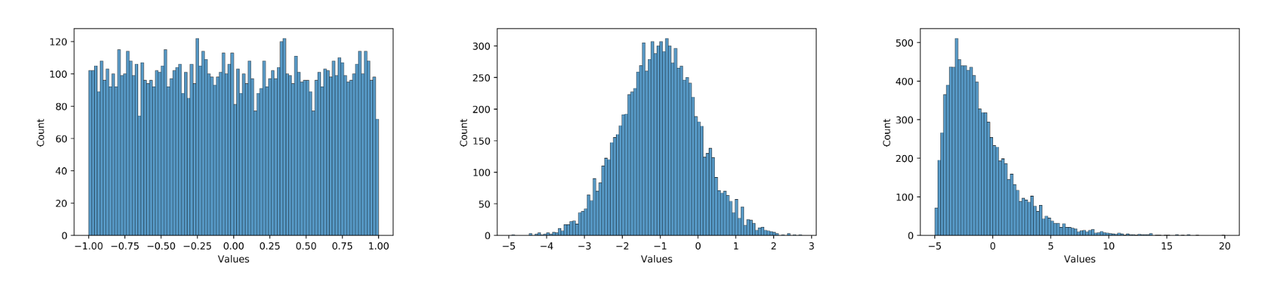
Because models usually have some redundancy, operators that look unfriendly to quantization do not always significantly reduce final accuracy. Therefore, these checks should be considered together with the later Calibration / QAT difficulty and the final quantized accuracy.
The following checklist can help you inspect common structural issues, input issues, and quantization risks before moving to the later quantization stages.
Are there quantization-unfriendly operators?
Operators such as softmax and layernorm usually carry higher quantization risk. Structures such as exp, pow, reciprocal, sigmoid, GeLU, and inverse_sigmoid also deserve extra attention.
-
How to check:
- Directly inspect the model structure and the forward path to see whether these operators appear in the deployment backbone.
-
Common risk:
- These operators either have unstable value ranges or complex low-level implementations, making them more likely to amplify errors after quantization.
-
What to do:
- If possible, avoid putting them in the deployment backbone.
- If they must remain, pay extra attention to the error and sensitivity of these positions in later
Calibration,QAT, and consistency analysis.
Are there shared modules?
If the same operator is called multiple times in one forward pass, different call sites may end up sharing the same set of quantization parameters, which can easily amplify quantization errors.
-
How to check:
- Check whether the same module instance is reused in the forward logic.
- After
Prepare, you can also confirm this withfx_graph.txtand later debug artifacts.
-
Common risk:
- Shared modules may cause issues in scale alignment, graph interpretation, and training behavior during
Prepare, calibration, and training.
- Shared modules may cause issues in scale alignment, graph interpretation, and training behavior during
-
What to do:
- If the output distributions at different call sites differ significantly, prioritize splitting the shared module into separate instances.
Are the distributions of multiple inputs too different?
If the inputs of multi-input operators such as add and cat differ too much, larger errors may be introduced.
-
How to check:
- First judge structurally whether the inputs come from different branches, different feature levels, or different data domains.
- Later, you can also use debug tools to inspect the distributions and errors of these inputs.
-
Common risk:
- When the numerical ranges of different inputs vary too much, it becomes difficult for one set of quantization parameters to work well for all of them, and one branch may suffer noticeably larger errors.
-
What to do:
- If the difference is obvious, consider splitting the quantization paths or handling the input branches separately.
Is zero-symmetric normalization applied to the input?
The plugin uses uniform symmetric quantization, so input distributions centered around zero are usually more quantization-friendly.
-
How to check:
- Check the training and inference preprocessing logic first to confirm whether the input is normalized around zero.
- If needed, directly inspect the statistics of the input tensor.
-
Common risk:
- If the input distribution is noticeably not zero-symmetric, it will usually affect the accuracy of
CalibrationandQATdirectly.
- If the input distribution is noticeably not zero-symmetric, it will usually affect the accuracy of
-
What to do:
- Try to make the model input zero-symmetric.
- If the model structure allows it, prefer using BN to help stabilize the data distribution.
- For data with clear physical meaning and stable ranges, fix scale can also be considered first.
Are the training and deployment input domains consistent?
If the training and deployment input domains differ, it is best to confirm this explicitly at this stage.
-
How to check:
- Check whether the training input and deployment input differ in domain, such as
rgb / bgr / yuv / nv12. - Check whether preprocessing has already been absorbed into the model, or whether preprocessing nodes are planned to be inserted at deployment time.
- Check whether the training input and deployment input differ in domain, such as
-
Common risk:
- Even if the model structure itself is correct, mismatches between the training domain and deployment domain may still introduce extra accuracy loss during
Calibration,QAT, and final deployment verification. - In particular,
nv12input introduces information loss. If this loss is not accounted for during training, the later fixed-point model and board-side model are more likely to show unexpected accuracy drops.
- Even if the model structure itself is correct, mismatches between the training domain and deployment domain may still introduce extra accuracy loss during
-
What to do:
- Try to account for
nv12 / yuvinput loss as early as possible instead of waiting until compilation or board deployment. - If preprocessing nodes must be inserted to absorb input domain differences, pay special attention to this source of error in later Model Calibration and Consistency Analysis for Deployment.
- Try to account for
Is the data distribution quantization-friendly?
Unfriendly data distributions, such as long tails, too many outliers, or numerical ranges that do not match the quantization bit width, can also significantly affect quantization quality.
Keep in mind that QAT itself has some corrective ability, so “not quantization-friendly” does not mean “cannot be quantized”. In many cases, whether structural changes are really necessary should still be judged together with the later Calibration / QAT difficulty and the final quantized accuracy.
If the model is already clearly overfitted, common symptoms include overly large numerical ranges and noticeable output changes even under small input perturbations. This kind of issue often amplifies quantization errors as well. In that case, it is usually better to adjust weight decay, data augmentation, and training strategy first, and then continue observing the effect on Calibration and QAT.
How to Tell Whether the Result Looks Normal
After the floating-point model has been fully prepared, you can continue to the next stage if the following checks are basically satisfied:
-
The quantization boundary is clear, and the positions of
QuantStub / DeQuantStubare as expected. -
Differences between the training input domain and deployment input domain have been identified, or there is already a clear handling plan.
-
No obvious high-risk structures, shared modules, or abnormal input distributions have been overlooked.