
The HBRuntime Inference Library

The HBRuntime is a x86-side model inference library provided by Horizon, which supports inference on the original ONNX models directly exported by commonly used training frameworks, the ONNX models at various stages generated during the ONNX model conversion process of the Horizon toolchain, and the HBIR(*.bc) models and HBM(*.hbm) models generated during the Horizon toolchain conversion process. The usage flow is shown as follows:
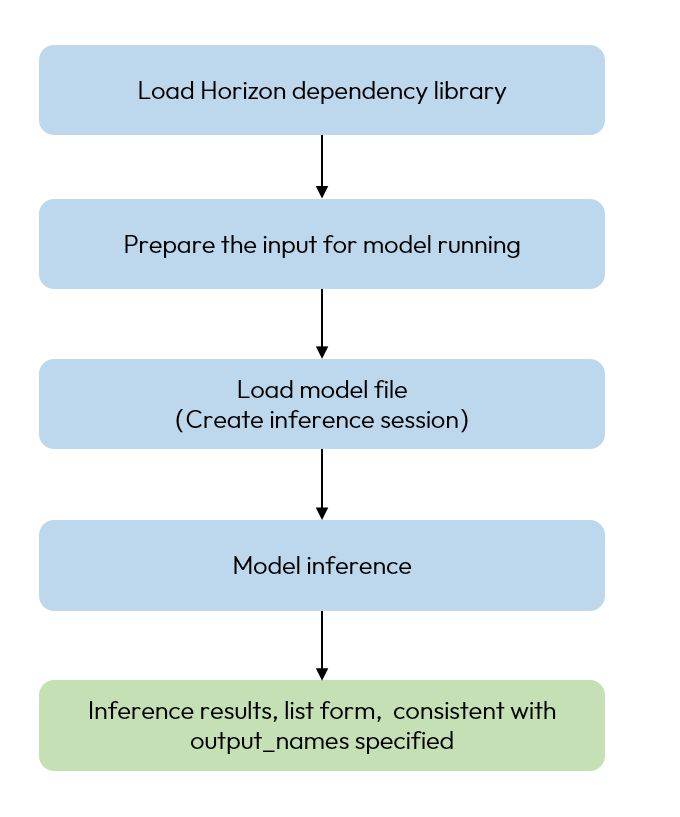
model_inference

Usage

Reference usage when using HBRuntime for model inference is as follows:

import numpy as np
# Load Horizon dependency library
from horizon_tc_ui.hb_runtime import HBRuntime

# Prepare the input for model running, here the `input.py` is the processed data
data = np.load("input.npy")    
# Load model file, specify according to the actual model
# ONNX model
sess = HBRuntime("model.onnx")
# HBIR model
sess = HBRuntime("model.bc")
# HBM model
sess = HBRuntime("model.hbm")
# Obtain the model input & output node information
input_names = sess.input_names
output_names = sess.output_names

# Prepare the input data according to the actual input type and layout
# The format needs to be the dict, where the input name and input data form a key-value pair
# If the model has only one input
input_feed = {input_names[0]: data}
# If the model has multi inputs
input_feed = {input_names[0]: data1, input_names[1]: data2}
# Model inference, the return value is a list that corresponds in order to the names specified by output_names
output = sess.run(output_names, input_feed)
Note
  • output_names: used to specify the output name, support to specify as None or custom configuration. If there are no special requirements, here we recommend you to set it to None.
    • Specify as None, the tool will internally read the information of the output nodes in the model and give the inference result in the order of parsing.
    • If you customize the configuration, you can specify full or partial output_name and support modifying the order of outputs. Then, when the inference is complete, the output will be returned according to the output name and order that you specified.
  • input_feed: Used to configure the inputs for the model running, which need to be prepared according to the input type and layout. The format needs to be the dict, where the input name and input data form a key-value pair.

In addition, HBRuntime supports you to view model attribute information during usage, the following model attribute information is supported to be viewed. For example, if you want to print to see the model input number, you can use print(f"input_num: {sess.input_num}").

model_attributeDESCRIPTION
input_numNumber of model input
output_numNumber of model output
input_namesNames of model input
output_namesNames of model output
input_typesTypes of model input
output_typesTypes of model output
input_shapesShapes of model input
output_shapesShapes of model output

Usage Example

In the following, we provide you with the usage samples of HBRuntime for two scenarios, ONNX model inference and HBIR model inference, respectively.

ONNX Model Inference

Hint

When performing ONNX model inference in a GPU Docker container, GPU acceleration is automatically utilized, resulting in higher efficiency.

The basic flow for loading ONNX model inference using HBRuntime is shown below, and this sample code applies to inference for all ONNX models. Prepare the data according to the input type and layout requirements of different models:

import numpy as np
# Load Horizon dependency library
from horizon_tc_ui.hb_runtime import HBRuntime

# Prepare the input for model running, here the `input.py` is the processed data
data = np.load("input.npy")  
# Load model file
sess = HBRuntime("model.onnx")
# Obtain the model input node information
input_names = sess.input_names

# Model inference, here we assume the model has only one input
output = sess.run(None, {input_names[0]: data})

HBIR Model Inference

The basic flow for loading HBIR model inference using HBRuntime is shown below, and this sample code applies to inference for all HBIR models. Prepare the data according to the input type and layout requirements of models:

import numpy as np
# Load Horizon dependency library
from horizon_tc_ui.hb_runtime import HBRuntime

# Prepare the input for model running, here the `input.py` is the processed data
data = np.load("input.npy")  
# Load model file
sess = HBRuntime("model.bc")
# Obtain the model input node information
input_names = sess.input_names

# Model inference, here we assume the model has only one input
output = sess.run(None, {input_names[0]: data})

HBM Model Inference

The basic flow for loading HBM model inference using HBRuntime is shown below, and this sample code applies to inference for all HBM model. Prepare the data according to the input type and layout requirements of different models:

import numpy as np
# Load Horizon dependency library
from horizon_tc_ui.hb_runtime import HBRuntime

# Prepare the input for the model runing, here `input.npy` is the processed data
data = np.load("input.npy")  
# Load Model File
sess = HBRuntime("model.hbm")
# Obtain the model input node information
input_names = sess.input_names

# Model inference, here we assume the model has only one input
output = sess.run(None, {input_names[0]: data})