This chapter introduces the entire process of accuracy tuning through a practical example. Please read the Quantization Accuracy Tuning Guide chapter firstly to understand the relevant theoretical knowledge and tool usage.
#Model Structure and Quantization Configuration Check
After completing the necessary adaptations for QAT, run the program. A model_check_result.txt file will be generated in the running directory. Firstly, check this file.
class BevFormer(BaseModule):
    def process_input(self, feats):
        ...
        for cam_idx in range(num_cameras):
            # Due to the presence of dynamic code blocks, it is necessary to use the dynamic_block annotation for proper fusion.
            with Tracer.dynamic_block(self, "bevformer_process_input"):
                src = cur_fpn_lvl_feat[cam_idx]
                bs, _, h, w = src.shape
                spatial_shape = (h, w)
                spatial_shapes.append(spatial_shape)
                src = self.input_proj[str(cam_idx)](src)
                src = src + self.cams_embeds[cam_idx][None, :, None, None]
                src = src + self.level_embeds[feat_idx][None, :, None, None]
                src = src.flatten(2).transpose(1, 2)  # B, C, H, W --> B, C, H*W --> B, H*W, C
                src_flatten.append(src)
Next, check the shared modules. Modules where called times > 1 should be split.
Each module called times:name called times--------------------------------------------------------------------------------------- --------------...model.map_head.sparse_head.decoder.gen_sineembed_for_position.div.reciprocal 8model.map_head.sparse_head.decoder.gen_sineembed_for_position.div.mul 8model.map_head.sparse_head.decoder.gen_sineembed_for_position.sin_model.sin 8model.map_head.sparse_head.decoder.gen_sineembed_for_position.cos_model.cos 8model.map_head.sparse_head.decoder.gen_sineembed_for_position.stack 8model.map_head.sparse_head.decoder.gen_sineembed_for_position.cat 4model.map_head.sparse_head.decoder.gen_sineembed_for_position.mul 8model.map_head.sparse_head.decoder.gen_sineembed_for_position.dim_t_quant 4...
After calibration or QAT training, if the accuracy is poor, you can use the debug tool to observe the statistics of shared operators in compare_per_layer. The base model is the floating-point model, and the analysis model is the calibration model. Taking two calls of model.map_head.sparse_head.decoder.gen_sineembed_for_position.div.mul as an example, the maximum value is 128 * 0.0446799 ≈ 5.719. For the first time, the output range is clearly smaller than [-5.719, 5.719], and the error is relatively small. For the second time, however, the output range exceeds [-5.719, 5.719], causing the values to be truncated, which leads to a larger error. The difference in the value ranges between the two uses also results in inaccurate scale statistics.
There is an operator with a qint32 output. High precision output is represented as torch.float32 in the table here, not qint32. This is likely due to a qconfig configuration error. The qconfig for model.obstacle_head.reg_branches.0.0 needs to be corrected.
The DequantStub has a qint8 input, which indicates that there may be some parts of the model that are not using high precision output. The template only supports automatic high-precision output for GEMM-like operators before dequant. You need to check if those operators before dequant are GEMM-like operators.
Apart from quant and dequant, a small number of operators have fp32 inputs, indicating that some parts may be missing quant nodes. If you compile the model, you'll find that it is not fully quantized; some operators are fallbacked to CPU. You can check the input-output types of each layer in detail to identify which operators need to insert QuantStub before.
The entire process first performs all-int16 precision tuning. This stage is used to confirm the model's maximum achievable precision, troubleshoot tool usage issues, and identify modules that are not quantization-friendly. Once the all-int16 precision meets the requirements, proceed with all-int8 precision tuning. If the precision is not up to standard, proceed with int8 / int16 mixed precision tuning, gradually increasing the proportion of int16 based on the all-int8 model. During this phase, a balance between precision and performance must be struck, aiming to find the quantization configuration that provides the best performance while maintaining the required precision.
For first calibration, precision collapses. Normally, the all-int16 quantization should not cause a precision collapse. You need to debug the outputs that are causing the precision drop. Here, you can choose either the static or dynamic branch's output and apply the following modifications. The example here includes some post-processing (sigmoid), and the debug is specifically performed on the last layer output of the static branch (map).
class BevNet(pl.LightningModule): def forward(self, batch): ... # return image, calibration, gt_dict, mask_dict, pred_dict # Only debug the outputs that are causing the precision drop. You could debug all outputs, but it would lack focus and is slower. return pred_dict['map']['preds']['layer_3']class MapQRHead(BaseModule): def forward_branch(self, hs, init_reference, inter_references): outputs = [] for lvl in range(hs.shape[0]): ... cls_out = getattr(self, "cls_out_dequant%d" % (lvl))(self.cls_branches[lvl](hs[lvl])) pts_out = getattr(self, "pts_out_dequant%d" % (lvl))(self.pts_branches[lvl](hs[lvl])).view(bs, -1, 2) # It belongs to the post-processing logic. Although it is placed after dequant, it should be added. pts_out = pts_out.sigmoid() pts_out = pts_out.view(bs, self.num_polyline, self.num_pts_per_polyline, -1) y = torch.cat([cls_out, pts_out, attr_out[0], attr_out[1], attr_out[2], attr_out[3], attr_out[4]], dim=-1) # bs,num_polyline,num_pts,n_attr outputs.append(y) return outputs
From the perspective of quantization sensitivity, the primary contributors are several QuantStub operators. In the compare_per_layer results, analyze the type of quantization error associated with these sensitive operators.
For model.view_transformation.transformer.layers.0.quant:
The quantization type is still qint8, which indicates that the int16 configuration has not taken effect. You need to check, aside from the setter, whether int8 qconfig has been manually set.
The scale is 0.7764707, and the representable floating-point range is from 0.776 * (-128) = -99.38 to 0.776 * 127 = 98.61. Considering the physical meaning here, the input range for this quant should be from -100 to 1, which results in some truncation errors. Additionally, the range of values is relatively large, there will also be significant rounding errors for int8. Therefore, it is necessary to switch to int16 quantization and set a fixed scale of 100 / 32768 according to the input range.
For model.obstacle_head.decoder.layers.0.cross_attn.quant_normalizer, the issue is similar.
After the modifications are completed, re-run the calibration and debugging. A noticeable improvement can be observed, and the sensitivity of the operators that were previously ranked higher in sensitivity has significantly decreased. Next, we will proceed with QAT training.
Branch
float
target (loss < 1%)
all-int16 calibration
dynamic
73.6
72.864
73.4
static
55.5
54.945
54
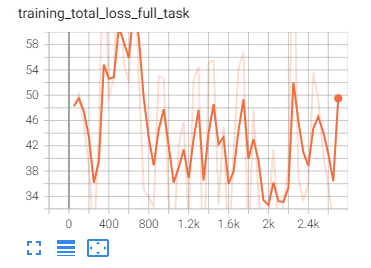
During the initial QAT training, the precision collapsed, and the loss curve did not converge.
Branch
float
target (loss < 1%)
all-int16 calibration
all-int16 qat
finetune float
dynamic
73.6
72.864
73.4
0
0
static
55.5
54.945
54
0
0
Attempt the following:
Since the calibration precision is very good, it is assumed that the model no longer has any issues with the quantization tool usage. The first step was to adjust hyperparameters like learning rate (lr), weight decay, etc., but this still did not resolve the issue.
Accuracy debugging. We can find that model.map_head.sparse_head.decoder.gen_sineembed_for_position0.dim_t_quant remains highly sensitive with significant quantization error with int16 quantization.
Reviewing the compare_per_layer results, the quantization range is 32767 * 0.2642754 ≈ 8659.51. Although the value is relatively large, there is no noticeable truncation error.
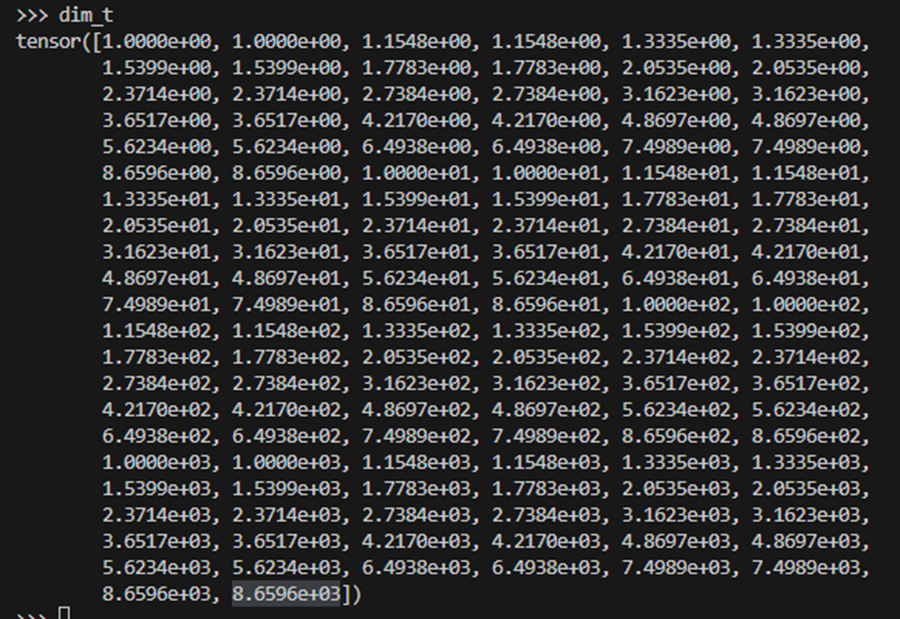
Print dim_t. It is a non-uniform distribution, which is not friendly to linear quantization. This distribution produces significant errors when the values are small.
dim_t is a denominator in a division operation. When dim_t is small, the rounding errors are amplified by the division. Since dim_t is fixed, and we know that the rounding errors from the smaller values have a larger impact, we can simply divide it into two groups for quantization. After the division operation, we can concatenate the groups together. This way, we ensure that the scale for the first group becomes smaller, which helps reduce the rounding errors.
At this point, after the adjustments, the all-int16 calibration precision shows some improvement, but the QAT precision still collapses.
Branch
float
target (loss < 1%)
all-int16 calibration
all-int16 qat
finetune float
dynamic
73.6
72.864
73.4
0
0
static
55.5
54.945
54.7
0
0
Start troubleshooting the training pipeline:
Using the QAT pipeline and training parameters, finetune the floating-point model and compare it with the floating-point training. It was found that the loss is still large, and the precision still collapses.
Set the learning rate to 0 and finetune the floating-point model, the precision still collapses. This led to the conclusion that the issue is not related to QAT. The problem lies in the fact that the code used for QAT training is not aligned with the code used for floating-point training.
After carefully comparing the modification records and resolving the alignment issues, the precision now meets the requirements.
Because we have already identified some sensitive operators in the all-int16 debug, during the all-int8 tuning, we can directly set these operators to int16 (or alternatively assume that if not identified, they remain int8, and they can also be detected in the int8 precision debug). The rest of the operators use int8. With such a quantization configuration, both calibration and QAT precision collapse.
Branch
float
target (loss < 1%)
all-int16 calibration
all-int16 qat
all-int8 calibration
all-int8 qat
dynamic
73.6
72.864
73.4
74.1
0
0
static
55.5
54.945
54.7
55.3
0
0
Int16 operators need to be added after precision debugging.
Finally, setting the top 0.5% most sensitive operators as int16, the precision meets the requirements. Next, we can further finetune parameters such as learning rate and weight decay to achieve QAT precition target with fewer int16 operators.
Prioritize checking sensitivity (outputs related to accuracy drops). After reviewing the sensitivity, proceed to compare_per_layer results. Once a sensitive operator is identified, confirm whether the error is due to rounding or truncation through statistical analysis. Then, adjust the quantization configuration accordingly.
Int8 / Int16 tuning is completed by the sensitivity setter. You only need to set the ratio, and it’s not too difficult for now. The focus of precision tuning should be on all-int16 tuning, where various issues such as usage problems, modules that are not quantization-friendly, and other complex challenges need to be addressed.
All-int16 calibration should achieve a normal precision. Precision collapse indicates usage issues. The process is continuous debugging, analyzing the top sensitive operators as described above, and modifying the quantization configuration until target precision is achieved. Some modifications may not immediately show accuracy improvements, but you can observe a reduction in sensitivity for the modified operators.