

FAQ
This section collects the questions that come up most often when using UCP, organized into general issues, model inference, and custom OP development. If you already have a specific error code, first check the Error Code section for its meaning, then come back here and troubleshoot by symptom.
Symptom Index
The table below lists the entry points for high-frequency issues by the symptom you actually observe on the development board. Locate the symptom first, then jump to the corresponding explanation:
For issues that remain unresolved after the checks above, refer to When to Contact Technical Support at the end of this section to collect the required artifacts before contacting Horizon technical support.
General Issues
What is the reason for returning HB_UCP_INVALID_ARGUMENT error code after task creation or submission?
Possible problems can be determined from the UCP error logs, which may exist as follows:
-
Operator Constraint Problem: Most acceleration operators should satisfy usage constraints when they are created, otherwise they will return error code.
-
If you encounter a log that prints
op $1 of task has no proper backend, user expect $2, indicating that there is no proper backend available for execution, where$1indicates the type of the task and$2is the backend parameter when the task is submitted in binary form, and the configuration needs to be done according to the number of cores that each J6 series backend can support.
How to understand the physical and virtual addresses of hbUCPSysMem?
In the J6 processor architecture, all hardware share the DDR memory, and a physically contiguous section of memory can be requested through the hbUCPMallocCached and hbUCPMalloc interfaczes.
The return values of these functions are wrapped in the hbUCPSysMem data structure,
and the phyAddr and virAddr fields correspond to the physical and virtual addresses of its memory space, respectively.
As this memory space is contiguous, both physical and virtual addresses can be represented, read, and written by the first address. However, in practice, it is recommended to use virtual addresses in preference in non-essential scenarios.
How to understand cacheable and non-cacheable hbmem?
UCP's memory management interface provides hbUCPMallocCached and hbUCPMalloc to allocate DDR read/write memory, which is physically contiguous and can be accessed and used by bpu/dsp and other ip accesses.
Where hbUCPMallocCached represents the allocation of memory for the cacheable attribute and is accompanied by the hbUCPMemFlush function to refresh the Cache.
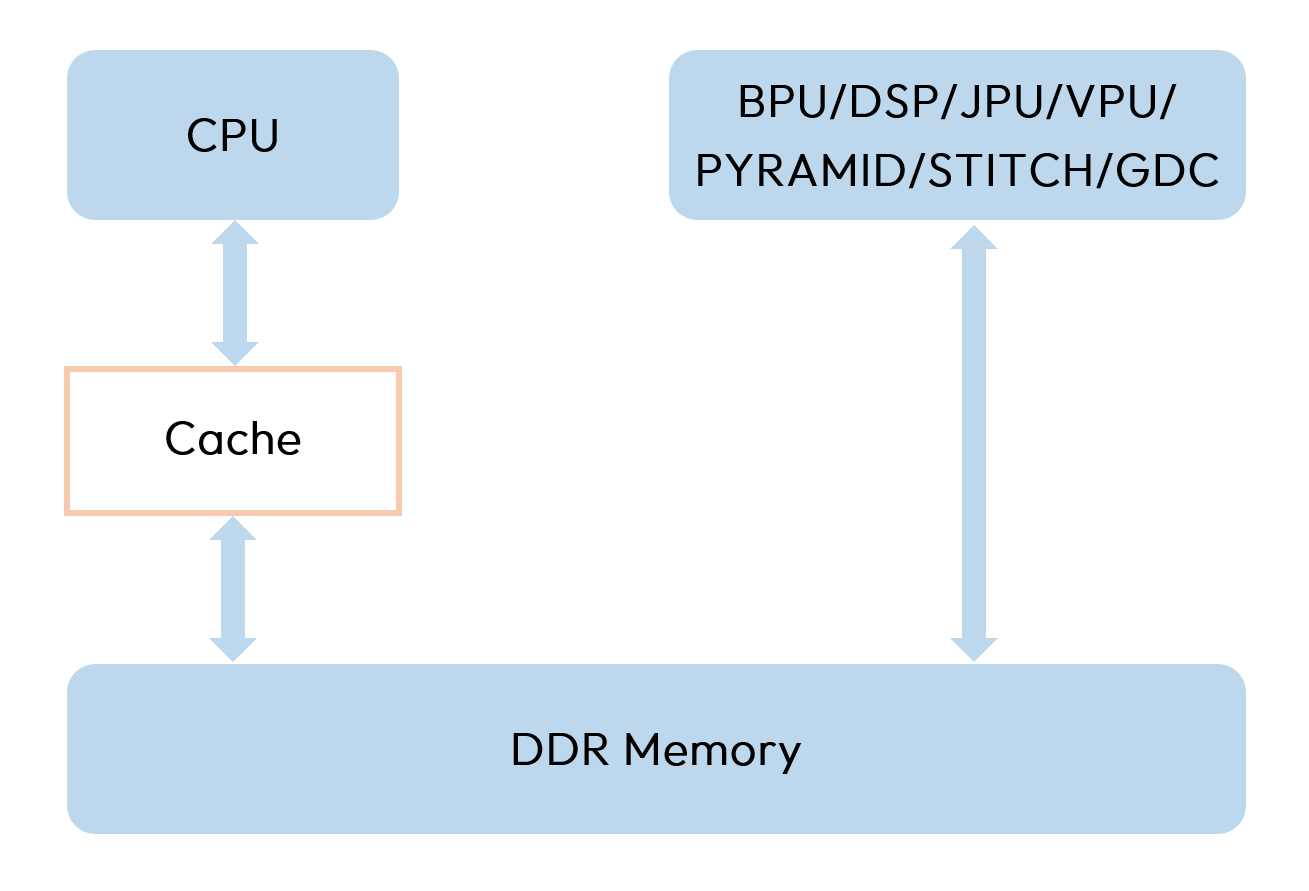
The cache mechanism is determined by the memory architecture of the platform, as shown in the following figure. The cache between CPU and memory is used as a data cache, however, there is no cache between the BPU/DSP/JPU/VPU(Video Process Unit)/PYRAMID/STITCH/GDC backend hardware and main memory. Therefore, the misuse of the cache can cause problems in data reading/writing accuracy and efficiency.
-
When the CPU has finished writing data, it needs to actively flush the data in the cache to the memory, otherwise other hardware accessing the same memory space may read the old data from before.
-
The CPU also needs to actively INVALIDATE the data in the Cache before accessing it when the other backend hardware has finished writing the data, otherwise the CPU will preferentially read the old data previously cached.
-
In the continuous inference process of the model, those that need to be read by the cpu, such as the model output, it is recommended to apply for memory with cacheable to accelerate the efficiency of the CPU to read and write repeatedly, while those that don't need to be read, and are only written, such as the model input, can apply for non-cacheable memory.
Can exit be used in exception handling on the application side?
Due to the existence of a resource management singleton within UCP, calling exit/std::exit on the application side (including in overridden signal handlers) will trigger the singleton's destructor. If there are still threads accessing the singleton's resources at that time, it can easily lead to exceptions. Therefore, UCP recommends using _exit/std::quick_exit. If you must use exit/std::exit, please ensure that no threads are accessing any UCP resources when exiting.
How to ensure log integrity when application exits abnormally?
To ensure that critical log messages are not lost due to abnormal process termination, it is recommended that the application calls the hbUCPFlushLog interface before abnormal exit to flush the buffered logs and ensure that all log messages are written to disk. This is particularly important for debugging anomalies and tracing system failures.
Model Inference
What are the possible causes of the timeout on the hbUCPWaitTaskDone interface for model reasoning?
-
The model itself takes a long time to execute, and an insufficient timeout set by the asynchronous wait interface, or a long queuing time for the task due to a high load on the current computational resources, may trigger an interface timeout.
-
Memory leaks exist. Slow allocation of memory in case of insufficient system memory may lead to inference timeout.
-
CPU load is too high. The scheduling thread can't get CPU, at this time, even if the task is completed, it can't be synchronized to the user interface in time, which leads to the reasoning timeout situation.
-
Model problem: The underlying running error caused by the model command reason, the error is not reported, resulting in hang. At this point, the bpu task situation can be viewed by
cat /sys/devices/system/bpu/bpu0/task_running, as shown below: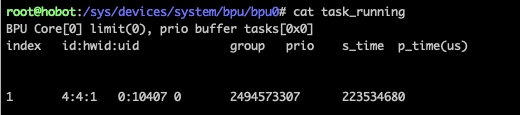
If s_time is not null, it means that the task has started normally, while p_time is null, it means that it has not returned normally, which can be assumed that the BPU task hangs, and can be solved by contacting sr or the compiler team.
What are the ROI input model constraints?
You can refer to the ROI Introduction and Constraints for the introduction of ROI constraints.
Troubleshooting model inference result consistency issues
-
Please ensure that the outputs used for consistency comparison have had padding removed.
-
If the model has dynamic-shaped outputs, please ensure that the
hbDNNGetTaskOutputTensorPropertiesAPI is called to obtain the actual output shape. -
Please ensure that Flush operations are correctly performed on both input and output memory.
-
If the consistency issue is resolved after disabling UCP ARM optimized operators, then the issue lies with the optimized operators. Method to disable:
Model inference performance optimization recommendations
-
Try to eliminate CPU operators in the model as much as possible.
-
It is recommended to allocate inference memory in a unified manner, use it in a distributed way, and enable memory reuse.
-
On the premise of implementing input/output memory reuse for the model, enable the Map LRU Cache strategy to mitigate BPU Map overhead. Method to enable:
- Adjust thread priorities. It is recommended to increase the priority of scheduling threads. If only model inference is used, it is recommended to disable unused backends such as DSP and ISP to reduce the number of threads. Reference example:
- Specify the BPU core ID during inference to reduce the number of Memory Map operations on multi-core hardware.
Custom OP Development
DSP Related
What are the DSP models selected for the J6?
The J6 uses Cadence's Tensilica Vision Q8 DSP IP (hereinafter referred to as Q8), a digital signal processor dedicated to vision/image processing, with the number of DSP IPs varying slightly depending on the development board model. More information can be found: DSP Development Documentation or Cadence Official Documentation。
How do to get the official Cadence documentation?
Installation steps can be referred to: DSP Development Documentation section; After installing the Cadence Development Kit, you can view some of the documentation within the development package. To obtain the complete documentation package, please contact Horizon technical support staff.
What computational accuracy does the DSP support?
Support int8/int16/int32 integer calculations, as well as float32 and double floating point calculations.
How to view the log output on the DSP side?
In the X86 simulation environment, you can view the log output by modifying the log printing level environment variable HB_DSP_VDSP_LOG_LEVEL when executing the sample script, and the method of setting the log level is the same as that of the UCP, and the modification method, please refer to the contents of the script;
In the development board, you can view the logs on the DSP side by monitoring the log file. The specific method is as follows:
- Add the environment variable export HB_DSP_WRITE_VDSP_LOG_TO_ARM=true to enable DSP log output.
-
Modify the DSP log printing level environment variable HB_DSP_VDSP_LOG_LEVEL.
-
Use the following command to enable file monitoring.
Can the DSP custom operator samples be run directly?
No. Using custom operators requires recompiling the DSP image before registering the operator implementation into the DSP calling framework. Therefore, the DSP image need to be compile first, then copy the image to the development board, and then run the example. For the compilation and running steps, please refer to: Custom Operator Samples section.
However, for code development or compiling new images, the DSP development software Xplorer and the corresponding License file are required, which can be obtained by contacting Horizon technical support.
What are the commonly used DSP debugging commands?
In the commands below, remoteproc1 corresponds to vdsp core0 and remoteproc2 corresponds to vdsp core1. The parts marked in J6P in the comments apply to J6P only, where two vdsp cores are available. On other platforms, run the corresponding commands according to the actual number of DSP cores.
- Obtain the status of the vdsp core, which can be either "offline" or "online".
- Obtain the vdsp image name and version. The version contains information such as the compilation version, compilation date, hash_id, etc., which can be used for version tracing.
There is no name information for QNX operating system in J6E/M, please check according to the specific environment.
-
Use the dmesg command to view low-level software log information.
-
Check the latest vdsp logs written to disk.
- DSP start/stop commands.
How to Troubleshoot DSP Custom Operator Hangs?
-
Check DSP logs for any error messages.
-
Determine if the DSP is hung or has coredumped by using the dmesg command to view kernel logs.
-
Investigate ARM-side code for potential memory Map/Unmap or cache refresh issues.
-
Examine DSP-side code for cache refresh problems, using methods like global refresh or binary search to locate faults.
-
Check DSP-side code for logical or memory access errors, using dmesg to view kernel log messages.
What Issues Can DDR Cache Desynchronization Cause in DSP Custom Operators?
-
Data inconsistency between ARM and DSP read/write operations.
-
DSP freezes or becomes unresponsive, potentially due to using unrefreshed memory.
-
DSP coredumps with error logs in kernel messages (dmesg), which can help locate specific fault addresses.
How to Further Optimize Performance of DSP VP/HPL Operators?
Currently, each submission of a VP/HPL DSP operator is treated as an independent task and needs to go through address mapping, task scheduling, RPC communication, address unmapping, and other procedures. In scenarios where a large number of operators are repeatedly invoked, the overhead of address mapping and unmapping can become significant. To optimize performance in such cases, the following methods can be used:
- For reusing the same address for input and output, use the hbDSPAddrMap interface for address pre-mapping. Repeated mapping only increases the reference count and does not actually trigger the underlying software address mapping logic, reducing the overhead of map and unmap operations in the underlying software for each VP/HPL submission. After all operations are completed, make sure to call hbDSPAddrUnmap in time to release the mapped address.
- Fuse VP/HPL operators with other operators through custom operators to reduce the number of operator invocations, thereby reducing the overhead of map and unmap operations.
- Decompose VP/HPL operator functionality and encapsulate it into custom operators, so that the timing of address mapping and unmapping can be manually controlled within the operators, thereby reducing the overhead of map and unmap operations. For the methods and steps for developing custom operators, refer to the DSP Custom Operator Development section. Among them, the operator communication structure definitions and DSP implementation source code are located in the sample directory ucp_tutorial/deps_aarch64/ucp/plugin/dsp_plugin/hobot/hb_dsp_algo, and the operator cmd values are located in the sample directory ucp_tutorial/deps_aarch64/ucp/plugin/dsp_plugin/hobot/include. These can be modified and extended according to actual requirements.
How to avoid DSP hang caused by acore abnormal exit?
In the current DSP framework, memory is allocated by the ARM side and mapped to the DSP side for use. If the ARM side experiences an abnormal exit (such as coredump), the allocated memory will be reclaimed by the system. If the DSP side task is executed after resource reclamation due to scheduling or other reasons, it may cause exceptions when the DSP side accesses the memory, leading to DSP hang. To avoid such situations, you can optimize through the following two methods:
- Optimize the memory release timing on the ARM side. When the ARM side abnormally exits, delay for a period of time before releasing the memory, giving the DSP side enough time to complete the current task and exit, avoiding the DSP side from accessing already released memory. The specific delay time can be controlled via the following commands.
Since the execution timing of DSP tasks is unpredictable, this solution can only reduce the probability of DSP hang caused by ARM abnormal exit, but cannot completely avoid it. You can switch to the vdsp_msg communication protocol through the second solution to completely avoid this problem.
- Use the vdsp_msg communication protocol in UCP, with the following specific enable method:
- The vdsp_msg protocol requires both ARM side and DSP side to be enabled simultaneously to take effect.
- Ensure that the UCP version is 3.14.6 or above, and the low-level software version supports the vdsp_msg protocol. For low-level software version requirements that support vdsp_msg protocol, please consult Horizon technical support.
How to use fusa version of VDSP in J6B environment?
VDSP Q8 supports functional safety by default. VDSP V130 supports limited functional safety, including functional safety version of libxos.a and header files, libxi.a, libtile_manager.a, as well as functional safety compilation parameters for xt-clang. Active adaptation and enabling of related options is required.
The VDSP custom operator compilation example already provides the -fusa compilation parameter. When compiling VDSP V130 images, you can ensure functional safety through the following steps:
- Adapt to the functional safety version of
libxos.aand header files. - Refer to the
-fusacompilation parameter description in the example to ensure that the functional safety compilation parameters ofxt-clangare enabled for image compilation. - Configure functional safety related startup parameters in the startup script for VDSP images.
The following provides detailed explanation for each step:
Step 1: Adapt to the functional safety version of libxos.a and header files.
It is necessary to upgrade XOS from RJ-2025.5 (QM version, XOS_v3.06) to the FuSa version required for functional safety (XOS_FuSa_v3.02.00S).
You can refer to the following steps to complete the update of libxos.a and header files, and perform build verification combined with the functional safety compilation parameters of xt-clang.
-
Obtain the FuSa version library
- The FuSa version library (XOS FuSa source code and compilation guide) is provided by Horizon technical support personnel. Please contact technical support to obtain it.
- Package information:
Horizon_v3_XS1a.zip(FuSa version XOS source code and XOS compilation guide),Horizon_v3_XS1b.zip(XOS/XTOS/HAL/libiDMA/XT-CLANG user manuals).
-
XOS upgrade steps (using installation in
/opt/xtensadirectory as example)- Backup current version
xos
- Extract FuSa version package and copy
srcandtestsuite
- Compile XOS
- Backup current version
libxos.aand header files
- Replace with FuSa compiled output
- Verify
Link
libxos.ain the build project (e.g.,LDFLAGS += -lxos). It is recommended to recompile and verify thevdspexecutable running result using the newly compiledxos/libxos.a.
- Backup current version
xos_idma.c Integration Note
The vendor clearly states that xos_idma.c is not within the functional safety certification scope. Therefore, the FuSa version libxos.a compiled according to the above steps does not include functions related to it. If you need to use functions related to xos_idma.c, you need to supplement them yourself and complete functional verification (for functional integration only, not guaranteed for functional safety).
- Method 1: Compile
xos_idma.cwith otherlibxossource code intolibxos.a- Refer to the
Makefilein the FuSa source package'sxos/src, movexos_idma.ofromNONFUSA_OBJStoOBJS, then recompile to generatelibxos.acontainingxos_idma. - It is recommended to use v3.06
xos_idma.cto replace/integrate into the corresponding location in the FuSa source code (v3.02 package lacks capabilities likeidma_chan_buf_clear, which may cause compilation errors).
- Refer to the
- Method 2: Put
xos_idma.cinto yourvdspproject and compile it together withvdspas a static library or executable file.
Step 2: Enable xt-clang functional safety compilation parameters.
The functional safety guide requires that when compiling functional safety versions with xt-clang, -safety must be added to the compilation parameters. There are the following restrictions. The VDSP custom operator development example has already made corresponding adaptations. You can locate the -fusa compilation option to view specific adaptation details. Additionally, you should also pay attention to this during custom operator development.
- Restriction 1:
--whole-archiveis not supported
Solution: Remove --whole-archive from Makefile or CMAKE, and compare the difference of compiled vdsp executable before and after removal. You need to supplement any potentially missing .o dependencies after difference analysis.
- Restriction 2:
-LNO:simdis not supported
Solution: Remove -LNO:simd. After removal, access bandwidth may decrease. You can use __vec_memcpy to replace ordinary memcpy in appropriate scenarios (Note: __vec_memcpy cannot be used in interrupt handling functions).
- Restriction 3:
.externis not supported in assembly
Solution: Remove .extern related usage in assembly.
- Restriction 4: Thread stack start address alignment
When using xos_thread_create to create threads, ensure thread stack start address is 4-byte aligned, refer to:
- Restriction 5: Need to remove several options that conflict with
-safetycompilation option
-rdynamic, -rpath, -fvectorize, etc. For other potentially conflicting compilation options, please refer to the -safety related chapters in the documentation to confirm.
Step 3: Configure functional safety related startup parameters.
In the startup script for VDSP images, add configuration to enable functional safety related startup parameters. This feature periodically calls idma self-test when system load is low to monitor potential memory errors. When system load is high, the idma self-test frequency will be reduced to avoid excessive consumption of system resources. The minimum frequency is 10 times the original period.
If you want to quickly verify the integration effect, you can obtain pre-compiled outputs from Horizon contact personnel (such as heads.tar.gz, libxos.a, and corresponding xos_idma.c version, etc.).
This saves the XOS upgrade and compilation process in the above steps. You can verify directly after replacing libxos.a and header files.
- Pre-compiled outputs are for debugging reference only and cannot be used for mass production. They will not be updated or maintained. Mass production scenarios still need to compile FuSa version
libxos.ayourself based on Vendor source code. - When using, please replace
libxos.aand header files to the same positions as in the above steps (it is recommended to backuplibxos.aand header files before replacement).
When to Contact Technical Support
For issues that remain unresolved after working through the checks above, contact Horizon technical support. Contacting support directly is recommended in the following cases:
-
The BPU task is confirmed to be hung, that is,
s_timeintask_runningis filled in whilep_timestays empty or keeps increasing for a long time. -
Input preparation, memory flush, and ARM optimized operators have all been ruled out, and the board-side result still differs from the quantized model produced in the quantization stage.
-
The interface returns
HB_UCP_UNKNOWN_ERRORor another error code marked as an internal issue in the Error Code section. -
The DSP side coredumps and the address in the log cannot be mapped back to the custom operator code.
Please provide the following artifacts so that the issue can be reproduced and located quickly:
-
The
hbmmodel running on the development board, together with the reference model produced in the quantization stage,quantized_model.bc(orquantized_removed_model.bcif the input/output nodes were removed during quantization). -
The board-side reproduction script and the matching input data.
-
The board-side runtime log. It is recommended to raise the UCP log level through Environment Variable and reproduce the issue again before collecting the log.
-
The
profiler.logandprofiler.csvfiles produced byhrt_model_exec perf --profile_path. -
The sampling records of
hrt_ucp_monitor. -
The
UCP Tracerecords. -
For DSP-related issues, the DSP-side log as well.